דילוג לתוכן
  • דף הבית
  • קטגוריות
  • פוסטים אחרונים
  • משתמשים
  • חיפוש
  • חוקי הפורום
כיווץ
תחומים

תחומים - פורום חרדי מקצועי

💡 רוצה לזכור קריאת שמע בזמן? לחץ כאן!
  1. דף הבית
  2. תוכנה
  3. הפעלה מחדש של מחשב מרוחק

הפעלה מחדש של מחשב מרוחק

מתוזמן נעוץ נעול הועבר תוכנה
10 פוסטים 4 כותבים 1.0k צפיות 2 עוקבים
  • מהישן לחדש
  • מהחדש לישן
  • הכי הרבה הצבעות
תגובה
  • תגובה כנושא
התחברו כדי לפרסם תגובה
נושא זה נמחק. רק משתמשים עם הרשאות מתאימות יוכלו לצפות בו.
  • ליכטל
    ליכטל
    ליכט
    כתב ב נערך לאחרונה על ידי ליכט
    #1

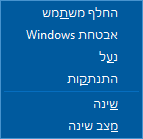
    אני מתחבר למחשב מרחוק דרך RDP, ואני רוצה להפעיל אותו מחדש.
    בתפריט הרגיל אני רואה רק אפשרות של התנתקות אך לא של הפעלה.
    e6f6283e-a009-4631-adca-6d8916ad31e2-image.png
    האם ישנה אפשרות בכל זאת להפעיל מחדש את המחשב מרחוק ?

    תגובה 1 תגובה אחרונה
    0
    • מ
      מ
      משחזר מידע
      כתב ב נערך לאחרונה על ידי
      #2

      פקודת
      ...shutdown

      ליכטל תגובה 1 תגובה אחרונה
      1
      • מ משחזר מידע

        פקודת
        ...shutdown

        ליכטל
        ליכטל
        ליכט
        כתב ב נערך לאחרונה על ידי
        #3

        @משחזר-מידע
        לא עשה את הפעולה, זה מה שעלה לי.

        C:\Windows\System32>shutdown
        Usage: shutdown [/i | /l | /s | /sg | /r | /g | /a | /p | /h | /e | /o] [/hybrid] [/soft] [/fw] [/f]
            [/m \\computer][/t xxx][/d [p|u:]xx:yy [/c "comment"]]
        
            No args    Display help. This is the same as typing /?.
            /?         Display help. This is the same as not typing any options.
            /i         Display the graphical user interface (GUI).
                       This must be the first option.
            /l         Log off. This cannot be used with /m or /d options.
            /s         Shutdown the computer.
            /sg        Shutdown the computer. On the next boot,
                       restart any registered applications.
            /r         Full shutdown and restart the computer.
            /g         Full shutdown and restart the computer. After the system is
                       rebooted, restart any registered applications.
            /a         Abort a system shutdown.
                       This can only be used during the time-out period.
                       Combine with /fw to clear any pending boots to firmware.
            /p         Turn off the local computer with no time-out or warning.
                       Can be used with /d and /f options.
            /h         Hibernate the local computer.
                       Can be used with the /f option.
            /hybrid    Performs a shutdown of the computer and prepares it for fast startup.
                       Must be used with /s option.
            /fw        Combine with a shutdown option to cause the next boot to go to the
                       firmware user interface.
            /e         Document the reason for an unexpected shutdown of a computer.
            /o         Go to the advanced boot options menu and restart the computer.
                       Must be used with /r option.
            /m \\computer Specify the target computer.
            /t xxx     Set the time-out period before shutdown to xxx seconds.
                       The valid range is 0-315360000 (10 years), with a default of 30.
                       If the timeout period is greater than 0, the /f parameter is
                       implied.
            /c "comment" Comment on the reason for the restart or shutdown.
                       Maximum of 512 characters allowed.
            /f         Force running applications to close without forewarning users.
                       The /f parameter is implied when a value greater than 0 is
                       specified for the /t parameter.
            /d [p|u:]xx:yy  Provide the reason for the restart or shutdown.
                       p indicates that the restart or shutdown is planned.
                       u indicates that the reason is user defined.
                       If neither p nor u is specified the restart or shutdown is
                       unplanned.
                       xx is the major reason number (positive integer less than 256).
                       yy is the minor reason number (positive integer less than 65536).
        ‏‏
        סיבות במחשב זה:
        (E = צפוי U = לא צפוי P = מתוכנן, C = בהגדרת המשתמש)
        סוג     חמור    קל      כותרת
        
         U      0       0       Other (Unplanned)
        E       0       0       Other (Unplanned)
        E P     0       0       Other (Planned)
         U      0       5       Other Failure: System Unresponsive
        E       1       1       Hardware: Maintenance (Unplanned)
        E P     1       1       Hardware: Maintenance (Planned)
        E       1       2       Hardware: Installation (Unplanned)
        E P     1       2       Hardware: Installation (Planned)
        E       2       2       Operating System: Recovery (Unplanned)
        E P     2       2       Operating System: Recovery (Planned)
          P     2       3       Operating System: Upgrade (Planned)
        E       2       4       Operating System: Reconfiguration (Unplanned)
        E P     2       4       Operating System: Reconfiguration (Planned)
          P     2       16      Operating System: Service pack (Planned)
                2       17      Operating System: Hot fix (Unplanned)
          P     2       17      Operating System: Hot fix (Planned)
                2       18      Operating System: Security fix (Unplanned)
          P     2       18      Operating System: Security fix (Planned)
        E       4       1       Application: Maintenance (Unplanned)
        E P     4       1       Application: Maintenance (Planned)
        E P     4       2       Application: Installation (Planned)
        E       4       5       Application: Unresponsive
        E       4       6       Application: Unstable
         U      5       15      System Failure: Stop error
         U      5       19      Security issue (Unplanned)
        E       5       19      Security issue (Unplanned)
        E P     5       19      Security issue (Planned)
        E       5       20      Loss of network connectivity (Unplanned)
         U      6       11      Power Failure: Cord Unplugged
         U      6       12      Power Failure: Environment
          P     7       0       Legacy API shutdown
        
        C:\Windows\System32>
        
        yossizY תגובה 1 תגובה אחרונה
        0
        • ליכטל ליכט

          @משחזר-מידע
          לא עשה את הפעולה, זה מה שעלה לי.

          C:\Windows\System32>shutdown
          Usage: shutdown [/i | /l | /s | /sg | /r | /g | /a | /p | /h | /e | /o] [/hybrid] [/soft] [/fw] [/f]
              [/m \\computer][/t xxx][/d [p|u:]xx:yy [/c "comment"]]
          
              No args    Display help. This is the same as typing /?.
              /?         Display help. This is the same as not typing any options.
              /i         Display the graphical user interface (GUI).
                         This must be the first option.
              /l         Log off. This cannot be used with /m or /d options.
              /s         Shutdown the computer.
              /sg        Shutdown the computer. On the next boot,
                         restart any registered applications.
              /r         Full shutdown and restart the computer.
              /g         Full shutdown and restart the computer. After the system is
                         rebooted, restart any registered applications.
              /a         Abort a system shutdown.
                         This can only be used during the time-out period.
                         Combine with /fw to clear any pending boots to firmware.
              /p         Turn off the local computer with no time-out or warning.
                         Can be used with /d and /f options.
              /h         Hibernate the local computer.
                         Can be used with the /f option.
              /hybrid    Performs a shutdown of the computer and prepares it for fast startup.
                         Must be used with /s option.
              /fw        Combine with a shutdown option to cause the next boot to go to the
                         firmware user interface.
              /e         Document the reason for an unexpected shutdown of a computer.
              /o         Go to the advanced boot options menu and restart the computer.
                         Must be used with /r option.
              /m \\computer Specify the target computer.
              /t xxx     Set the time-out period before shutdown to xxx seconds.
                         The valid range is 0-315360000 (10 years), with a default of 30.
                         If the timeout period is greater than 0, the /f parameter is
                         implied.
              /c "comment" Comment on the reason for the restart or shutdown.
                         Maximum of 512 characters allowed.
              /f         Force running applications to close without forewarning users.
                         The /f parameter is implied when a value greater than 0 is
                         specified for the /t parameter.
              /d [p|u:]xx:yy  Provide the reason for the restart or shutdown.
                         p indicates that the restart or shutdown is planned.
                         u indicates that the reason is user defined.
                         If neither p nor u is specified the restart or shutdown is
                         unplanned.
                         xx is the major reason number (positive integer less than 256).
                         yy is the minor reason number (positive integer less than 65536).
          ‏‏
          סיבות במחשב זה:
          (E = צפוי U = לא צפוי P = מתוכנן, C = בהגדרת המשתמש)
          סוג     חמור    קל      כותרת
          
           U      0       0       Other (Unplanned)
          E       0       0       Other (Unplanned)
          E P     0       0       Other (Planned)
           U      0       5       Other Failure: System Unresponsive
          E       1       1       Hardware: Maintenance (Unplanned)
          E P     1       1       Hardware: Maintenance (Planned)
          E       1       2       Hardware: Installation (Unplanned)
          E P     1       2       Hardware: Installation (Planned)
          E       2       2       Operating System: Recovery (Unplanned)
          E P     2       2       Operating System: Recovery (Planned)
            P     2       3       Operating System: Upgrade (Planned)
          E       2       4       Operating System: Reconfiguration (Unplanned)
          E P     2       4       Operating System: Reconfiguration (Planned)
            P     2       16      Operating System: Service pack (Planned)
                  2       17      Operating System: Hot fix (Unplanned)
            P     2       17      Operating System: Hot fix (Planned)
                  2       18      Operating System: Security fix (Unplanned)
            P     2       18      Operating System: Security fix (Planned)
          E       4       1       Application: Maintenance (Unplanned)
          E P     4       1       Application: Maintenance (Planned)
          E P     4       2       Application: Installation (Planned)
          E       4       5       Application: Unresponsive
          E       4       6       Application: Unstable
           U      5       15      System Failure: Stop error
           U      5       19      Security issue (Unplanned)
          E       5       19      Security issue (Unplanned)
          E P     5       19      Security issue (Planned)
          E       5       20      Loss of network connectivity (Unplanned)
           U      6       11      Power Failure: Cord Unplugged
           U      6       12      Power Failure: Environment
            P     7       0       Legacy API shutdown
          
          C:\Windows\System32>
          
          yossizY
          yossizY
          yossiz
          כתב ב נערך לאחרונה על ידי
          #4

          @ליכט

          shutdown /s
          

          📧 יוסי@מייל.קום | 🌎 בלוג | ☕ קפה
          👈 רוצים כתובת מייל בעברית? כנסו למייל.קום 👉

          ליכטל תגובה 1 תגובה אחרונה
          2
          • yossizY yossiz

            @ליכט

            shutdown /s
            
            ליכטל
            ליכטל
            ליכט
            כתב ב נערך לאחרונה על ידי
            #5

            @yossiz
            עשה כיבוי....
            בינתיים לא הפעיל את עצמו מחדש....

            yossizY תגובה 1 תגובה אחרונה
            1
            • ליכטל ליכט

              @yossiz
              עשה כיבוי....
              בינתיים לא הפעיל את עצמו מחדש....

              yossizY
              yossizY
              yossiz
              כתב ב נערך לאחרונה על ידי
              #6

              @ליכט אופסס.. ממש מצטער.
              זה היה אמור להיות:

              shutdown /r
              

              מקוה שלא תקעתי אותך... 😞

              📧 יוסי@מייל.קום | 🌎 בלוג | ☕ קפה
              👈 רוצים כתובת מייל בעברית? כנסו למייל.קום 👉

              ליכטל תגובה 1 תגובה אחרונה
              2
              • yossizY yossiz

                @ליכט אופסס.. ממש מצטער.
                זה היה אמור להיות:

                shutdown /r
                

                מקוה שלא תקעתי אותך... 😞

                ליכטל
                ליכטל
                ליכט
                כתב ב נערך לאחרונה על ידי
                #7

                @yossiz
                תקעת אותי....

                סוך סוף הסתדרתי, והגעתי למחשב להפעיל א"ז.
                כעת ניסיתי עם r ואכן הצליח, תודה.

                yossizY תגובה 1 תגובה אחרונה
                2
                • ליכטל ליכט

                  @yossiz
                  תקעת אותי....

                  סוך סוף הסתדרתי, והגעתי למחשב להפעיל א"ז.
                  כעת ניסיתי עם r ואכן הצליח, תודה.

                  yossizY
                  yossizY
                  yossiz
                  כתב ב נערך לאחרונה על ידי yossiz
                  #8

                  @ליכט אמר בהפעלה מחדש של מחשב מרוחק:

                  תקעת אותי....

                  😖 😖 😖
                  ממש מצטער... (לא הצלחתי למצוא אימוג'י של הכאת על חטא...)

                  📧 יוסי@מייל.קום | 🌎 בלוג | ☕ קפה
                  👈 רוצים כתובת מייל בעברית? כנסו למייל.קום 👉

                  ליכטל תגובה 1 תגובה אחרונה
                  5
                  • yossizY yossiz

                    @ליכט אמר בהפעלה מחדש של מחשב מרוחק:

                    תקעת אותי....

                    😖 😖 😖
                    ממש מצטער... (לא הצלחתי למצוא אימוג'י של הכאת על חטא...)

                    ליכטל
                    ליכטל
                    ליכט
                    כתב ב נערך לאחרונה על ידי
                    #9

                    @yossiz
                    זה בסדר גמור, זה גם אחת השלבים בניסוי ותעייה...

                    תגובה 1 תגובה אחרונה
                    4
                    • Y
                      Y
                      yits
                      כתב ב נערך לאחרונה על ידי yits
                      #10

                      למי שקצת מתקשה עדיף להשתמש עם GUI, להקליד את השורה הבאה.

                      shutdown /i
                      

                      לקניה והנחות ב KSP כנסו מכאן.
                      למוצרים עם הנחה מכאן.

                      תגובה 1 תגובה אחרונה
                      4

                      שלום! נראה שהשיחה הזו מעניינת אותך, אבל עדיין אין לך חשבון.

                      נמאס לכם לגלול בין אותם הפוסטים בכל ביקור? כשנרשמים לחשבון, תמיד תחזרו בדיוק למקום שבו הייתם קודם, ותוכלו לבחור לקבל התראות על תגובות חדשות (בין אם במייל, ובין אם בהתראת פוש). תוכלו גם לשמור סימניות ולפרגן ב-upvote לפוסטים כדי להביע הערכה לחברי קהילה אחרים.

                      בעזרת התרומה שלך, הפוסט הזה יכול להיות אפילו טוב יותר 💗

                      הרשמה התחברות
                      תגובה
                      • תגובה כנושא
                      התחברו כדי לפרסם תגובה
                      • מהישן לחדש
                      • מהחדש לישן
                      • הכי הרבה הצבעות


                      בא תתחבר לדף היומי!
                      • התחברות

                      • אין לך חשבון עדיין? הרשמה

                      • התחברו או הירשמו כדי לחפש.
                      • פוסט ראשון
                        פוסט אחרון
                      0
                      • דף הבית
                      • קטגוריות
                      • פוסטים אחרונים
                      • משתמשים
                      • חיפוש
                      • חוקי הפורום