מישהו יודע איך מנוע החיפוש שלהם עובד או איך אפשר ליצור כזה דבר?
הרי מדובר בלפחות שמונה גיגה של חומר. אז איך מקבלים תוצאות כל כך מהר.
(באוצר החכמה זה עובד אחרת כי הוא רק עובד בשיטת אינדקס שזה כבר קצת יותר קל).
 P
P
pcinfogmach
@pcinfogmach
הפורום כעת לקריאה בלבד, לקריאה נוספת.
-
שאלה: מה הסוד מאחורי מנוע החיפוש של בר אילן? (מבחינת תיכנות) -
קוד לעורך טקסט בhtml - שמישהו שלח לי - אולי יהיה שימושי למישהוגירסה אחרת שמצאתי שעובדת על בסיס קידוד ישיר
<!DOCTYPE html> <html lang="en"> <head> <meta charset="UTF-8"> <meta name="viewport" content="width=device-width, initial-scale=1.0"> <title>HTML Editor</title> <style> body { background-color: #f0f0f0; /* Light gray background color */ margin: 0; padding: 0; } /* Container for the editor */ .editor-container { display: flex; height: 100vh; margin: 20px; /* Margin around the entire editor */ } /* Style for the code input textarea */ #codeInput { flex: 1; border: 1px solid #ccc; padding: 10px; margin-right: 10px; /* Margin between input and output */ } /* Style for the output frame */ #outputFrame { flex: 1; border: 1px solid #ccc; padding: 10px; background-color: #f5f5f5; /* Very light gray background color */ } </style> </head> <body> <div class="editor-container"> <!-- Left Box for Direct Editing --> <textarea id="codeInput" contenteditable="true"></textarea> <!-- Right Box for Code Display --> <iframe id="outputFrame"></iframe> </div> <script> // Get references to the textarea and the outputFrame const codeInput = document.getElementById('codeInput'); const outputFrame = document.getElementById('outputFrame'); // Function to update the outputFrame with HTML code from codeInput function updateOutput() { const code = codeInput.value; outputFrame.contentDocument.open(); outputFrame.contentDocument.write(code); outputFrame.contentDocument.close(); } // Update the output whenever there is a change in the codeInput codeInput.addEventListener('input', updateOutput); // You can initially load some sample code into the codeInput if needed codeInput.value = 'This text will change the formatting in the right box.'; updateOutput(); // Update the output initially </script> </body> </html> -
קוד לעורך טקסט בhtml - שמישהו שלח לי - אולי יהיה שימושי למישהוקוד לעורך טקסט בhtml - מקור לא ידוע
צריך כמה תיקונים אבל בגדול עובד.<!DOCTYPE html> <html> <head> <title>Text Editor</title> <style> body { margin: 0; padding: 0; font-family: 'Noto Sans Hebrew', Arial, sans-serif; background-color: #f0f0f0; /* Light gray background for the entire page */ } #editor-container { margin: 50px auto; /* Center the editor container horizontally and provide top margin */ width: 793px; /* Fixed width for the editor */ height: 410px; /* Fixed height for the editor */ border: 1px solid #ccc; padding: 20px; /* Add margins here */ background-color: #fff; /* White content area background */ overflow: auto; /* Enable vertical scrolling */ margin-top: 100px; /* Adjust the margin-top to move the editor lower */ } #editor:focus { outline: none; /* Remove the default focus outline */ /* You can add additional styles or borders here as needed */ } .floating-toolbar { position: fixed; top: 0; left: 0; width: 100%; background-color: #fff; border-bottom: 1px solid #ccc; box-shadow: 0 1px 5px rgba(0, 0, 0, 0.1); z-index: 1000; display: flex; align-items: center; /* Vertically center the items within the toolbar */ justify-content: center; /* Horizontally center the items within the toolbar */ } .button-container { display: flex; flex-wrap: wrap; /* Allow buttons to wrap to the next line */ justify-content: center; /* Center-align the buttons horizontally */ gap: 5px; padding: 5px 0; /* Adjust top and bottom padding to center vertically */ } .button { font-size: 14px; background-color: #eee; color: #333; border: none; border-radius: 5px; cursor: pointer; min-width: 30px; padding: 5px; /* Add padding to match the size */ } .button:hover { background-color: #ccc; } .underline-button { text-decoration: underline; } .dropdown select { padding: 5px; font-size: 14px; background-color: #eee; color: #333; border: none; border-radius: 5px; cursor: pointer; } .color-dropdown { position: relative; } .color-dropdown-content { display: none; position: absolute; background-color: #f9f9f9; width: 100px; /* Set a fixed width for the dropdown list */ max-height: 100px; /* Limit the height of the dropdown */ overflow-y: auto; /* Enable vertical scrolling */ border: 1px solid #ccc; z-index: 1; } .color-dropdown-content button { display: block; width: 100%; text-align: left; padding: 8px 12px; border: none; background-color: transparent; cursor: pointer; } .color-dropdown-content button:hover { background-color: #ddd; } /* Add Hebrew fonts here */ @import url('https://fonts.googleapis.com/css2?family=Noto+Sans+Hebrew&display=swap'); /* Media query for smaller screens */ @media (max-width: 480px) { .button-container { flex-direction: column; /* Stack buttons vertically */ align-items: center; /* Center-align buttons vertically */ } } .label-font-size { padding: 5px 10px; /* Adjust the padding as needed */ line-height: 1; /* Set line-height to 1 for vertical centering */ } </style> </head> <body> <div class="floating-toolbar"> <div class="button-container"> <button class="button" onclick="formatText('bold')" title="Bold (Ctrl+B)">B</button> <button class="button" onclick="formatText('italic')" title="Italic (Ctrl+I)">I</button> <button class="button underline-button" onclick="formatText('underline')" title="Underline (Ctrl+U)">U</button> <button class="button" onclick="toggleJustify()" title="Justify">J</button> <button class="button" onclick="alignText('left')" title="Left Align">L</button> <button class="button" onclick="alignText('center')" title="Center Align">C</button> <button class="button" onclick="alignText('right')" title="Right Align">R</button> <div class="dropdown"> <select id="styleDropdown" onchange="formatHeader()" title="Style"> <option value="hidden" disabled selected style="display:none">Style</option> <option value="normal">Normal</option> <option value="h1">H1</option> <option value="h2">H2</option> <option value="h3">H3</option> <option value="h4">H4</option> <option value="h5">H5</option> <option value="h6">H6</option> </select> </div> <div class="dropdown"> <select id="fontDropdown" onchange="changeFont()" title="Font"> <option value="Arial">Arial</option> <option value="Helvetica">Helvetica</option> <option value="Verdana">Verdana</option> <option value="Georgia">Georgia</option> <option value="Times New Roman">Times New Roman</option> <option value="Courier New">Courier New</option> <option value="Arial Black">Arial Black</option> <option value="Impact">Impact</option> <option value="Lucida Console">Lucida Console</option> <option value="Tahoma">Tahoma</option> <option value="Trebuchet MS">Trebuchet MS</option> <option value="Palatino Linotype">Palatino Linotype</option> <!-- Change "Frank Ruhl Libre" to "FrankRuhl" --> <option value="FrankRuhl">Frank Ruhl</option> <!-- Add Hebrew fonts below --> <option value="David">David</option> <option value="Narkisim">Narkisim</option> <option value="Hadassa">Hadassa</option> </select> </div> <!-- Added buttons for creating HTML lists --> <button class="button" onclick="createUnorderedList()" title="Unordered HTML List"><b>•</b></button> <button class="button" onclick="createOrderedList()" title="Ordered HTML List">1.2.3.</button> <!-- RTL button --> <button class="button" onclick="toggleRTL()" title="Toggle Right-to-Left">RTL</button> <!-- HR button --> <button class="button" onclick="insertHorizontalRule()" title="Insert Horizontal Line">HR</button> <!-- Text Color dropdown --> <div class="color-dropdown"> <button class="button" onclick="toggleTextColorDropdown()" title="Text Color">Text Color</button> <div class="color-dropdown-content" id="textColorDropdown"> <button onclick="changeTextColor('black')" style="color: black;">Black</button> <button onclick="changeTextColor('red')" style="color: red;">Red</button> <button onclick="changeTextColor('green')" style="color: green;">Green</button> <button onclick="changeTextColor('blue')" style="color: blue;">Blue</button> <button onclick="changeTextColor('purple')" style="color: purple;">Purple</button> <button onclick="changeTextColor('orange')" style="color: orange;">Orange</button> <button onclick="changeTextColor('yellow')" style="color: yellow;">Yellow</button> <button onclick="changeTextColor('pink')" style="color: pink;">Pink</button> <button onclick="changeTextColor('brown')" style="color: brown;">Brown</button> <button onclick="changeTextColor('gray')" style="color: gray;">Gray</button> <button onclick="changeTextColor('lightblue')" style="color: lightblue;">Light Blue</button> <button onclick="changeTextColor('lightgreen')" style="color: lightgreen;">Light Green</button> <button onclick="changeTextColor('teal')" style="color: teal;">Teal</button> <button onclick="changeTextColor('indigo')" style="color: indigo;">Indigo</button> <button onclick="changeTextColor('violet')" style="color: violet;">Violet</button> </div> </div> <!-- Highlight Color dropdown --> <div class="color-dropdown"> <button class="button" onclick="toggleHighlightColorDropdown()" title="Highlight Text">Highlight</button> <div class="color-dropdown-content" id="highlightColorDropdown"> <button onclick="highlightText('yellow')" style="background-color: #ffffcc;">Yellow</button> <button onclick="highlightText('lightgreen')" style="background-color: #ccffcc;">Light Green</button> <button onclick="highlightText('lightpink')" style="background-color: #ffcce6;">Light Pink</button> <button onclick="highlightText('lightblue')" style="background-color: #cce6ff;">Light Blue</button> <button onclick="highlightText('lightorange')" style="background-color: #ffe6cc;">Light Orange</button> <button onclick="highlightText('lightpurple')" style="background-color: #e6ccff;">Light Purple</button> <button onclick="highlightText('lightgray')" style="background-color: #f2f2f2;">Light Gray</button> <button onclick="highlightText('white')" style="background-color: #ffffff; color: #000000;">White</button> </div> </div> <!-- Remove Formatting button --> <button class="button" onclick="removeFormatting()" title="Remove Color">Remove Formatting</button> <button class="button" onclick="formatText('superscript')" title="Superscript">Sup</button> <button class="button" onclick="formatText('subscript')" title="Subscript">Sub</button> <button class="button" onclick="increaseIndent()" title="Increase Indent">⭲</button> <button class="button" onclick="decreaseIndent()" title="Decrease Indent">⭰</button> <!-- Font size buttons --> <label for="fontSizeSpan" class="label-font-size">Font Size:</label> <button class="button" onclick="changeFontSize('increase')" title="Increase Font Size">+</button> <button class="button" onclick="changeFontSize('decrease')" title="Decrease Font Size">-</button> <!-- Spacing between paragraphs buttons --> <label for="spacingBetweenParagraphs" class="label-font-size">Spacing:</label> <button class="button" onclick="changeSpacing('increase')" title="Increase Spacing">+</button> <button class="button" onclick="changeSpacing('decrease')" title="Decrease Spacing">-</button> <!-- Add Link button --> <button class="button add-link-button" title="Add Link">🔗</button> <button class="button" onclick="exportHTML()" title="Export HTML">Export HTML</button> <button class="button" onclick="exportToTxt()" title="Export to TXT">Export As Code</button> <!-- Add this button for exporting HTML --> </div> </div> <div id="editor-container"> <div id="editor" contenteditable="true" onkeypress="handleKeyPress(event)"> <!-- Automatically start with a <p> tag --> <p>Start typing here...</p> </div> </div> <script> let isJustified = false; let isRTL = false; function formatText(command) { document.execCommand(command, false, null); } function toggleJustify() { isJustified = !isJustified; document.execCommand(isJustified ? 'justifyFull' : 'justifyLeft', false, null); } function alignText(align) { document.execCommand('justify' + align, false, null); isJustified = false; } function formatHeader() { const styleDropdown = document.getElementById('styleDropdown'); const selectedStyle = styleDropdown.value; if (selectedStyle === 'normal') { document.execCommand('formatBlock', false, 'p'); } else if (selectedStyle) { document.execCommand('formatBlock', false, selectedStyle); } styleDropdown.selectedIndex = 0; } function changeFont() { const fontDropdown = document.getElementById('fontDropdown'); const selectedFont = fontDropdown.value; document.execCommand('fontName', false, selectedFont); } function createUnorderedList() { document.execCommand("insertUnorderedList"); } function createOrderedList() { document.execCommand("insertOrderedList"); } function handleKeyPress(event) { if (event.keyCode === 13) { // Enter key document.execCommand('insertHTML', false, '<p><br></p>'); event.preventDefault(); } } function insertHorizontalRule() { document.execCommand('insertHorizontalRule', false, null); } function toggleRTL() { isRTL = !isRTL; const editorContainer = document.getElementById('editor-container'); editorContainer.style.direction = isRTL ? 'rtl' : 'ltr'; } function toggleTextColorDropdown() { const textColorDropdown = document.getElementById('textColorDropdown'); textColorDropdown.style.display = (textColorDropdown.style.display === 'block') ? 'none' : 'block'; } function changeTextColor(color) { document.execCommand("foreColor", false, color); toggleTextColorDropdown(); // Close the dropdown } function toggleHighlightColorDropdown() { const highlightColorDropdown = document.getElementById('highlightColorDropdown'); highlightColorDropdown.style.display = (highlightColorDropdown.style.display === 'block') ? 'none' : 'block'; } function highlightText(color) { document.execCommand("hiliteColor", false, color); toggleHighlightColorDropdown(); // Close the dropdown } function removeFormatting() { document.execCommand("removeFormat", false, null); } function increaseIndent() { document.execCommand("indent", false, null); } function decreaseIndent() { document.execCommand("outdent", false, null); } function changeFontSize(action) { const editor = document.getElementById('editor'); const selectedText = document.getSelection(); const span = document.createElement('span'); if (action === 'increase') { span.style.fontSize = 'larger'; } else if (action === 'decrease') { span.style.fontSize = 'smaller'; } if (!selectedText.isCollapsed) { const range = selectedText.getRangeAt(0); range.surroundContents(span); } } function changeSpacing(action) { const editor = document.getElementById('editor'); const selectedParagraphs = document.querySelectorAll('#editor p'); selectedParagraphs.forEach(paragraph => { let currentMargin = parseInt(window.getComputedStyle(paragraph).marginBottom); if (action === 'increase') { currentMargin += 5; // Increase spacing by 5px } else if (action === 'decrease') { currentMargin -= 5; // Decrease spacing by 5px } paragraph.style.marginBottom = currentMargin + 'px'; }); } function exportHTML() { // Get the content of the editor const editorContent = document.getElementById('editor').innerHTML; // Create a new window or tab to preview the HTML content const previewWindow = window.open('', '_blank'); // Create a blob containing the editor's HTML content const blob = new Blob([editorContent], { type: 'text/html' }); // Create a URL for the blob const url = URL.createObjectURL(blob); // Create an anchor element to trigger the download const a = document.createElement('a'); a.href = url; a.download = 'exported_text.html'; // Define the file name // Create a button to allow the user to download the HTML const downloadButton = document.createElement('button'); downloadButton.textContent = 'Download HTML'; downloadButton.style.position = 'absolute'; // Set the button position to absolute downloadButton.style.top = '10px'; // Adjust the top position as needed downloadButton.style.left = '10px'; // Adjust the left position as needed downloadButton.onclick = () => { // Trigger a click event on the anchor element to start the download a.click(); // Clean up by revoking the blob URL URL.revokeObjectURL(url); }; // Append the download button to the preview window previewWindow.document.body.appendChild(downloadButton); // Write the editor's HTML content to the new window previewWindow.document.open(); previewWindow.document.write(editorContent); previewWindow.document.close(); } // Function to create a link using selected text or prompt for text and link address function createLink() { const selectedText = document.getSelection().toString(); let linkText = selectedText; let linkURL = ''; if (!selectedText) { linkText = prompt('Enter the text for the link:'); if (!linkText) { return; // Cancelled by the user } } linkURL = prompt('Enter the link address:'); if (!linkURL) { return; // Cancelled by the user } const linkHTML = `<a href="${linkURL}" target="_blank">${linkText}</a>`; document.execCommand('insertHTML', false, linkHTML); } // Add event listener for the "Add Link" button document.querySelector('.button.add-link-button').addEventListener('click', createLink); function exportToTxt() { // Get the editor content const editorContent = document.getElementById('editor').innerHTML; // Create a Blob containing the content and specify the MIME type as plain text const blob = new Blob([editorContent], { type: 'text/plain' }); // Create a download link for the Blob const url = URL.createObjectURL(blob); const a = document.createElement('a'); a.href = url; a.download = 'exported_text.txt'; // Trigger a click event on the link to start the download a.click(); // Release the object URL to free up resources URL.revokeObjectURL(url); } </script> </body> </html> -
תוסף חדש - תורת אמת בוורד@אוריי
תוקן - תודה רבה על ההערה!
הקובץ בפוסט המקור עודכן -
תוסף חדש - תורת אמת בוורד -
תוסף חדש - תורת אמת בוורדנוסף אפשרות להסרת ניקוד הקובץ עודכן בפוסט למעלה
-
תוסף חדש - תורת אמת בוורד@one1010
הכנתי גירסה חדשה עם ההצעה שלך
ושמתי בפוסט המקור
כמו"כ נוספו עוד כמה שיפוריםכדי לחפש מקור מדוייק יש להוסיף את המיקום בתוך סוגריים לדוגמא:
בראשית (כד יא)
או ברכות (לב ב) -
תוסף חדש - תורת אמת בוורד@אהרן
תיצוא איתי קשר במייל (שם משתמש בגימייל) -
תוסף חדש - תורת אמת בוורד@one1010
רעיון מצויין!
אשמח לקבל עוד רעיונות מצויינים לשיפור. -
תוסף חדש - תורת אמת בוורדעדכון:
בס"ד נוספו הרבה הוספות חשובות לתוסף - הקובץ עודכן בפוסט המקורי -
תוסף חדש - תורת אמת בוורדאם התוסף לא עובד יש להגדיר באפשרויות וורד "מטב עבור תאימות"
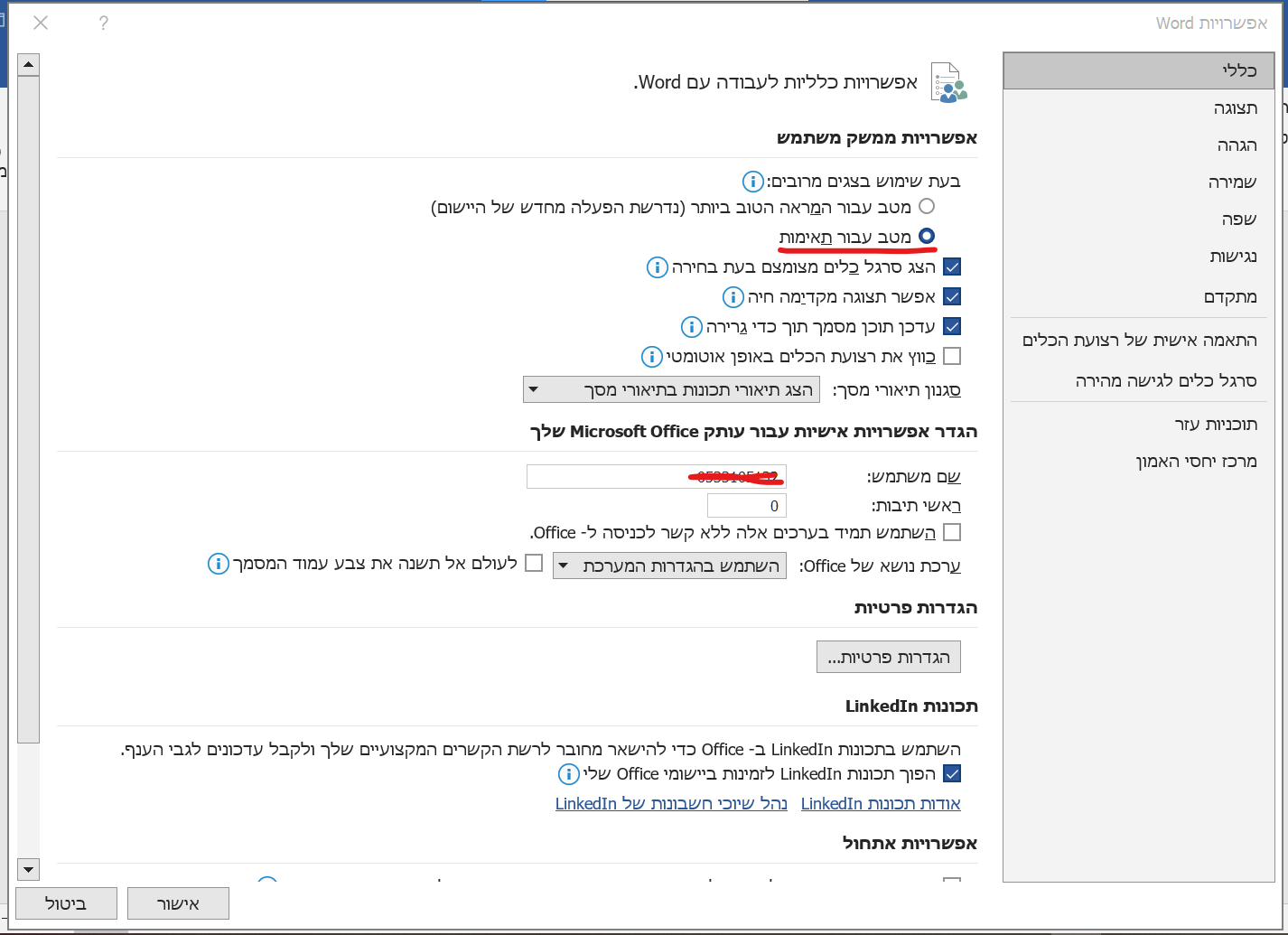
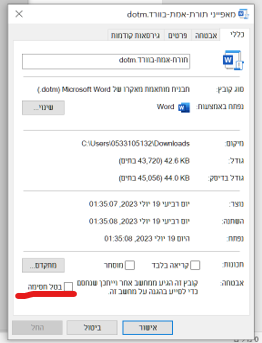
כמו"כ יש להסיר את החסימה לפני ההתקנה על ידי לחיצה ימנית על הקובץ ואז לחיצה על מאפיינים
-
תוסף חדש - תורת אמת בוורדהתחלתי לפתח userform להציג את הספרים של תורת אמת בוורד כדי להקל על ציטוטים
אשמח מאוד לקבל הצעות הן מבחינת הקוד והן משאר בחינות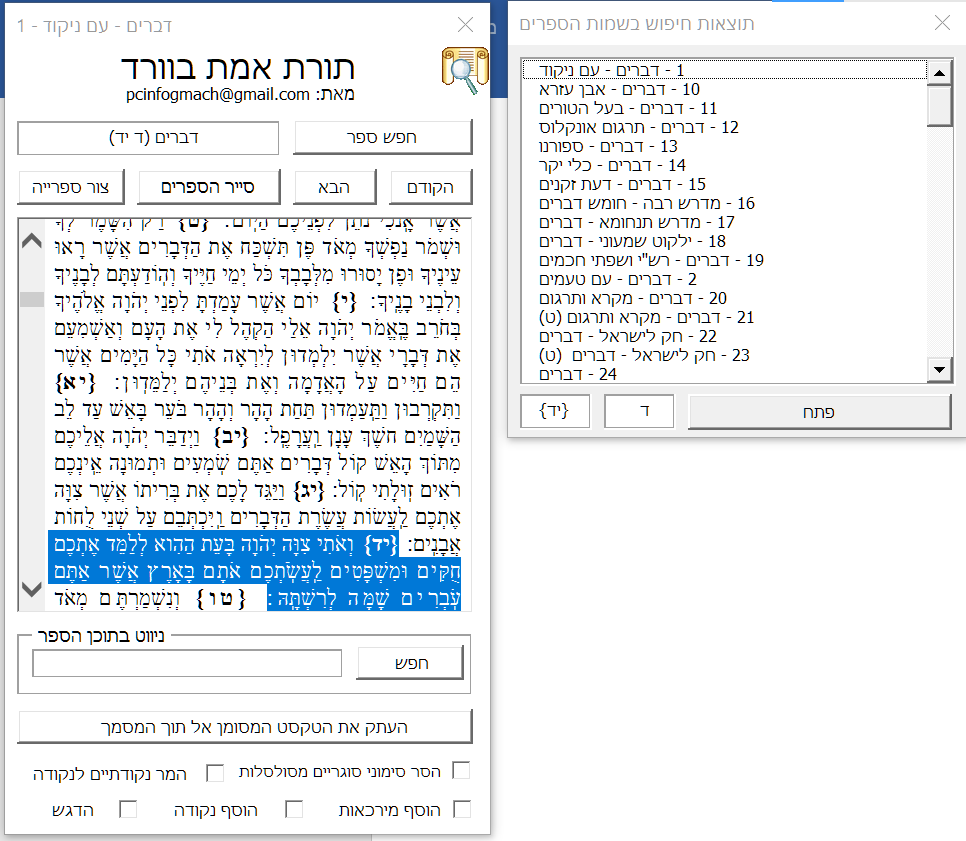
לעת עתה יש עדיין קצת בעיה מצד החזות של המסמכים כי צריך להתאים את הקודים של המסמכים של תורת אמת לhtml מי שיודע איך לעשות זאת אשמח מאוד לשמוע.
כדי לנווט בקלות אפשר להקליד לחיפוש לדוגמא: "דף כב" או "פרק כב" או "פרשת וארא"
כמובן שיש להתקין קודם את תורת אמת כדי להשתמש בתבנית
כדי להתקיןאת יש להעתיק את התבנית אל תוך תיקייה זו
%AppData%\Microsoft\Word\STARTUPואז לפתוח דרך תפריט המאקרו בכרטיסיית 'תצוגה'
או ללחוץ על קיצור המקשים (Alt + T)להלן הקובץ:
פרויקט נוסף שלי:
[תוסף עיצוב תורני לוורד]
https://mitmachim.top/post/626904 -
מישהו יודע באיזה שפת תיכנות המסמכים של תורת אמת מקודדים?@dovid
תודה
תוכל למקד אותי קצת יותר בבקשה?
בתוך הפקוייקט איפה אני מוצא את הפרסור
(אגב איך אומרים פרסור באנגלית?) -
מישהו יודע באיזה שפת תיכנות המסמכים של תורת אמת מקודדים?אני רוצה להמיר אותו ל-html אבל לא דרך התוכנה של תורת אמת
-
מישהו יודע באיזה שפת תיכנות המסמכים של תורת אמת מקודדים?תודה
אני רק תוהה לעצמי איך אני אמור לדעת את מה להמיר למה? -
מישהו יודע באיזה שפת תיכנות המסמכים של תורת אמת מקודדים?מישהו יודע באיזה שפת תיכנות המסמכים של תורת אמת מקודדים? או אולי איך להמיר בקלות את כל הקודים ל-html על ידי חיפוש והחלפה (בלי להשתמש עם האופציה המובנית של התוכנה)
חלק מהקודים הם html אבל חלק לא.....
מצו"ב כמה מסמכי דוגמא
a01_Genesis.txt b01_Genesis.txt a01__Genesis.txt -
הפעלת פונקציה בvba בPowerPoint בהפעלת המצגתPrivate Sub App_PresentationOpen(ByVal Pres As Presentation)
-
קוד vba לייצוא כל המודולים בבת אחתשמתי לב שיש בעיה הגירסאות מסויימות של וורד שהקוד מייצא עברית בגיבריש
-
קוד vba לייצוא כל המודולים בבת אחתקוד vba לייצוא מודולים
Sub ייצוא_מודולים()
'נוצר על ידי pcinfogmach

Dim sourceDoc As Object ' מסמך מקור המכיל את המודולים
Dim targetDoc As Object ' מסמך יעד להעתקת המודולים אליו
Dim sourceModule As Object ' מודול מקור
Dim targetModule As Object ' מודול יעד
Dim fileDialog As Object ' דיאלוג לבחירת קובץ
Dim savePath As String ' נתיב לשמירת המודולים המיוצאים
Dim mysavePath As String ' נתיב לשמירת המודולים המיוצאים
Dim saveFolder As Object ' דיאלוג לבחירת תיקייה

    ' יצירת דיאלוג לבחירת קובץ
    Set fileDialog = Application.fileDialog(msoFileDialogFilePicker)

    ' אפשרות לבחירת קובץ יחיד בלבד
    fileDialog.AllowMultiSelect = False

'    הגדרת הכותרת והסינונים לדיאלוג
    fileDialog.Title = "בחר מסמך מקור"
    fileDialog.Filters.Clear
    fileDialog.Filters.Add "מסמכי וורד", "*.docm; *.dotm; *.dot"

    ' הצגת הדיאלוג ובדיקה אם נבחר קובץ
    If fileDialog.Show = -1 Then
    ' הגדרת הקובץ הנבחר כמסמך המקור
        Set sourceDoc = Documents.Open(fileDialog.SelectedItems(1))

    ' יצירת דיאלוג לבחירת תיקיית יעד
    Set saveFolder = Application.fileDialog(msoFileDialogFolderPicker)
    ' הגדרת הכותרת לדיאלוג
    saveFolder.Title = "בחר תיקיית יעד"

            ' הצגת הדיאלוג ובדיקה אם נבחרה תיקייה
        If saveFolder.Show = -1 Then
                    ' הגדרת התיקייה הנבחרת כנתיב השמירה
            savePath = saveFolder.SelectedItems(1) & Application.PathSeparator

        ' לולאה על כל מודול במסמך המקור
        For Each sourceModule In ActiveDocument.VBProject.VBComponents
         'קבלת שם המודול
                Dim moduleName As String
                moduleName = sourceModule.Name

            ' בניית נתיב הקובץ לשמירת המודול המיוצא באמצעות השם המקורי
            If sourceModule.Type = 1 Or sourceModule.Type = 100 Then
                mysavePath = savePath & moduleName & ".bas"
            ElseIf sourceModule.Type = 2 Then
                mysavePath = savePath & moduleName & ".cls"
            ElseIf sourceModule.Type = 3 Then
                mysavePath = savePath & moduleName & ".frm"
            End If

     ' ייצוא המודול מהמסמך המקור באמצעות נתיב הקובץ
                sourceModule.Export mysavePath

        Next sourceModule

      ' סגירת המסמך המקור בלי שמירת שינויים
        sourceDoc.Close False
    End If
    End If
End Sub