@Whenever
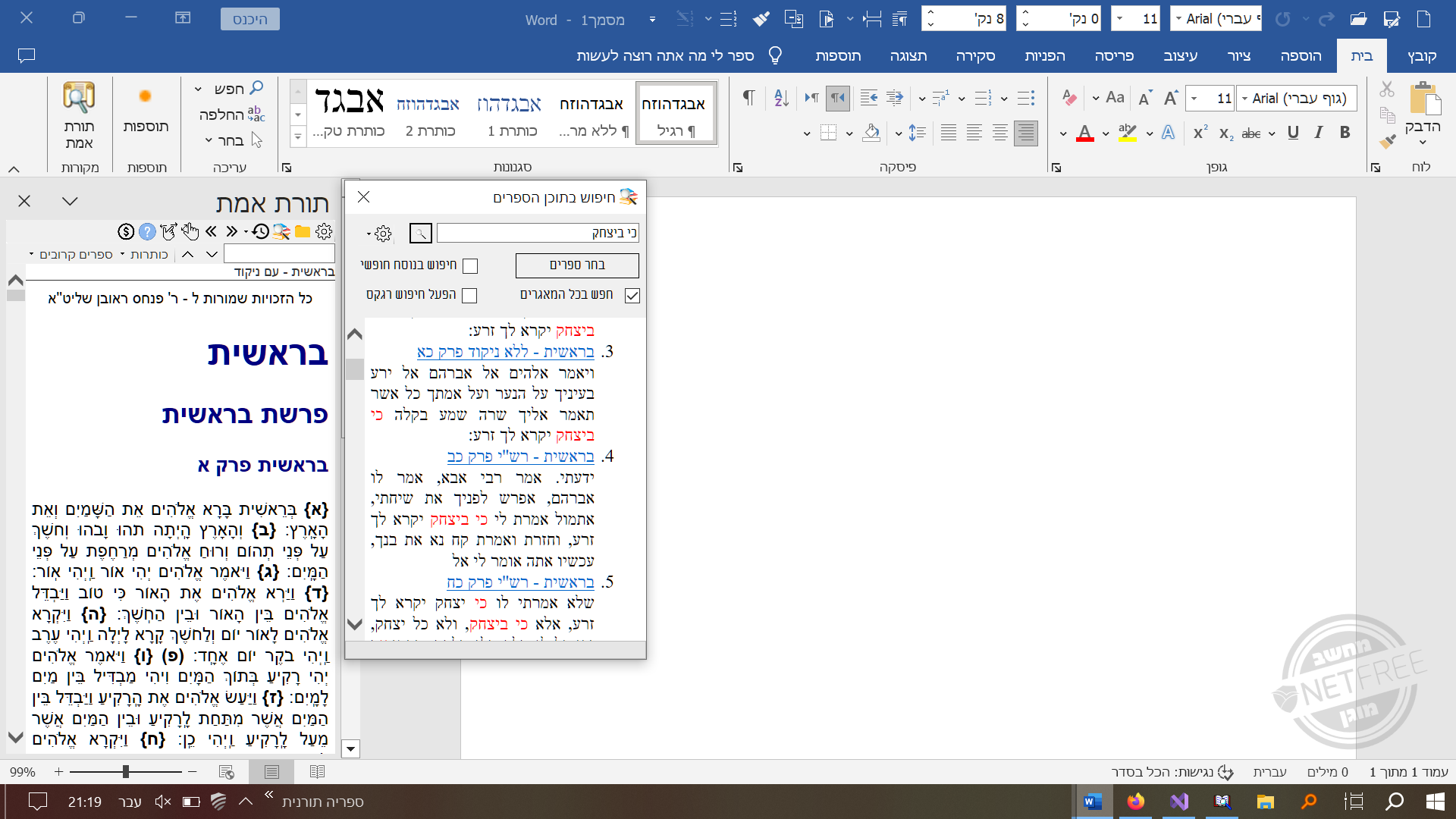
היעילות של קישוריות תלויה בדיוק: קישוריות איננה מנוע חיפוש אלא קפיצה קלה למיקום מסויים. אם הקפיצה נהיית מסובכת אנשים פשוט לא ישתמשו בה. אפשרות חיפוש כותרות ודאי שכבר יש בתוכנה.
 P
P
pcinfogmach
@pcinfogmach
-
איך לזהות על ידי תוכנה קישורים בספרי קודש ? -
הפקת דוחו"ת מWPF מה מומלץ?@אביי
הייתי מתחיל עם תכנית פשוטה איך להציג את ה-html
אח"כ לפי זה נראה איך להתקדם - ייתכן מאוד שאתה לא ריך שום ספריה רק מבנה נתונים נכון ואולי קצת js
להכניס לwebbrowser יש לך פקודה שנקראת navigatetostring -
קוד ל- treeview ב- html כולל חיפושדוגמא נוספת כאן העץ מוסתר ואפשר לגשת אליו על ידי הצמדת העכבר לצד ימין של המסך.
<!DOCTYPE html> <html lang="he"> <head> <meta charset="UTF-8"> <style> html, body { height: 100%; margin: 0; padding: 0; background-color: whitesmoke; } .container { display: flex; height: 100%; } .textContentBox { background-color: white; flex: 1; height: 100%; padding: 10px; overflow-y: auto; } .treeView-container { display: flex; flex-direction: column; height: 100%; transition: 0.5s; max-width:0.5%; -webkit-touch-callout: none; /* iOS Safari */ -webkit-user-select: none; /* Safari */ -khtml-user-select: none; /* Konqueror HTML */ -moz-user-select: none; /* Firefox */ -ms-user-select: none; /* Internet Explorer/Edge */ user-select: none; /* Non-prefixed version, currently supported by Chrome and Opera */ } #treeView-SearchInput { margin: 10px; height:25px; border: 1px solid #ccc; } #treeView-SearchInput:focus { outline: none; } .treeView { height:100%; overflow: auto; margin-top: 5px; white-space: nowrap; text-indent: -40px; } .treeView details { border-top: 1px solid #eaeaea; border-bottom: 1px solid #eaeaea; } .treeView summary::-webkit-details-marker { display: none; } .treeView summary { transition: background-color 0.3s ease; list-style: none; } .treeView summary:hover { background-color: #eaeaea; } .treeView Button { background: none; border: none; cursor: pointer; font-weight: 500; margin: 5px; transition: background-color 0.3s ease; border-radius: 50px; } .treeView button:hover { background-color: #eaeaea; } </style> </head> <body dir="rtl"> <div class="container"> <div id="treeView-container" class="treeView-container" onmouseover="toggleTreeViewWidth()" onmouseout="toggleTreeViewWidth()"> <input type="text" id="treeView-SearchInput" onkeyup="findAndSelectItem()" placeholder="חפש כותרת..."> <div class="treeView" id="treeView"> </div> </div> <div class="textContentBox" id="contentBox"> <h2 id="בעל הטורים בראשית המאור, פרק א">פרק א</h2> <h3 id="בעל הטורים בראשית המאור, פרק א, פסוק א">פסוק א</h3> בראשית ברא. בגימטריא בראש השנה נברא (העולם), בראשית נוטריקון בראשונה ראה אלהים שיקבלו ישראל תורה.<p> בראשית ברא אלהים ס''ת אמת מלמד שברא העולם באמת כמו שנאמר ראש דברך אמת וכן יש הרבה פסוקים ס''ת אמת:<p> <h3 id="בעל הטורים בראשית המאור, פרק א, פסוק ב">פסוק ב</h3> "תֹהוּ וָבֹהוּ" – ב'. הכא, ואידך: "רָאִיתִי אֶת הָאָרֶץ וְהִנֵּה תֹהוּ וָבֹהוּ" (ירמיהו ד כג). מלמד שצפה הקב"ה בבריאת העולם בחורבן הבית, שנחרב בשנת תה"ו, שהרי הבית הראשון עמד ת"י שנה, ונחרב בשנת תי"א. ובית שני עמד כמנין הית"ה, וזהו "וְהָאָרֶץ הָיְתָה". ואחר כך "חֹשֶׁךְ", רמז לגלויות. וכן דורש בבראשית רבה. דבר אחר: "וְהָאָרֶץ הָיְתָה תֹהוּ וָבֹהוּ" – בגימטריא "אלפים שנה בלי תורה".<p> "וְרוּחַ אֱלֹהִים מְרַחֶפֶת" – בגימטריא: "זו היא רוחו של מלך המשיח".<p> "וְחֹשֶׁךְ עַל פְּנֵי תְהוֹם" – ב' במסורת. הכא, ואידך: "וְחֹשֶׁךְ אֵי זֶה מְקֹמוֹ" (איוב לח יט). זה הוא שאמרו (חגיגה יא ב), שאין לשאול: "מה לפנים? מה לאחור?" "וְחֹשֶׁךְ אֵי זֶה מְקֹמוֹ", פירוש, שאין לשאול אי זה היה מקום החושך תחילה.<p> "וְרוּחַ אֱלֹהִים" – ב' דסמיכי. הכא, ואידך: "וְרוּחַ אֱלֹהִים לָבְשָׁה אֶת זְכַרְיָה" (דברי הימים ב כד כ). קרי ביה הכא נמי: "וְרוּחַ אֱלֹהִים לָבְשָׁה". פירוש, שעל ידי לבושו אמר "וַיְהִי אוֹר", דכתיב בתריה: "וַיֹּאמֶר אֱלֹהִים יְהִי אוֹר". וזה הוא שדרשו רז"ל (ב"ר פרשה ג): ממעטה לבושו נבראת האורה.<p> <h2 id="בעל הטורים בראשית המאור, פרק לח">פרק לח</h2> <h3 id="בעל הטורים בראשית המאור, פרק לח, פסוק טו">פסוק טו</h3> פרק לח, טו <p> ויחשבה. ג' במסורה. הכא. ואידך: בפרשת לך לך (לעיל טו, ו) ויחשבה לו צדקה. ואידך: ויחשבה עלי לשכורה (ש"א א, יג): <p> לזונה. ב' במסורה. ויחשבה לזונה. איכה היתה לזונה (ישעיה א, כא). מה תמר בבזיון ולבסוף בכבוד אף ירושלים סופה בכבוד, כדכתיב (זכריה ב, ט) ולכבוד אהיה בתוכה. וזהו זאת קומתך דמתה לתמר (שה"ש ז, ח).<p> <h2 id="בעל הטורים בראשית המאור, פרק מד">פרק מד</h2> <h3 id="בעל הטורים בראשית המאור, פרק מד, פסוק יח">פסוק יח</h3> ויגש אליו יהודה: ס"ת שוא. שאמר לו אני שוה לך שכמו שאתה מלך גם אני מלך. ועל זה דורש במדרש (ברשית רבה צ"נ:ב') כי הנה המלכים נועדו (תהילים מ"ח:ה'):<p> <h2 id="בעל הטורים בראשית המאור, פרק מט">פרק מט</h2> <h3 id="בעל הטורים בראשית המאור, פרק מט, פסוק א">פסוק א</h3> ויקרא יעקב אל בניו: שביקש לגלות להם הקץ ונסתם ממנו (פסחים נו.). אמר יעקב שמא יש בכם חטא. אמרו לו תדקדק בשמותנו ולא תמצא בהם אותיות חט. ואמר להם קם אין בהם אותיות קץ (עיין ירושלמי יומא ס״פ ז׳, בבלי שם עג:).<p> </div> </div> <script> function populateTreeView() { const contentBox = document.getElementById('contentBox'); const treeView = document.getElementById('treeView'); let currentDetails = treeView; let currentIndentLevel = 0; // Loop through each heading element in contentBox contentBox.querySelectorAll('h1, h2, h3, h4, h5, h6').forEach(heading => { const indentLevel = parseInt(heading.tagName[1]); // If the current heading has a lower or equal indent level to the previous one, // we need to move up the tree to the appropriate parent details element while (currentIndentLevel >= indentLevel) { currentDetails = currentDetails.parentElement; currentIndentLevel--; } // Create a new details and summary elements const details = document.createElement('details'); const summary = document.createElement('summary'); const button = document.createElement('button'); summary.style.paddingRight = 20 * indentLevel + 'px'; button.textContent = '👁'; button.setAttribute('onclick', `treeViewSelection('${heading.id}')`); button.setAttribute('title', 'הצג'); summary.appendChild(button); summary.appendChild(document.createTextNode(heading.textContent)); details.appendChild(summary); // Append the new details element to the currentDetails currentDetails.appendChild(details); // Update the currentDetails and currentIndentLevel for the next iteration currentDetails = details; currentIndentLevel = indentLevel; }); } function treeViewSelection(id) { // Scroll the corresponding heading into view const heading = document.getElementById(id); if (heading) { heading.scrollIntoView({ behavior: 'smooth', block: 'start' }); } } // Populate the tree view on page load window.onload = populateTreeView; // //treeView-Search // function findAndSelectItem() { var input = document.getElementById("treeView-SearchInput"); var filter = input.value.trim().toUpperCase().replace(/,/g, ''); var details = document.querySelectorAll("details"); var firstMatchFound = false; // Collapse all details if filter is empty if (filter === "") { for (var i = 0; i < details.length; i++) { details[i].open = false; var summary = details[i].querySelector("summary"); details[i].style.display = ""; } return; // Exit function } for (var i = 0; i < details.length; i++) { var summary = details[i].querySelector("summary"); if (summary) { var parentPath = getParentText(details[i]).replace(/👁/g, '').toUpperCase(); var summaryPath = summary.textContent.replace(/👁/g, '').trim().toUpperCase(); var fullPath = parentPath + " " + summaryPath; // Highlight matching summaries if (fullPath.includes(filter)) { details[i].open = true; details[i].style.display = ""; if (!firstMatchFound) { summary.scrollIntoView({ behavior: 'smooth', block: 'center' }); firstMatchFound = true; } // Open parent details elements recursively var parentDetails = details[i].parentNode; while (parentDetails.tagName === 'DETAILS') { parentDetails.open = true; parentDetails.style.display = ""; parentDetails = parentDetails.parentNode; } } else { details[i].open = false; details[i].style.display = "none"; } } } } function getParentText(element) { var text = ""; var parent = element.parentNode; while (parent && parent.tagName.toLowerCase() === 'details') { var summary = parent.querySelector("summary"); if (summary) { text = summary.textContent.trim() + " " + text; } parent = parent.parentNode; } return text.trim(); } function toggleTreeViewWidth() { var element = document.getElementById("treeView-container"); if (!element) { alert("Element with ID 'treeView-container' not found."); return; // Exit the function if element is not found } if (element.style.maxWidth === "35%") { element.style.maxWidth = "0.5%" } else { element.style.maxWidth = "35%"; } } </script> </body> </html> -
איך להשיג את האייקון של כל סוגי הקבצים בC#@ארי
שיניתי תודה -
המלצה לקורס@OdedDvir כתב בהמלצה לקורס:
זה שגוי בעיני להתקבע על שפה מסויימת מראש.
נו באמת... לא לזה התכווני. רק רציתי לוודא אם תחום העניין שלו הוא יצירת דפי אינטרנט או משהו כזה.
למעשה מה שמעניין אותו זה מסדי נתונים כך שהיריעה פרוסה לפניו לשחק היכן שליבו חפץ.@OdedDvir כתב בהמלצה לקורס:
אין באמת הבדל גדול בעקרונות התכנות בין שפה לשפה.
אכן, רק שבvba ואקסס אפשר להסתדר גם עם הרגלים רעים מאחר ומדובר בעיקר בקודים ממוקדים. בשפות תכנות אחרות - לא מומלץ להמשיך עם אותו ראש.
וזה מה שבאתי לומר שייקח גם קצת זמן ללמוד עקרונות תכנות ולא רק frontend. -
איך לעדכן progressBar ב- wpf במשך פעולת asyncלאחרונה היה לי צורך לעשות progressBar ב- wpf שמתדעכן במשך פעולת async
לאחר שביררתי את הנושא מישהו הביא לי את הדרך דלהלן (זה עובד הרבה יותר טוב מdispatcher שתוקע קצת את החלון שבו הוא פועל)
יוצרים progressreporter
IProgress<double> progressReporter = new Progress<double>(OnProgressChanged);ו-יוצרים לזה Void
  private void OnProgressChanged(double progressValue)
  {
      progressBar.Value += 1;
  }
ואז פשוט תוך כדי הפעולה
progressReporter.Report(1);ולאיפוס של הprogressbar
progressReporter.Report(-1);מקווה שלמישהו יהיה תועלת מזה בהצלחה.
-
wpf תחליף ל - avalondocks : ממשק משתמש דינמימצו"ב לינק לתחליף לavalon docks שגיבבתי מפה ומשם.
https://drive.google.com/drive/folders/1FnV-oHk0-4PsgsR5SkLdNo8oMkmR6J2e?usp=sharing
למי שלא יודע במה מדובר:
הרעיון הוא לספק פתרון בwpf ליצירת חלונות, פאנלים, כדי ליצור ממשק משתמש דינמי שבו חלונות ופאנלים יכולים להתעמס זה על גבי זה, להתקמץ, להתפשט, ולשנות את מיקומם.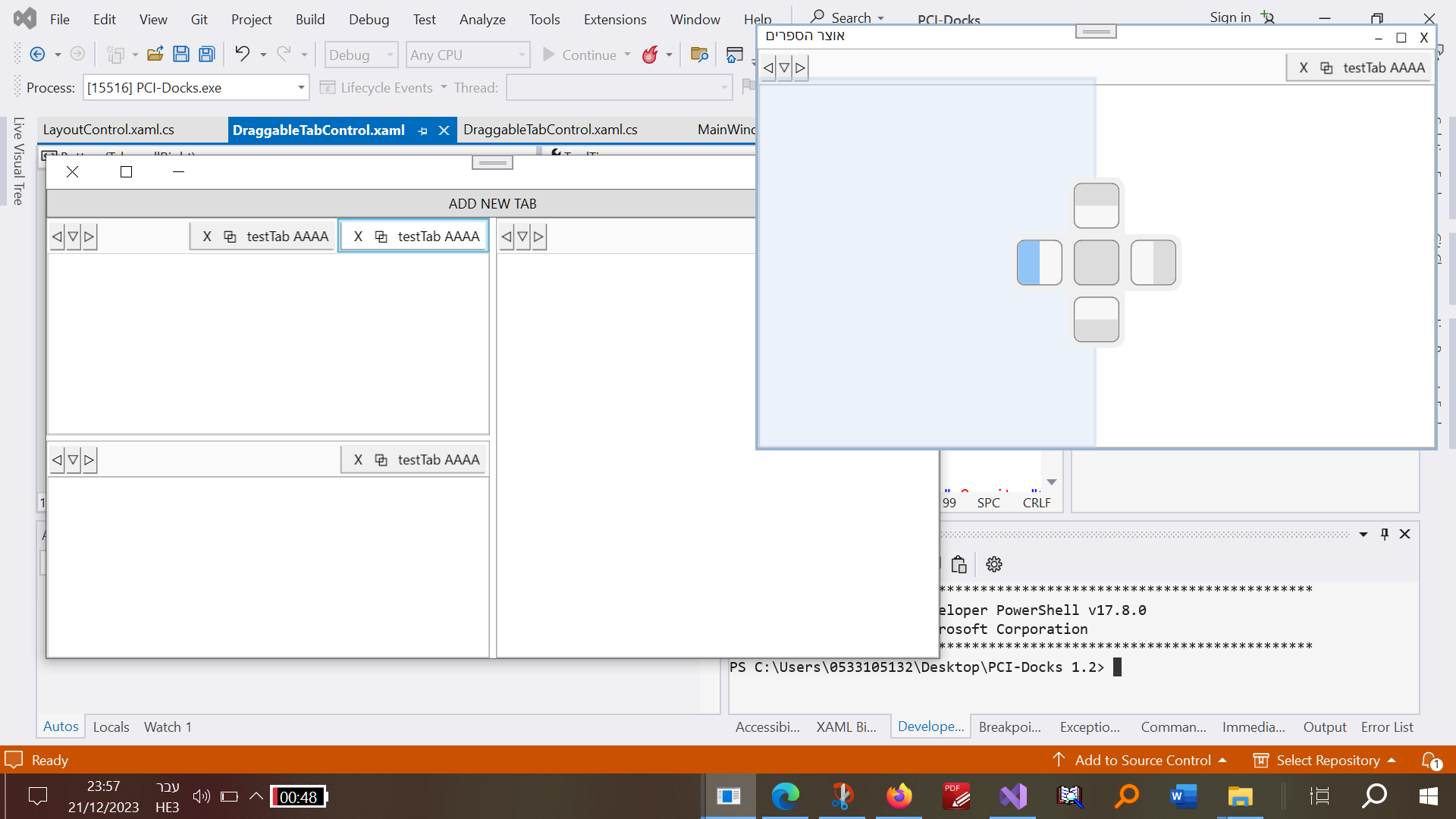
-
שאלה בVsto בC# איך אפשר להוסיף תמיכה לתוסף שלי עבור דארק מודשאלה בVsto בC# איך אפשר להוסיף תמיכה לתוסף שלי עבור דארק מוד
ככה אמור להיראות
וככה זה נראה בדארק מוד. (מה שמפריע בפרט זה שהלחצנים ליד תיבת החיפוש לא ניראים).
-
איך ליצור childform יותר יפה כאשר משתמשים בmdiשיחקתי עם זה קצת והוספתי לו תכונות snap פשוטות (לקצוות של הparentform ולקצוות של אחד לשני)
static class MyDictionary { public static List<SizeableUserControl> userControlCollection = new List<SizeableUserControl>(); } class SizeableUserControl : UserControl { Form parentForm; private const int grab = 16; public SizeableUserControl(Form form) { parentForm = form; MyDictionary.userControlCollection.Add(this); this.ResizeRedraw = true; InitializeComponent(); } private void InitializeComponent() { this.SuspendLayout(); this.BorderStyle = System.Windows.Forms.BorderStyle.FixedSingle; this.Name = "SizeableUserControl"; this.Size = new System.Drawing.Size(100, 100); Panel titleBar = new Panel(); titleBar.Dock = DockStyle.Top; titleBar.BackColor = Color.White; titleBar.Height = 20; Controls.Add(titleBar); titleBar.MouseDown += TitleBar_MouseDown; titleBar.MouseMove += TitleBar_MouseMove; titleBar.MouseUp += TitleBar_MouseUp; // Minimize button Button minimizeButton = new Button(); minimizeButton.Text = "─"; minimizeButton.TextAlign = ContentAlignment.MiddleCenter; minimizeButton.Width = 20; minimizeButton.Height = 20; minimizeButton.Dock = DockStyle.Right; minimizeButton.FlatStyle = FlatStyle.Flat; minimizeButton.FlatAppearance.BorderSize = 0; titleBar.Controls.Add(minimizeButton); minimizeButton.Click += (sender, e) => { if (minimizeButton.Text == "─") { minimizeButton.Text = "+"; this.Height = 20; this.Width = 60; } else { minimizeButton.Text = "─"; this.Height = 100; this.Width = 100; } }; // Maximize button Button maximizeButton = new Button(); maximizeButton.Text = "⬜"; // Larger square Unicode character maximizeButton.TextAlign = ContentAlignment.MiddleCenter; maximizeButton.Width = 20; maximizeButton.Height = 20; maximizeButton.Dock = DockStyle.Right; maximizeButton.FlatStyle = FlatStyle.Flat; maximizeButton.FlatAppearance.BorderSize = 0; // Store the original DockStyle DockStyle originalDockStyle = DockStyle.None; maximizeButton.Click += (sender, e) => { if (this.Dock == DockStyle.None) { // Maximize the form originalDockStyle = this.Dock; this.Dock = DockStyle.Fill; maximizeButton.Text = "❐"; // Change text to indicate restore } else { // Restore the original DockStyle this.Dock = originalDockStyle; maximizeButton.Text = "⬜"; // Change text to indicate maximize } }; titleBar.Controls.Add(maximizeButton); // X button Button xButton = new Button(); xButton.Text = "X"; xButton.Dock = DockStyle.Right; xButton.Width = 20; xButton.Height = 20; xButton.FlatStyle = FlatStyle.Flat; xButton.FlatAppearance.BorderSize = 0; xButton.Click += (sender, e) => this.Dispose(); titleBar.Controls.Add(xButton); this.ResumeLayout(false); } protected override void WndProc(ref Message m) { base.WndProc(ref m); const int WM_NCHITTEST = 0x84; const int HT_LEFT = 10; const int HT_RIGHT = 11; const int HT_TOP = 12; const int HT_TOPLEFT = 13; const int HT_TOPRIGHT = 14; const int HT_BOTTOM = 15; const int HT_BOTTOMLEFT = 16; const int HT_BOTTOMRIGHT = 17; if (m.Msg == WM_NCHITTEST) { var pos = this.PointToClient(new Point(m.LParam.ToInt32())); if (pos.X <= grab && pos.Y <= grab) m.Result = new IntPtr(HT_TOPLEFT); else if (pos.X >= this.ClientSize.Width - grab && pos.Y <= grab) m.Result = new IntPtr(HT_TOPRIGHT); else if (pos.X <= grab && pos.Y >= this.ClientSize.Height - grab) m.Result = new IntPtr(HT_BOTTOMLEFT); else if (pos.X >= this.ClientSize.Width - grab && pos.Y >= this.ClientSize.Height - grab) m.Result = new IntPtr(HT_BOTTOMRIGHT); else if (pos.X <= grab) m.Result = new IntPtr(HT_LEFT); else if (pos.X >= this.ClientSize.Width - grab) m.Result = new IntPtr(HT_RIGHT); else if (pos.Y <= grab) m.Result = new IntPtr(HT_TOP); else if (pos.Y >= this.ClientSize.Height - grab) m.Result = new IntPtr(HT_BOTTOM); } } bool isMouseDown = false; private Point mouseDownLocation; private void TitleBar_MouseUp(object sender, MouseEventArgs e) { isMouseDown = false; } private void TitleBar_MouseMove(object sender, MouseEventArgs e) { if (isMouseDown) { // Check proximity on all sides (adjust the threshold as needed) int proximityThreshold = 10; // Calculate the new position of the control based on the mouse movement int newX = this.Left - mouseDownLocation.X + e.X; int newY = this.Top - mouseDownLocation.Y + e.Y; // Ensure the new position is within the boundaries of the parent form newX = Math.Max(0, Math.Min(newX, parentForm.ClientSize.Width - this.Width)); newY = Math.Max(0, Math.Min(newY, parentForm.ClientSize.Height - this.Height)); // Iterate through other controls and check if snapping is possible foreach (var kvp in MyDictionary.userControlCollection) { if (kvp != this) { // Check top side if (Math.Abs(newY - kvp.Bottom) < proximityThreshold) { newY = kvp.Bottom + 1; // Align right and left if they are close enough if (Math.Abs(newX - kvp.Left) < proximityThreshold) { newX = kvp.Left; } else if (Math.Abs(newX + this.Width - kvp.Right) < proximityThreshold) { newX = kvp.Right - this.Width; } } // Check bottom side else if (Math.Abs(newY + this.Height - kvp.Top) < proximityThreshold) { newY = kvp.Top - this.Height - 1; // Align right and left if they are close enough if (Math.Abs(newX - kvp.Left) < proximityThreshold) { newX = kvp.Left; } else if (Math.Abs(newX + this.Width - kvp.Right) < proximityThreshold) { newX = kvp.Right - this.Width; } } // Check left side if (Math.Abs(newX - kvp.Right) < proximityThreshold) { newX = kvp.Right + 1; // Align tops if they are close enough if (Math.Abs(newY - kvp.Top) < proximityThreshold) { newY = kvp.Top; } // Align bottoms if they are close enough else if (Math.Abs(newY + this.Height - kvp.Bottom) < proximityThreshold) { newY = kvp.Bottom - this.Height; } } // Check right side else if (Math.Abs(newX + this.Width - kvp.Left) < proximityThreshold) { newX = kvp.Left - this.Width - 1; // Align tops if they are close enough if (Math.Abs(newY - kvp.Top) < proximityThreshold) { newY = kvp.Top; } // Align bottoms if they are close enough else if (Math.Abs(newY + this.Height - kvp.Bottom) < proximityThreshold) { newY = kvp.Bottom - this.Height; } } } } // Snap to parent form edges if (Math.Abs(newX) < proximityThreshold) { newX = 0; } else if (Math.Abs(newX + this.Width - parentForm.ClientSize.Width) < proximityThreshold) { newX = parentForm.ClientSize.Width - this.Width; } if (Math.Abs(newY) < proximityThreshold) { newY = 0; } else if (Math.Abs(newY + this.Height - parentForm.ClientSize.Height) < proximityThreshold) { newY = parentForm.ClientSize.Height - this.Height; } this.Location = new Point(newX, newY); // Forces the control to repaint for a smoother visual experience this.Invalidate(); } } private void TitleBar_MouseDown(object sender, MouseEventArgs e) { isMouseDown = true; mouseDownLocation = e.Location; } } -
שאלה בC#: מה הדרך הכי טובה להוציא גזירים מתוך קטע טקסט?@חגי
צודק אני רואה שהתבלבתי לגמרי. הקוד של דוד הוא מצויין כמו שהוא -
קוד לבוחר פונטים בשביל C#הייתי צריך משהו יותר ממוקד מfontdialog המובנה של windows form
אולי למישהו אחר גם יהיה מזה תועלת
יש להוסיף class חדש לפרוייקט להעתיק לתוכו את הקוד כמות שהוא.using System; using System.Drawing; using System.Windows.Forms; using System.Linq; public class CustomFontSelectionDialog : Form { private ListBox fontListBox; private Label previewLabel; private Button okButton; private TextBox searchBox; public Font SelectedFont { get; private set; } public CustomFontSelectionDialog() { this.Text = "בחר גופן"; this.Size = new Size(450, 280); this.RightToLeft = RightToLeft.Yes; this.RightToLeftLayout = true; searchBox = new TextBox(); searchBox.Location = new Point(10, 10); searchBox.Size = new Size(200, 20); searchBox.TextChanged += SearchBox_TextChanged; this.Controls.Add(searchBox); fontListBox = new ListBox(); fontListBox.Location = new Point(10, searchBox.Bottom + 10); fontListBox.Size = new Size(200, 180); fontListBox.SelectedIndexChanged += FontListBox_SelectedIndexChanged; this.Controls.Add(fontListBox); previewLabel = new Label(); previewLabel.Location = new Point(fontListBox.Right + 10, 10); previewLabel.Size = new Size(180, this.ClientSize.Height - 2 * 20 - 40); // Adjusted for searchBox and margin previewLabel.Font = new Font("Arial", 12); previewLabel.Text = "תצוגה מקדימה"; // Sample Hebrew text for preview previewLabel.BackColor = Color.White; this.Controls.Add(previewLabel); okButton = new Button(); okButton.Text = "אישור"; okButton.Location = new Point(previewLabel.Right - okButton.Width, this.ClientSize.Height - okButton.Height - 20); okButton.Click += OkButton_Click; this.Controls.Add(okButton); // Populate the fontListBox with available fonts foreach (FontFamily fontFamily in FontFamily.Families) { fontListBox.Items.Add(fontFamily.Name); } } private void SearchBox_TextChanged(object sender, EventArgs e) { string searchText = searchBox.Text.ToLower(); // Convert search text to lowercase fontListBox.Items.Clear(); // Filter and display fonts that match the search text (case-insensitive) foreach (FontFamily fontFamily in FontFamily.Families) { if (fontFamily.Name.ToLower().Contains(searchText)) { fontListBox.Items.Add(fontFamily.Name); } } //fontListBox.SelectedIndex = 0; } private void FontListBox_SelectedIndexChanged(object sender, EventArgs e) { string selectedFontName = fontListBox.SelectedItem as string; if (selectedFontName != null) { SelectedFont = new Font(selectedFontName, 12); // Set a default size previewLabel.Font = SelectedFont; } } private void OkButton_Click(object sender, EventArgs e) { // The user has selected a font, you can use the SelectedFont property here. DialogResult = DialogResult.OK; this.Close(); } [STAThread] static void Main() { Application.EnableVisualStyles(); Application.Run(new CustomFontSelectionDialog()); } }וזה הקוד שלי לפתיחת הבוחר פונטים
שימו לב: אפשר להשתמש עם זה כדי להגדיר פונט בתוכנה שלכם על ידי שימוש ב resources >Settings שם תוכלו להגדיר משתנה שישמור את שם הפונט שהשתמשתם בו כמוצג בקוד דלהלן.private void chooseFontForBooks_Click(object sender, EventArgs e) { using (CustomFontSelectionDialog fontDialog = new CustomFontSelectionDialog()) { if (fontDialog.ShowDialog() == DialogResult.OK) { Properties.Settings.Default.fontName = fontDialog.SelectedFont.Name; Properties.Settings.Default.Save(); } } } -
שאלה: איך עושים בתוסף vsto לוורד שtaskpane יישאר תמיד בחלונית האקטיבית@dovid
לקחת את הרעיון שלי ושיפרת אותו לאין ערוך אין מילים בפי להודות לך. תודה! -
מחפש דרך לקבל בקלות את כל הפרקי תהילים והמשניות שיש@צדיק-תמים כתב במחפש דרך לקבל בקלות את כל הפרקי תהילים והמשניות שיש:
רק שיש שם בעיה עם הקידוד של העברית
הקידוד הוא windows 1255
אפשר לקרוא את הקובץ ככה ואז לשמור מחדש עם איזה קידוד שרק תרצו -
ביצוע פרקטי לאינדוקס מאגר טקסט עברי@dovid כתב בביצוע פרקטי לאינדוקס מאגר טקסט עברי:
אני צריך ערובה שהשקעתי בתשובה לא תירד לטמיון.
גם מאוד מפריע לי הפיזור שלך בשאלות, זה נראה שאתה בלחץ אטומי. תברר דבר דבר, תעיין תבין ותחכים.לגבי הערובה אני נמצא במקום של התלמיד כך שהשאלה היא האם התלמיד יכול להגיד לרב שמה שהוא אומר זה יעיל לו או לא? לבינתיים לא איכזבת אז אני מאמין בך. אם נגיע לתוצאות שאפשר להשתמש בהם ברור שאשתמש בזה.
האמת היא שאני עדיין מנסה לעכל את זה שיש פה מישהו שמוכן ככה לעזור בחפשיות (אם לא אשגע אותו מדאי הרבה). VBA הייתי צריך ללמוד לבד והדרך הייתה מפותלת ומעניינת. (היה לי שם חברותא אבל לא "רב").לחץ אטומי ממש לא - פשוט ככה הראש שלי עובד אני מבין דברים הפוך, לא מההתחלה לסוף אלא מהסוף להתחלה הריכוז שלי ג"כ עובד בצורה מעניינת כלומר שהריכוז שלי מאוד ממוקד - סוג של חפרפרת שפשוט נדבק על משהו עד שהוא מגיע לאשורו (גם הנקיונות שלי לשבת נראים ככה - וזה משגע את אישתי...) (מכיון שראית את התפתחות חלק מהפוסטים שלי אני חושב שאתה יכול לקבל תמונה קצת על מה אני מדבר).
כל זה לא אומר שאני לא יכול לעבוד בצורה מסודרת אם צריך. אשתדל להישאר כאן בפוסט זה ולא לפזר שאלות לכל עבר.דבר ראשון החיפוש הוא לא הגיוני, הטבלה הרי מכילה מילים בודדות, לא ביטוי (של יותר ממילה).
את זה אני יודע - הבדיקה היתה על חיפוש של מילה אחת כדי לבדוק מהירות שליפה.
לגבי הסימות וכו' הסיבה היא בגלל שאני אוהב לבדוק מקרי קצה לפני שאני נכנס לעובי הקורה. אולי אתה צודק ואי אפשר לשפוט יעילות לפי מקרי קצה. למרות שבפרוייקט שלי השימוש בסיומות וכו' אמור להיות די מצוי.
למעשה עשיתי עכשיו בדיקה ללא הסיומות ולא היה שום הבדל מצד המהירות
command.Parameters.Add(new SQLiteParameter("@searchTerm", searchTerm)); -
הסתעפות מייצור אינדקס - עזרה בקידוד C#@dovid
אני יודע C# בסיסי (היה גם חלק דברים שתיכנתתי בעצמי בתוסף - רק שמסיבות אישיות אני החלטתי לשים לעצמי גבול כמה אני הולך לתכנת) הבעיה היא ברגע שמתחילים לדבר איתי על מושגים מעולם התיכנות שאני לא נפגשתי בהם בלמידה העצמית שלי. וכל מה שהמתכנת אומר זה (זה מורכב מאוד ונאנח לו ככה)... -
קוד לעורך טקסט בhtml - שמישהו שלח לי - אולי יהיה שימושי למישהוגירסה אחרת שמצאתי שעובדת על בסיס קידוד ישיר
<!DOCTYPE html> <html lang="en"> <head> <meta charset="UTF-8"> <meta name="viewport" content="width=device-width, initial-scale=1.0"> <title>HTML Editor</title> <style> body { background-color: #f0f0f0; /* Light gray background color */ margin: 0; padding: 0; } /* Container for the editor */ .editor-container { display: flex; height: 100vh; margin: 20px; /* Margin around the entire editor */ } /* Style for the code input textarea */ #codeInput { flex: 1; border: 1px solid #ccc; padding: 10px; margin-right: 10px; /* Margin between input and output */ } /* Style for the output frame */ #outputFrame { flex: 1; border: 1px solid #ccc; padding: 10px; background-color: #f5f5f5; /* Very light gray background color */ } </style> </head> <body> <div class="editor-container"> <!-- Left Box for Direct Editing --> <textarea id="codeInput" contenteditable="true"></textarea> <!-- Right Box for Code Display --> <iframe id="outputFrame"></iframe> </div> <script> // Get references to the textarea and the outputFrame const codeInput = document.getElementById('codeInput'); const outputFrame = document.getElementById('outputFrame'); // Function to update the outputFrame with HTML code from codeInput function updateOutput() { const code = codeInput.value; outputFrame.contentDocument.open(); outputFrame.contentDocument.write(code); outputFrame.contentDocument.close(); } // Update the output whenever there is a change in the codeInput codeInput.addEventListener('input', updateOutput); // You can initially load some sample code into the codeInput if needed codeInput.value = 'This text will change the formatting in the right box.'; updateOutput(); // Update the output initially </script> </body> </html> -
החלפת סיליקון באמבטיה@שוהם307
לא.
אולי עדיף שתשאל בפורום ידיים טובות לא מכיר את הפורום הזה רק יודע שהוא קיים. -
דלתות הזזה עבור מחסן מפנלית בבניה עצמאית@יעקב-מ-פינס
עם ישראל תמיד עסוק בשיפוצים אני לא חושב שיהיה מדאי קשה להשיג איזשהו תריס למי שבאמת רוצה - אם זה רק למחסן.... -
עצות לשיפור מראה של אתר אניטרנט@YK
תודה רבה! רעיונות מצויינים יישמתי אותם. -
רעיונות תעסוקה לחופש@פלורידה
יש הרבה מתכונים לגלידה עם מלח לא מדובר בכמות גדולה כמובן
https://myglida.co.il/12-מתכוני-גלידה-מהירים-ללא-מכונה/