
@אהרן תנסה התקנה זו
RegexInWord_V2.3.5_Installer.exe
 P
P
pcinfogmach
@pcinfogmach
-
תוסף חיפוש רגקס בוורד -
איך לייצר Watermark עבור TextBox ב-wpfלהלן רעיון קל ליישום בשביל Watermark עבור TextBox ב-WPF באמצעות XAML בלבד:

(זה לא שאין ספריות והרבה כתבות על זה אבל בסופו של דבר הכל לא עבד לי חלק חוץ מהרעיון שלפניכם יש בזה גם מעלה מבחינת כך שזה מבוסס xaml בלבד)
הסגנון מבוסס על שימוש בתכונת ToolTip של ה-TextBox לצורך הצגת ה-Watermark. כמובן שניתן להשתמש גם בתכונות אחרות (כגון Tag) – אני בחרתי ב-ToolTip, משום שכאשר מוצג Watermark, בדרך כלל אין צורך ממשי ב-Tooltip.
בסגנון יש שני טריגרים שמאפיינים התנהגות של הסתרת ה-Watermark כאשר תיבת הטקסט בפוקוס או כאשר איננה ריקה
  <Style TargetType="TextBox" x:Key="WatermarkTextBox">
     <Setter Property="Template">
         <Setter.Value>
             <ControlTemplate TargetType="TextBox">
                 <Border x:Name="border"
                     Background="{TemplateBinding Background}"
                     BorderBrush="{TemplateBinding BorderBrush}"
                     BorderThickness="{TemplateBinding BorderThickness}"
                     SnapsToDevicePixels="True">
                     <Grid>
                         <ScrollViewer x:Name="PART_ContentHost"
                                   Focusable="false"
                                   HorizontalScrollBarVisibility="Hidden"
                                   VerticalScrollBarVisibility="Hidden"/>

                         <TextBlock x:Name="PlaceholderHost" Text="{TemplateBinding ToolTip}"
                                    HorizontalAlignment="{TemplateBinding HorizontalContentAlignment}"
                                    VerticalAlignment="{TemplateBinding VerticalContentAlignment}"
                                    Padding="{TemplateBinding Padding}"
                                    Margin="{TemplateBinding Margin}"
                                    Opacity="0.2"
                                    IsHitTestVisible="False"
                                    Visibility="Collapsed"/>
                     </Grid>
                 </Border>
                 <ControlTemplate.Triggers>
                     <DataTrigger Binding="{Binding Path=Text, RelativeSource={RelativeSource Self}}" Value="">
                         <Setter Property="Visibility" TargetName="PlaceholderHost" Value="Visible"/>
                     </DataTrigger>
                     <DataTrigger Binding="{Binding Path=IsKeyboardFocusWithin, RelativeSource={RelativeSource Self}}" Value="true">
                         <Setter Property="Visibility" TargetName="PlaceholderHost" Value="Collapsed"/>
                     </DataTrigger>
                 </ControlTemplate.Triggers>
             </ControlTemplate>
         </Setter.Value>
     </Setter>
 </Style>
אפשר גם להסתיר את ה-tooltip כליל ולהשתמש רק ב-watermark במקום זאת על ידי הוספת הקוד דלהלן בתוך הסגנון.
<Style.Resources> <Style TargetType="ToolTip"> <Setter Property="Visibility" Value="Collapsed"/> </Style> </Style.Resources> -
קודים של אתר שנבנה ללקוח, האם הוא ציבורי?@צדיק-תמים כתב בקודים של אתר שנבנה ללקוח, האם הוא ציבורי?:
אני מבין שאתה מדבר על אנשים מאוד מסוימים ולא באופן כללי, קשה לדבר על משהו שלא ברור אם כמה ואיפה קיים
כנראה שלא נפגשתם בהתנהגות זו. ואני מתקשה לתאר לך את זה כי אתה לא מסוגל לדמיין זאת. ולכן כשאתה שומע שיש מי שמבקש כסף על משהו אתה שואל למה לא?
בוא ניקח את הדוגמא שהביאו למעלה:
לקחת עוד כסף על העברת הגרפיקה.
אם כולם ככה עושים וזוהי הצורה בהחלט למה לא?
אם אתה החלטת שכך אתה רוצה לעבוד - למה לא?
אבל אם אתה עושה זאת בצורה ערמומית או סתם כי פתאום קלטת שאתה יכול להרוויח עוד לוקסוס על הדרך (בזמן שבתחילה בכלל לא התכוונת לקחת כסף זה מהלקוח). או ואבוי! -
כיצד להשוות ערך range.Font.Color לצבע הקסדצימלי ב-VSTO?@pcinfogmach כתב בכיצד להשוות ערך range.Font.Color לצבע הקסדצימלי ב-VSTO?:
בכתבה מוצג קוד לחישוב דינאמי של הערכים השונים של גווני ערכת הנושא (בערכים דצימליים המומרים ל-hex מיוחד לוורד).
מצו"ב הקוד מתורגם ל-C# בדגש דווקא על בהירות והבנה (במחיר זניח של יעילות).
using System; using Microsoft.Office.Interop.Word; public class ThemeColorsHelperBase { // Color code components private readonly string _hexPrefix = "0x"; // Prefix used for hexadecimal strings private readonly string _themeColorFlag = "D"; // Identifier for theme color private readonly string _zeroByte = "00"; // Unused byte in the color code private readonly string _maxValue = "FF"; // Used when no tint/shade is applied /// <summary> /// Generates an int representation of a theme color with its tint or shade. /// </summary> /// <param name="themeColorIndex">Theme color index (e.g., Accent1, Text1)</param> /// <param name="tintAndShade">accepts percantage double (0.50, 0.25 etc.); positive (tint/lighten) or negative (shade/darken).</param> /// <returns></returns> public long GetThemeColor(WdThemeColorIndex themeColorIndex, double brightness) { string hex = GenerateThemeColorHex(themeColorIndex, brightness); return Convert.ToInt64(hex, 16); } private string GenerateThemeColorHex(WdThemeColorIndex themeColorIndex, double brightness) { string themeColorHex = ((int)themeColorIndex).ToString("X"); string tintHex = brightness >= 0 ? ((int)((1 - brightness) * 0xFF)).ToString("X2") : _maxValue; string shadeHex = brightness < 0 ? ((int)((1 + brightness) * 0xFF)).ToString("X2") : _maxValue; string fullHex = _hexPrefix + _themeColorFlag + themeColorHex + _zeroByte + tintHex + shadeHex; return fullHex; } } -
vsto תוסף לוורד: וורד גונב את הפוקוס בפקודות מסויימותמצאתי פיתרון:
Dispatcher.BeginInvoke(new Action(() =>
{
    Keyboard.Focus(SearchTextBox);
}), System.Windows.Threading.DispatcherPriority.ApplicationIdle);
ברוב המקרים זה עוזר אא"כ בהרצת הרבה פעולות ברצף מהיר מאוד.
-
איך להגדיר את ה-owner של חלון wpf בתוסף וורדהקוד הבא מיועד לתוספים ב-Word המבוססים על WPF.
הוא נועד להגדיר את חלון ה-WPF כחלון בן (Owned Window) של Word. חלון בן מתנהג באופן שונה מחלון עצמאי בכך שאינו מקבל פוקוס חוץ מחלון האב, והוא ממוזער יחד איתו. התנהגות שמצוייה בחלון דיאולוג שמקושר לחלון הפתוח. אחרת החלון יתנהל כמו תוכנה נפרדת לחלוטין מצד אופן התצוגה שלו ואף יופיע מעל חלונות של תוכנות אחרות שאינם קשורות אליו כלל.//יש להוסיף שם מחלקה - את שם הפרוייקט של התוסף אחרת globals לא ייקלט using System; using System.Diagnostics; using System.Windows; using System.Windows.Interop; public static class WordWindowOwner { public static void SetOwner(Window window) { try { var content = window.Content; //if (content != null) { window.Content = null; } // optional remove window content if nessecary for perfomance isssues IntPtr wordWindowHandle = IntPtr.Zero; var activeWindow = Globals.ThisAddIn.Application.ActiveWindow; wordWindowHandle = new IntPtr(activeWindow.Hwnd); WindowInteropHelper helper = new WindowInteropHelper(window); helper.Owner = wordWindowHandle; //if (content != null) { window.Content = content; } } catch (Exception ex) { Debug.WriteLine($"Error in SetOwner: {ex.Message}"); } } } -
אפשרות מובנית בוורד לשלוף את כל הצבעים במסמך@מד
האמת שחשבתי על הרעיון שלך, וכשאתה מעלה אותו שוב, אני קצת משתכנע שאולי אוכל ליישם גם אותו. עם זאת, לדעתי, הוא לבדו לא משרת את המטרה.הסיבה היא שאם יש לך מסמך ארוך, ואינך זוכר בדיוק איזה טקסט צבוע ואיך, זה לא יהיה נוח לגלול כל פעם מחדש כדי לבצע חיפוש.
במיוחד כאשר מדובר בהחלפות, שבהן המטרה היא לעבוד במהירות בתוך חלונית ההחלפות על מספר רב של שינויים. ואידך זיל גמור. -
תוסף חיפוש רגקס בוורד@dovid
עקב דבריך הנכוחים נסיתי לבדוק זאת ואכן לא ניתקלתי במגבלה. כנראה שהיה באג בקוד שלי שגרם לבעיות אינני יודע - אולי באמת קשור לזיכרון כלומר הרבה פעולות בבת אחת. כשיהיה לי יותר מידע אכתוב בלי נדר.
בכל אופן לבינתיים אני מסיק שאין כזו מגבלה. -
באג ב-vba בפונקציה Selection.Information(wdVerticalPositionRelativeToPage)@yossiz
ייתכן שאתה צודק ואין פתרון.
ולו יהא זה שכרי בפתיחת הפוסט שכל מורט בשער ראשו יידע מה מקור עצביו.אגב ההשוואה בין הטורים רק הבאתי את זה כדוגמא
זה רלונטי לכל מיקום מדוייק של שני אובייקטים במסמך -
סקיצה איך ליישם Theming ב- wpf בצורה קלה ונוחההרעיון שלי איך ליישם theming ב- wpf בצורה קלה
שוב אני מוצא את עצמי מתמודד עם פתרונות מסורבלים. לכן יצרתי את הסקיצה הבאה עבור יישום themeing קליל פשוט ונוח (הצורך שלי היה מוגבל ל-Dark Mode, אבל ניתן להרחיב את הרעיון די בקלות).
בבסיס האתגר הזה יש שני נושאים עיקריים:
א. חלון WPF אינו מאפשר שינוי צבע ה-Title Bar.
ב. יצירת Binding שיכול לשמש את כל התוכנה בצורה גלובלית.את עיצוב החלון כבר יצרתי בעבר, וכעת הפכתי אותו ל-Style. לדעתי, זו גישה הרבה יותר נוחה מאשר ליצור פקד חלון עם Theming, כיוון שהתעסקות עם ירושת פקד חלון ב-WPF היא קצת מורכבת. ישנם מדריכים רבים (עם הרבה באגים) בנושא, תכלס, חסכתי לכם הרבה עבודה אם זה מה שאתם מחפשים ה-style המצורף נקי ועובד חלק.
כמה פרטים חשובים:
ה-Style משתמש במחלקה סטטית שמארחת פקודות לסגירת חלון וכו', וגם מארחת ViewModel גלובלי. זהו פתרון קל ונוח לשימוש לצורך שינוי Theme.
מכיוון שהצורך שלי היה ב-Dark Mode, יצרתי קוד שמזהה באופן אוטומטי אם המערכת מוגדרת ל-Dark Theme.
בנוסף, הוספתי כפתור שמאפשר מעבר בין Dark Mode ל-Light Mode.
עיצוב ה-Themeיצרתי מחלקה עם שני מאפיינים בסיסיים: Background ו-Foreground. לצרכים שלי זה היה מספיק, אבל אם אתם מחפשים משהו מורחב יותר, פשוט הוסיפו רכיבים למחלקה כיד ה' עליכם.
Theme חדש ניתן להוסיף ל-Dictionary שנמצא ב-ViewModel, והיישום שלו אינטואיטיבי וקל.
בנוסף, תוכלו לעשות Binding על ה-Dictionary ל-ListBox או ComboBox, ולאפשר למשתמש לבחור Theme בקלות.
מכיוון שהמחלקה המארחת היא סטטית, תהיה לכם גישה נוחה ופשוטה ל-Themes מכל מקום בקוד.זהו פתרון יעיל ופשוט, ואני מאמין שיכול לחסוך לכם הרבה זמן ועבודה בהתמודדות עם אתגרי Theming ב-WPF.
<ResourceDictionary xmlns="http://schemas.microsoft.com/winfx/2006/xaml/presentation"
                    xmlns:x="http://schemas.microsoft.com/winfx/2006/xaml"
                    xmlns:mscorlib="clr-namespace:System;assembly=mscorlib"
                    xmlns:window="clr-namespace:MyWpf.Themes.Window;assembly=MyWpf"
                    xmlns:Converters="clr-namespace:MyWpf.Converters">

    <SolidColorBrush x:Key="HoverBackGroundBrush" Color="#ff646464" Opacity="0.2"/>
    <SolidColorBrush x:Key="SelectedBackGroundBrush" Color="#ff646464" Opacity="0.3"/>
    <SolidColorBrush x:Key="WindowBorderBrush" Color="#ff646464"/>
    <SolidColorBrush x:Key="TitlebarBrush" Color="#ff646464" Opacity="0.1"/>
    <mscorlib:Double x:Key="CaptionHieght">36</mscorlib:Double>

    <Style x:Key="TitleBarButton" TargetType="Button">
        <Setter Property="Width" Value="{Binding ActualHeight, RelativeSource={RelativeSource Mode=Self}}"/>
        <Setter Property="WindowChrome.IsHitTestVisibleInChrome" Value="True"/>
        <Setter Property="Background" Value="Transparent"/>
        <Setter Property="Template">
            <Setter.Value>
                <ControlTemplate TargetType="{x:Type Button}">
                    <Border x:Name="border" Background="{TemplateBinding Background}"
                        Padding="10">
                        <ContentPresenter x:Name="contentPresenter"/>
                    </Border>
                    <ControlTemplate.Triggers>
                        <Trigger Property="IsMouseOver" Value="true">
                            <Setter Property="Background" Value="{StaticResource HoverBackGroundBrush}"/>
                        </Trigger>
                        <Trigger Property="AreAnyTouchesOver" Value="true">
                            <Setter Property="Background" Value="{StaticResource HoverBackGroundBrush}" />
                        </Trigger>
                        <Trigger Property="IsPressed" Value="true">
                            <Setter Property="Background" Value="{StaticResource SelectedBackGroundBrush}" />
                        </Trigger>
                    </ControlTemplate.Triggers>
                </ControlTemplate>
            </Setter.Value>
        </Setter>
    </Style>

    <Style x:Key="TitleBarPathIcon" TargetType="Path">
        <Setter Property="Stroke" Value="{Binding Foreground, RelativeSource={RelativeSource AncestorType=Window}}"/>
        <Setter Property="StrokeThickness" Value="1"/>
        <Setter Property="Stretch" Value="Uniform"/>
    </Style>

    <Style x:Key="DarkModeIconPath" TargetType="Path">
        <Setter Property="Fill" Value="{Binding Foreground, RelativeSource={RelativeSource AncestorType=Window}}"/>
        <Setter Property="Stretch" Value="Uniform"/>
    </Style>

    <Style x:Key="MaximizeRestorePath" TargetType="Path" BasedOn="{StaticResource TitleBarPathIcon}">
        <Style.Triggers>
            <!-- Trigger when Window is Maximized -->
            <DataTrigger Binding="{Binding WindowState, RelativeSource={RelativeSource AncestorType=Window}}" Value="Maximized">
                <Setter Property="Data" Value="M 13.5,12.5 H 20.5 V 19.5 H 13.5 Z M 15.5,12.5 V 10.5 H 22.5 V 17.5 H 20.5"/>
            </DataTrigger>

            <!-- Trigger when Window is Normal (Not Maximized) -->
            <DataTrigger Binding="{Binding WindowState, RelativeSource={RelativeSource AncestorType=Window}}"   Value="Normal">
                <Setter Property="Data" Value="M 13.5,10.5 H 22.5 V 19.5 H 13.5 Z"/>
            </DataTrigger>
        </Style.Triggers>
    </Style>

    <Style TargetType="Window" x:Key="ThemedWindow">
        <Setter Property="WindowChrome.WindowChrome">
            <Setter.Value>
                <WindowChrome
                CornerRadius="{x:Static SystemParameters.WindowCornerRadius}"
                UseAeroCaptionButtons="False"
                CaptionHeight="{StaticResource CaptionHieght}"/>
            </Setter.Value>
        </Setter>

        <!--<Setter Property="FlowDirection" Value="{Binding Path=(window:ThemeHelper.FlowDirection)}" />-->
        <Setter Property="Background" Value="{Binding Source={x:Static window:ThemeHelper.ThemeModel}, Path=CurrentTheme.Background}"/>
        <Setter Property="Foreground" Value="{Binding Source={x:Static window:ThemeHelper.ThemeModel}, Path=CurrentTheme.Foreground}"/>

        <Setter Property="Template">
            <Setter.Value>
                <ControlTemplate TargetType="Window">
                    <Border  BorderBrush="{StaticResource WindowBorderBrush}"
                             BorderThickness="0.8"
                             Background="{TemplateBinding Background}">
                        <Grid x:Name="RootGrid">
                            <Grid.RowDefinitions>
                                <RowDefinition x:Name="TitleBarRow" Height="auto"/>
                                <RowDefinition x:Name="ContentRow" Height="*"/>
                            </Grid.RowDefinitions>

                            <Grid x:Name="TitleBarGrid"
                                  Height="{StaticResource CaptionHieght}"
                                  Background="{StaticResource TitlebarBrush}">
                                <Grid.ColumnDefinitions>
                                    <ColumnDefinition Width="auto" x:Name="CaptionColumn"/>
                                    <ColumnDefinition Width="*" x:Name="PlaceHolderColumn"/>
                                    <ColumnDefinition Width="auto" x:Name="TitleBarButtonsColumn"/>
                                </Grid.ColumnDefinitions>

                                <TextBlock x:Name="WindowTitle" Padding="10" VerticalAlignment="Center" IsHitTestVisible="False"
                                           Text="{TemplateBinding Title}"/>

                                <StackPanel x:Name="TitleBarButtonsPanel" Orientation="Horizontal" Grid.Column="2" Margin="1">
                                    <Button Style="{StaticResource TitleBarButton}"
                                            Command="{Binding Source={x:Static window:ThemeHelper.ThemeModel}, Path=ToggleThemeCommand}"
                                            CommandParameter="{Binding RelativeSource={RelativeSource AncestorType=Window}}">
                                        <Path Style="{StaticResource DarkModeIconPath}"
                                              Data="M7.5,2C5.71,3.15 4.5,5.18 4.5,7.5C4.5,9.82 5.71,11.85 7.53,13C4.46,13 2,10.54 2,7.5A5.5,5.5 0 0,1 7.5,2M19.07,3.5L20.5,4.93L4.93,20.5L3.5,19.07L19.07,3.5M12.89,5.93L11.41,5L9.97,6L10.39,4.3L9,3.24L10.75,3.12L11.33,1.47L12,3.1L13.73,3.13L12.38,4.26L12.89,5.93M9.59,9.54L8.43,8.81L7.31,9.59L7.65,8.27L6.56,7.44L7.92,7.35L8.37,6.06L8.88,7.33L10.24,7.36L9.19,8.23L9.59,9.54M19,13.5A5.5,5.5 0 0,1 13.5,19C12.28,19 11.15,18.6 10.24,17.93L17.93,10.24C18.6,11.15 19,12.28 19,13.5M14.6,20.08L17.37,18.93L17.13,22.28L14.6,20.08M18.93,17.38L20.08,14.61L22.28,17.15L18.93,17.38M20.08,12.42L18.94,9.64L22.28,9.88L20.08,12.42M9.63,18.93L12.4,20.08L9.87,22.27L9.63,18.93Z"/>
                                    </Button>

                                    <Button Style="{StaticResource TitleBarButton}"
                                         Command="{Binding Source={x:Static window:ThemeHelper.MinimizeCommand}}"
                                         CommandParameter="{Binding RelativeSource={RelativeSource AncestorType=Window}}">
                                        <Path Style="{StaticResource TitleBarPathIcon}" Data="M 13,15 H 23"/>
                                    </Button>

                                    <Button Style="{StaticResource TitleBarButton}"
                                         Command="{Binding Source={x:Static window:ThemeHelper.MaximizeRestoreCommand}}"
                                         CommandParameter="{Binding RelativeSource={RelativeSource AncestorType=Window}}">
                                        <Path Style="{StaticResource MaximizeRestorePath}"/>
                                    </Button>

                                    <Button Style="{StaticResource TitleBarButton}"
                                          Command="{Binding Source={x:Static window:ThemeHelper.CloseWindowCommand}}"
                                          CommandParameter="{Binding RelativeSource={RelativeSource AncestorType=Window}}">
                                        <Path Style="{StaticResource TitleBarPathIcon}" Data="M 13,11 22,20 M 13,20 22,11"/>
                                    </Button>

                                </StackPanel>
                            </Grid>

                            <ContentPresenter x:Name="PART_MainContentPresenter"  Grid.Row="1"/>
                        </Grid>
                    </Border>

                    <ControlTemplate.Triggers>
                        <Trigger Property="WindowState" Value="Maximized">
                            <Setter TargetName="RootGrid" Property="Margin" Value="7.5"/>
                        </Trigger>
                    </ControlTemplate.Triggers>
                </ControlTemplate>
            </Setter.Value>
        </Setter>
    </Style>
</ResourceDictionary>
using MyWpf.Models; using System.Diagnostics; using System.Windows; using System.Windows.Input; using System.Windows.Media; namespace MyWpf.Themes.Window { public static class ThemeHelper { private static ThemeModel _themeModel; public static ThemeModel ThemeModel { get { if (_themeModel == null) _themeModel = new ThemeModel(); return _themeModel; } } //public static double CaptionHeight { get => SystemParameters.WindowCaptionHeight + 10;} //public static FlowDirection FlowDirection { get => CultureInfo.CurrentUICulture.TwoLetterISOLanguageName == "he" ? FlowDirection.RightToLeft : FlowDirection.LeftToRight; } public static ICommand CloseWindowCommand = new RelayCommand<System.Windows.Window>((window) => window.Close(), (window) => window != null); public static ICommand MaximizeRestoreCommand = new RelayCommand<System.Windows.Window>((window) => window.WindowState = window.WindowState == WindowState.Maximized ? WindowState.Normal : WindowState.Maximized, (window) => window != null); public static ICommand MinimizeCommand = new RelayCommand<System.Windows.Window>((window) => window.WindowState = WindowState.Minimized, (window) => window != null); } public class ThemeModel : ViewModelBase { private bool _isDarkTheme; private ThemeObject _currentTheme; public Dictionary<string, ThemeObject> ThemeCollection = new Dictionary<string, ThemeObject> { { "DarkTheme", new ThemeObject{ Background = new SolidColorBrush(Color.FromRgb(34, 34, 34)), Foreground = new SolidColorBrush(Color.FromRgb(200, 200, 200))} }, { "LightTheme", new ThemeObject{ Background = new SolidColorBrush(Colors.White), Foreground = new SolidColorBrush(Colors.Black)} }, }; public ThemeObject CurrentTheme { get => _currentTheme; set => SetProperty(ref _currentTheme, value); } public ICommand ToggleThemeCommand => new RelayCommand<System.Windows.Window>(ToggleTheme, (window) => window != null); public ThemeModel() { _isDarkTheme = GetSystemTheme; _currentTheme = _isDarkTheme ? ThemeCollection["DarkTheme"] : ThemeCollection["LightTheme"]; } public void ToggleTheme(System.Windows.Window window) { CurrentTheme = _isDarkTheme ? ThemeCollection["LightTheme"] : ThemeCollection["DarkTheme"]; _isDarkTheme = !_isDarkTheme; } static bool GetSystemTheme { get { string registryKeyPath = @"Software\Microsoft\Windows\CurrentVersion\Themes\Personalize"; string registryValueName = "AppsUseLightTheme"; try { using (var key = Microsoft.Win32.Registry.CurrentUser.OpenSubKey(registryKeyPath)) if (key?.GetValue(registryValueName) is int value) return value == 0; // 0 means Dark Theme is enabled, 1 means Light Theme } catch (Exception ex) { Debug.WriteLine(ex.ToString()); } return false; } } public class ThemeObject { public SolidColorBrush Background { get; set; } public SolidColorBrush Foreground { get; set; } } } }הקוד משתמש בשני מחלקות שימושיות המהוות בסיס טוב עבור כל viewmodel
using System.Collections.Generic;
using System.ComponentModel;
using System.Runtime.CompilerServices;

namespace MyWpf.Models
{
    public class ViewModelBase : INotifyPropertyChanged
    {
        public event PropertyChangedEventHandler PropertyChanged;

        protected virtual void OnPropertyChanged(string propertyName)
        {
            PropertyChanged?.Invoke(this, new PropertyChangedEventArgs(propertyName));
        }

        protected bool SetProperty<T>(ref T field, T value, [CallerMemberName] string propertyName = null)
        {
            if (EqualityComparer<T>.Default.Equals(field, value)) return false;
            field = value;
            OnPropertyChanged(propertyName);
            return true;
        }
    }

}
using System; using System.Windows.Input; namespace MyWpf.Models { public class RelayCommand : ICommand { private readonly Action _execute; private readonly Func<bool> _canExecute; public RelayCommand(Action execute, Func<bool> canExecute = null) { _execute = execute ?? throw new ArgumentNullException(nameof(execute)); _canExecute = canExecute; } public bool CanExecute(object parameter) => _canExecute?.Invoke() ?? true; public void Execute(object parameter) => _execute(); public event EventHandler CanExecuteChanged { add => CommandManager.RequerySuggested += value; remove => CommandManager.RequerySuggested -= value; } } public class RelayCommand<T> : ICommand { private readonly Action<T> _execute; private readonly Func<T, bool> _canExecute; public RelayCommand(Action<T> execute, Func<T, bool> canExecute = null) { _execute = execute ?? throw new ArgumentNullException(nameof(execute)); _canExecute = canExecute; } public bool CanExecute(object parameter) => _canExecute?.Invoke((T)parameter) ?? true; public void Execute(object parameter) => _execute((T)parameter); public event EventHandler CanExecuteChanged { add => CommandManager.RequerySuggested += value; remove => CommandManager.RequerySuggested -= value; } } } -
API לקבלת רשימת דפים וסימנים בספרי היסוד התורניים@NH-LOCAL
כדי להתגבר על חוסר העקביות ברמות הכותרות, אפשר להשתמש במבנה היררכי, כמו Stack, כדי לעקוב אחר ה-parent האחרון. כך ניתן לתקן את רמת הכותרת בהתאם להקשר ולהבטיח זיהוי נכון של המספרים והכותרות. -
תוכנה מצוינת עם אוסף אייקונים לשימוש חינמי ב-WPFאם אתם מפתחים אפליקציות ב-WPF ומחפשים אוסף אייקונים לשימוש ב-UI שלכם, מצאתי כלי מעולה שמספק אוסף גדול של אייקונים הניתנים לשימוש בקלות באמצעות תכונת ה-Path ב-XAML.
https://apps.microsoft.com/detail/9mtbnqsz9nz9?hl=en-US&gl=US
-
מהו האחסון המהיר ביותר האפשרי של נתוני טקסט ב-C# ?אוקיי בבדיקות שערכתי בlinqpad נראה שאתם צודקים במקסימום שהגעתי אליו היה 0.200 שניות
-
קוד C# לחילוץ טקסט מקבצי וורדusing DocumentFormat.OpenXml.Packaging; using System; using System.IO; using System.Runtime.InteropServices; using System.Text; using System.Xml; using WordInterop = Microsoft.Office.Interop.Word; namespace MsWordTextExtractor { public static class DocxTextExtractor { public static string Extract(string filePath) { try { return ReadAllTextParts(filePath); } catch { return WordInteropExtractor(filePath); } } static string ReadAllTextParts(string filePath) { StringBuilder stb = new StringBuilder(); using (WordprocessingDocument wordprocessingDocument = WordprocessingDocument.Open(filePath, false)) { var mainPart = wordprocessingDocument.MainDocumentPart; stb.AppendLine(ReadTextPart(mainPart.GetStream())); if (mainPart.FootnotesPart != null) { string footNotes = ReadFootnotesPart(mainPart.FootnotesPart.GetStream()); if (!string.IsNullOrEmpty(footNotes)) { stb.AppendLine(); stb.AppendLine(footNotes); } } if (mainPart.EndnotesPart != null) { string footNotes = ReadFootnotesPart(mainPart.FootnotesPart.GetStream()); if (!string.IsNullOrEmpty(footNotes)) { stb.AppendLine(); stb.AppendLine(footNotes); } } } return stb.ToString(); } static string ReadTextPart(Stream partStream) { NameTable nameTable = new NameTable(); XmlNamespaceManager xmlNamespaceManager = new XmlNamespaceManager(nameTable); xmlNamespaceManager.AddNamespace("w", "http://schemas.openxmlformats.org/wordprocessingml/2006/main"); StringBuilder stringBuilder = new StringBuilder(); XmlDocument xmlDocument = new XmlDocument(nameTable); xmlDocument.Load(partStream); XmlNodeList paragraphNodes = xmlDocument.SelectNodes("//w:p", xmlNamespaceManager); foreach (XmlNode paragraphNode in paragraphNodes) { ReadTextContent(stringBuilder, paragraphNode, xmlNamespaceManager); stringBuilder.Append(Environment.NewLine); } return stringBuilder.ToString().Trim(); } static string ReadFootnotesPart(Stream partStream) { NameTable nameTable = new NameTable(); XmlNamespaceManager xmlNamespaceManager = new XmlNamespaceManager(nameTable); xmlNamespaceManager.AddNamespace("w", "http://schemas.openxmlformats.org/wordprocessingml/2006/main"); StringBuilder stringBuilder = new StringBuilder(); XmlDocument xmlDocument = new XmlDocument(nameTable); xmlDocument.Load(partStream); XmlNodeList footnoteNodes = xmlDocument.SelectNodes("//w:footnote | .//w:endnote", xmlNamespaceManager); foreach (XmlNode footnoteNode in footnoteNodes) { string footnoteId = footnoteNode.Attributes["w:id"].Value; if (footnoteId == "-1" || footnoteId == "0") { continue; } stringBuilder.Append($"{footnoteId}"); ReadTextContent(stringBuilder, footnoteNode, xmlNamespaceManager); stringBuilder.AppendLine(); } return stringBuilder.ToString().Trim(); } static void ReadTextContent(StringBuilder stringBuilder, XmlNode xmlNode, XmlNamespaceManager xmlNamespaceManager) { XmlNodeList textNodes = xmlNode.SelectNodes(".//w:t | .//w:tab | .//w:br | .//w:footnoteReference | .//w:numPr", xmlNamespaceManager); foreach (XmlNode textNode in textNodes) { switch (textNode.Name) { case "w:t": stringBuilder.Append(textNode.InnerText); break; case "w:tab": stringBuilder.Append("\t"); break; case "w:br": stringBuilder.Append("\v"); break; case "w:footnoteReference": string footnoteId = textNode.Attributes["w:id"].Value; stringBuilder.Append($"{footnoteId}"); break; case "w:numPr": XmlNode ilvlNode = textNode.SelectSingleNode(".//w:ilvl", xmlNamespaceManager); XmlNode numIdNode = textNode.SelectSingleNode(".//w:numId", xmlNamespaceManager); if (ilvlNode != null && numIdNode != null) { stringBuilder.Append("*"); } break; } } } public static string WordInteropExtractor(string filePath) { string tempFilePath = Path.Combine(Path.GetTempPath(), Path.GetFileNameWithoutExtension(filePath) + ".txt"); try { using (WordApp wordApp = new WordApp()) { WordInterop.Document doc = null; bool isFileAlreadyOpen = false; foreach (WordInterop.Document openDoc in wordApp.App.Documents) { if (openDoc.FullName.Equals(Path.GetFullPath(filePath), StringComparison.OrdinalIgnoreCase)) { doc = openDoc; isFileAlreadyOpen = true; break; } } if (doc == null) doc = wordApp.App.Documents.Open(filePath, ReadOnly: true, Visible: false); var originalFormat = doc.SaveFormat; doc.SaveAs2(tempFilePath, WordInterop.WdSaveFormat.wdFormatUnicodeText, Encoding: 65001, AddToRecentFiles: false); if (isFileAlreadyOpen) doc.SaveAs2(filePath, originalFormat); if (doc != null && !isFileAlreadyOpen) doc.Close(WordInterop.WdSaveOptions.wdDoNotSaveChanges); } return File.ReadAllText(tempFilePath); } catch (Exception ex) { Console.WriteLine(ex.Message); return string.Empty; } finally { if (File.Exists(tempFilePath)) File.Delete(tempFilePath); } } } class WordApp : IDisposable { public Microsoft.Office.Interop.Word.Application App; bool isNewApp; public WordApp() { try { App = (WordInterop.Application)Marshal.GetActiveObject("Word.Application"); } catch (COMException) { App = new WordInterop.Application(); isNewApp = true; } } public void Dispose() { if (isNewApp && App != null) { App.Quit(); Marshal.ReleaseComObject(App); } } } }עריכה:
מי שרוצה לחלץ טקסט מקבצי doc ללא שימוש באופיס יכול להשתמש בספרייה NPOI.HWPFעם הקוד דלהלן
internal class NpoiDocExtractor
{
    public static string ExtractTextFromDoc(string filePath)
    {
        using (FileStream fileStream = new FileStream(filePath, FileMode.Open, FileAccess.Read))
        {
            HWPFDocument doc = new HWPFDocument(fileStream);
            WordExtractor extractor = new WordExtractor(doc);
            return extractor.Text;
        }
    }
}
הספרייה עושה עבודה די טובה החסרון היחיד שלה הוא שהיא לא מחלצת את מספרי ההערות
-
באיזה תוכנת אינדקס גוגל משתמשים?@אלף-שין
אני מעריך את הרצון שלך להעמיק ולחקור את התחום, אך ברצוני להציע לך לשקול לא להשקיע את זמנך בדברים הללו. חקירה שטחית של נושא מורכב כמו אינדוקס ללא הבנה מעמיקה יותר עלולה לגזול זמן רב ויקר ממך ולא להביא לתוצאות הרצויות.
בהצלחה בדרכך! -
רג'קס להסרת גרשיים מטקסט מלבד ר"תאינני בקי ברגקס של JS
אבל ב-C# הייתי עושה כך:^"|"$|" | "ההחלפה קצת יותר מורכבת כי אתה צריך להיזהר לא להחליף את הרווח. ולכן ייתכן שה-lookahead וה-lookbehind עדיף במקרה הזה כמו שצדיק תמים כתב
https://regex101.com/r/CajTc0/1 -
טעינה איטית של combobox מרובה פריטים ב-wpf - לא עוד!לאחר שיצאתי מתוסכל מהטעינה האיטית של הפקד cmbobox כאשר יש בו הרבה פריטים חפרתי קצת ומצאתי פתרון
מצו"ב הלינק
https://stackoverflow.com/a/8834289 -
קוד להצגת שינויים בין טקסטים ב-C# (השוואת טקסטים)**DiffPlex השוואת טקסטים.exe **
למי שמעוניין בניתי את הפקד של DiffPlex בתוך חלון בצורה מסודרת (בעברית כמובן).
עובד מעולה החיסרון היחיד שלו הוא העובדה שאין לו אפשרות לעשות wrap עבור הטקסט המוזן.https://github.com/mmanela/diffplex/issues/113
שימו לב! מכיון שמדובר בתוכנה ניידת האנטי וירוס עלול למחוק אותו (תלוי איזה אנטי וירוס יש לכם).
למי שרוצה את הקודים שמתי בגיטהאב
https://github.com/pcinfogmach/DiffPlex-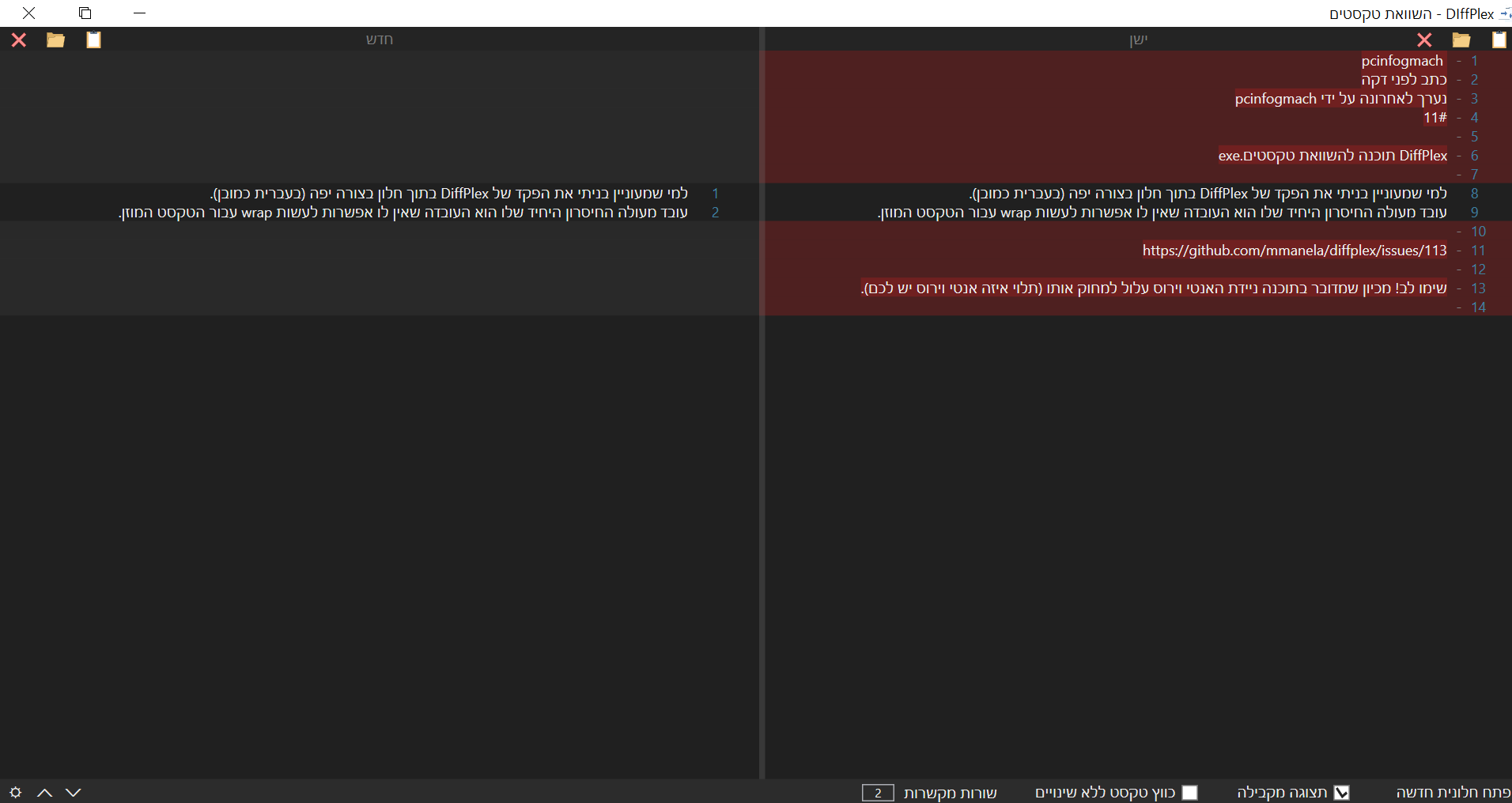
-
קוד להצגת שינויים בין טקסטים ב-C# (השוואת טקסטים)אני יודע שיש כבר דברים מוכנים כגון אלו:
https://github.com/mmanela/diffplex/
http://git.savannah.gnu.org/cgit/diffutils.git/tree/src/analyze.c?id=fecd0079fe6e15b0f53bf953721d838d9099bf05אבל לשם ההתלמדות חשבתי לעשות אולי משהו כזה בעצמי
הייתי שמח לקבל משוב (ההשואה יוצרת טקסט html שמסמן את השינויים)אגב אם מישהו מכיר תוכנה כבר מוכנה (לא אתר) אשמח לשמוע עליה
להלן הקוד שלי
using System;
using System.Collections.Generic;
using System.Linq;
using System.Text;
using System.Threading.Tasks;

namespace TextComparer
{
    public static class TextCompare
    {
        public static void Compare(ref string text1, ref string text2)
        {
            text1 = $"<span style=\"background-color: lightblue;\">{text1}</span>";
            text2 = $"<span style=\"background-color: lightblue;\">{text2}</span>";
            // Get the LSS lss
            string lssString = "placeholdertext";
            List<string> lssList = new List<string>();
            string copyOfText1 = text1;
            string copyOfText2 = text2;
            while (!string.IsNullOrEmpty(lssString))
            {
                try
                {
                    lssString = FindLongestSimilarSubstring(copyOfText1.ToCharArray(), copyOfText2.ToCharArray());
                    if (lssString.Length > 1) { lssList.Add(lssString); }
                    copyOfText2 = copyOfText2.Replace(lssString, "");
                    copyOfText1 = copyOfText1.Replace(lssString, "");
                }
                catch { break; }
            }

            foreach (var item in lssList)
            {
                text1.Replace(item, $"<span style=\"background-color: white;\"{item}");
                text2.Replace(item, $"<span style=\"background-color: white;\"{item}");
            }
        }

        static string FindLongestSimilarSubstring(char[] arr1, char[] arr2)
        {
            // Initialize variables to keep track of the longest common substring
            int[,] table = new int[arr1.Length + 1, arr2.Length + 1];
            int maxLength = 0;
            int endIndex = 0;

            // Fill the table
            for (int i = 1; i <= arr1.Length; i++)
            {
                for (int j = 1; j <= arr2.Length; j++)
                {
                    if (arr1[i - 1] == arr2[j - 1])
                    {
                        table[i, j] = table[i - 1, j - 1] + 1;
                        if (table[i, j] > maxLength)
                        {
                            maxLength = table[i, j];
                            endIndex = i - 1;
                        }
                    }
                    else
                    {
                        table[i, j] = 0;
                    }
                }
            }

            // Extract the longest common substring
            if (maxLength == 0)
            {
                return ""; // No common substring found
            }
            else
            {
                return new string(arr1, endIndex - maxLength + 1, maxLength);
            }
        }

    }
}
עריכה:
לבינתיים גילית שהרעיון הנ"ל מוגבל ביותר מאחר והוא לא יכול לגלות שינויים בסדר של הקבצים מה שצריך לעשות הוא להשתמש עם lcs כמתואר כאן
https://en.wikipedia.org/wiki/Diff
מהשלא הצלחתי להבין הוא איך פותרים על ידי זה את הבעיה של מילים ששונה מיקומם. כי אפילו עם lcs עדיין אם יש אות זהה במיקום בו היתה המילה בראשונה אזי התוכנה תחשוב שהיא אותה האות למרות שבאמת היא שייכת למילה שהוזזה.
בכל אופן מצו"ב הקוד הנוכחי שלי ל-lcsstatic List<string> Compare(string text1, string text2) { // Find the longest common subsequence List<string> commonSubsequence = LongestCommonSubsequence(text1, text2); // Generate diff output based on the longest common subsequence List<string> diffOutput = GenerateDiffOutput(text1, text2, commonSubsequence); return diffOutput; } private static List<string> LongestCommonSubsequence(string text1, string text2) { int m = text1.Length; int n = text2.Length; int[,] dp = new int[m + 1, n + 1]; // Build DP table for (int i = 0; i <= m; i++) { for (int j = 0; j <= n; j++) { if (i == 0 || j == 0) dp[i, j] = 0; else if (text1[i - 1] == text2[j - 1]) dp[i, j] = dp[i - 1, j - 1] + 1; else dp[i, j] = Math.Max(dp[i - 1, j], dp[i, j - 1]); } } // Reconstruct the longest common subsequence List<string> commonSubsequence = new List<string>(); int index = dp[m, n]; int temp = index; char[] lcs = new char[index + 1]; lcs[index] = '\0'; int p = m, q = n; while (p > 0 && q > 0) { if (text1[p - 1] == text2[q - 1]) { lcs[index - 1] = text1[p - 1]; p--; q--; index--; } else if (dp[p - 1, q] > dp[p, q - 1]) p--; else q--; } // Convert char array to List of strings foreach (char c in lcs) { if (c != '\0') commonSubsequence.Add(c.ToString()); } return commonSubsequence; } private static List<string> GenerateDiffOutput(string text1, string text2, List<string> commonSubsequence) { List<string> diffOutput = new List<string>(); int index1 = 0, index2 = 0; foreach (string s in commonSubsequence) { while (index1 < text1.Length && text1[index1].ToString() != s) { diffOutput.Add($"<span style=\"background-color: rgb(255, 204, 204);\">{text1[index1]}</span>"); index1++; } while (index2 < text2.Length && text2[index2].ToString() != s) { diffOutput.Add($"<span style=\"background-color: lightblue;\">{text2[index2]}</span>"); index2++; } diffOutput.Add($"{s}"); index1++; index2++; } // Handle remaining parts of text1 and text2 for (int i = index1; i < text1.Length; i++) { diffOutput.Add($"<span style=\"background-color: rgb(255, 204, 204);\">{text1[i]}</span>"); } for (int i = index2; i < text2.Length; i++) { diffOutput.Add($"<span style=\"background-color: lightblue;\">{text2[i]}</span>"); } return diffOutput; }