
בגדול אם אני יכול לזהות שם ספר בצורה נכונה זזה כבר ייעל את זה בהרבה - איפה הסיבוך:
יש ספרים עם שמות זהים: לדוגמא - ברכות
יכול הליות בבלי ברכות או משנה ברכות
או יותר גרוע בראשית
יש המון ספרים שכוללים בתוך השם שלהם את המילה בראשית (בהצחלה בסוף או באמצע). איך התוכנה תידע באיזה בראשית מדובר?? במקרה הזה כמובן אפשר לעשות ברירת מחדל שיצביע לחומש אבל שוב זה אומר הרבה hardcoding אני מחפש צורה דינאמית שתחפה על המקרים שלא עשיתי בצורה ישירה
 P
P
pcinfogmach
@pcinfogmach
הפורום כעת לקריאה בלבד, לקריאה נוספת.
-
איך לזהות על ידי תוכנה קישורים בספרי קודש ? -
טיפ לבוני תוכנות באקסס - שימו לב לתאימות שפהלפעמים כאשר בונים תוכנה באקסס והגדרת האיזור של המערכת הוא ישראל עברית מה שקורה הוא שאם מישהו עם מחשב אמריקאי מנסה להריץ אותה - הוא יראה גיבריש - המחשב מתבלבל ולא מצליח להציג את העברית.
ההצעה שלי תתכנתו עם מחשב עם הגדרת איזור באנגלית אולי זה יעזור.
-
איך לזהות על ידי תוכנה קישורים בספרי קודש ?@Whenever
יש פה מורכבות מסויימת שלא חשבתי עליה.
מכיון שהתוכנה שבניתי היא דינאמית - אין לה מסד נתונים כלל - הכל נבנה במקום עם פתיחת הקובץ. כך שאין לי כותרות מוכנות להשוות אליהם מראש. (שמות ספרים יש לי רשימה כי הם נטענים עם טעינת התוכנה אבל לא כותרות) -
איך לזהות על ידי תוכנה קישורים בספרי קודש ?@Whenever
רגקס בהחלט עוזר אבל איזה רגקס אולי למישהו יש רעיון בתור התחלה?
אומר את האמת אני לא מוצא את ידי ורגלי למרות שכרגיל אני די טוב עם רגקס משהו פה מבלבל אותיבעיקרון אם מדובר בקישור פשוט כמו בראשית א יג לא משנה איך זה אמור להיות קל לזהות
אבל לא תמיד שם הספר הוא רק מילה אחת לדוגמא דברי הימים א
כאן יש כבר מורכבות נוספת כי איך התוכנה תדע שמדובר בא של שם הספר ולא של הפרק. -
איך לזהות על ידי תוכנה קישורים בספרי קודש ?מכיוון שהנושא לכשעצמו לא ברור לי דיו אני כותב שאלה לא ברורה בתקוה שמתוך הדיון לכשעצמו הדברים יתבהרו - מה ריאלי ומה לא - תודה מראש.
אני מחפש עצה איך ניתן לזהות קשורים בשביל התוכנה שלי - תורת אמת בוורד
בדומה למה שיש בבר אילן ומה שנקרא בלעז "קשוריות" - שאם לוחצים על קישור |(מראה מקום) זה יוביל לפתיחת ספר במיקום הזה.הקושי שלי הוא בעצם איך להשוות קישורים שאינם מדוייקים:
כלומר פורמט הכותרות בתוכנה שלי הוא מתתמיד על ידי הפרדה של פסיקים
לדוגמא: בראשית, פרשת בראשית, פרק ד, טו
בספרי תורת אמת הקישורים מופיעים בכל מיני פורמטים:
לבינתיים אני עובר אחד אחד ומנסה לזהות את הפורמט השאלה שלי אפ יש משהו יותר כללי שאפשר ליישם שתחסוך לי את כל הטירחה הזו? או שלכה"פ ישמש אותי כאשר לא הצלחתי לדמות בצורה מרובעת את הקישורים. -
השוואת טקסט כאשר המילים אינם לפי הסדר בc#בC# קיימת הפונקציה contains שבודקת האם מחרוזת טקסט מכיל בתוכו מחרוזת טקסט אחרת
אבל מה קורה אם המחרוזת השניה מבולגנת (כלומר המילים אינם לפי הסדר) ואתה רוצה לבדוק אם היא קיימת בתוך מחרוזת הראשונה (לדוגמא אם נחפש את "כי זרע יקרא לך ביצחק" בתוך חומש בראשית).
בניתי לזה קוד והייתי שמח לקבל משוב - תודה מראשpublic static bool StringContains(this string line, string[] searchPatternArray, int maxDistance) { maxDistance = maxDistance - searchPatternArray[searchPatternArray.Length - 1].Length; List<List<int>> wordIndexesList = new List<List<int>>(); // Get indexes of each word in the line foreach (string word in searchPatternArray) { var indexes = AllIndexesOf(line, word).ToList(); wordIndexesList.Add(indexes); } if (wordIndexesList.Any(list => list.Count == 0)) return false; // Calculate if there is an occurrence of all words within the max distance return IsWithinMaxDistance(wordIndexesList, maxDistance); } static IEnumerable<int> AllIndexesOf(string str, string value) { if (string.IsNullOrEmpty(value)) throw new ArgumentException("The string to find may not be empty", nameof(value)); int index = 0; while (index < str.Length) { index = str.IndexOf(value, index); if (index == -1) break; yield return index; index += value.Length; } } static bool IsWithinMaxDistance(List<List<int>> wordIndexesList, int maxDistance) { // Check if all words occur within the maximum distance for (int i = 0; i < wordIndexesList[0].Count; i++) { int startIndex = wordIndexesList[0][i]; if (IsWithinMaxDistanceForIndex(wordIndexesList, maxDistance, 1, startIndex)) { return true; } } return false; } static bool IsWithinMaxDistanceForIndex(List<List<int>> wordIndexesList, int maxDistance, int wordIndex, int startIndex) { if (wordIndex >= wordIndexesList.Count) return true; // All words checked within max distance for (int j = 0; j < wordIndexesList[wordIndex].Count; j++) { int endIndex = wordIndexesList[wordIndex][j]; int distance = Math.Abs(endIndex - startIndex); if (distance <= maxDistance) { if (IsWithinMaxDistanceForIndex(wordIndexesList, maxDistance, wordIndex + 1, endIndex)) { return true; } } else if (endIndex > startIndex) { // No need to check further as the indexes are sorted break; } } return false; } -
הצגת מסמכי pdf ב-.net - כל המידע שאספתי בנושא@חגי
תודה רבה הפוסט עצמו גם היה מאוד אינפורמטיבי
כלומר התגובה הזו
https://stackoverflow.com/a/44118559/23343154 -
pdfium viewer ב- עבור C# wpf@חגי
אין כמוך!
אני מצרף לינק לתשובה המדוייקת שם שעזרה לי
https://stackoverflow.com/a/67373337/23343154 -
pdfium viewer ב- עבור C# wpf@חגי
תודה
גם זה לא עובד לי עדכנתי את הפוסט למעלה עם מה שקרה -
wpf Checked-TreeView עם Bindingמצו"ב קוד לפרוייקט שלי עבור יצירת
wpf Checked-TreeView עם Binding
אשמח לקבל משוב. תודה
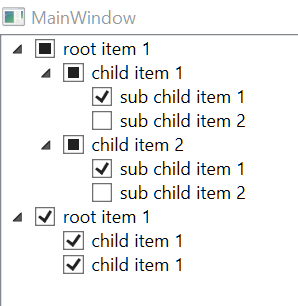
כמו"כ לא הצלחתי לעשות BInding ל itemsorce ישירות מה-xaml רק דרך הקוד זה עובד - אשמח לקבל הדרכה בנושא ממי שיכול.
תודה מראש.
עשיתי את זה בעיקר ללימוד - מקווה שיהיה שימושי בעז"ה לעוד מישהו חוץ ממני.<Window x:Class="Wpf_Checked_TreeView.MainWindow" xmlns="http://schemas.microsoft.com/winfx/2006/xaml/presentation" xmlns:x="http://schemas.microsoft.com/winfx/2006/xaml" xmlns:d="http://schemas.microsoft.com/expression/blend/2008" xmlns:mc="http://schemas.openxmlformats.org/markup-compatibility/2006" xmlns:local="clr-namespace:Wpf_Checked_TreeView" mc:Ignorable="d" Title="MainWindow" Height="450" Width="800" DataContext="{Binding RelativeSource={RelativeSource Self}}" > <Grid> <TreeView x:Name="treeView" ItemsSource="{Binding treeItemsList}"> <TreeView.Resources> <HierarchicalDataTemplate DataType="{x:Type local:CheckedTreeItem}" ItemsSource="{Binding Children}"> <StackPanel Orientation="Horizontal"> <CheckBox Content="{Binding Name}" IsChecked="{Binding IsChecked, Mode=TwoWay}"/> </StackPanel> </HierarchicalDataTemplate> </TreeView.Resources> </TreeView> </Grid> </Window>using System.Collections.ObjectModel; using System.ComponentModel; using System.Linq; using System.Windows; namespace Wpf_Checked_TreeView { /// <summary> /// Interaction logic for MainWindow.xaml /// </summary> public partial class MainWindow : Window { public ObservableCollection<object> treeItemsList = new ObservableCollection<object>(); public MainWindow() { InitializeComponent(); CheckedTreeItem rootItem1 = new CheckedTreeItem { Name = "root item 1" }; CheckedTreeItem child1 = new CheckedTreeItem { Name = "child item 1"}; CheckedTreeItem child2 = new CheckedTreeItem { Name = "child item 2" }; rootItem1.AddChild(child1); rootItem1.AddChild(child2); child1.AddChild(new CheckedTreeItem { Name = "sub child item 1" }); child1.AddChild(new CheckedTreeItem { Name = "sub child item 2" }); child2.AddChild(new CheckedTreeItem { Name = "sub child item 1" }); child2.AddChild(new CheckedTreeItem { Name = "sub child item 2" }); CheckedTreeItem rootItem2 = new CheckedTreeItem { Name = "root item 1" }; rootItem2.AddChild(new CheckedTreeItem { Name = "child item 1" }); rootItem2.AddChild(new CheckedTreeItem { Name = "child item 1" }); treeItemsList.Add(rootItem1); treeItemsList.Add(rootItem2); treeView.ItemsSource = treeItemsList; } } public class CheckedTreeItem : INotifyPropertyChanged { private ObservableCollection<CheckedTreeItem> _children = new ObservableCollection<CheckedTreeItem>(); public ObservableCollection<CheckedTreeItem> Children { get { return _children; } set { _children = value; OnPropertyChanged(nameof(Children)); } } private CheckedTreeItem _parent; public CheckedTreeItem Parent { get { return _parent; } set { _parent = value; OnPropertyChanged(nameof(Parent)); } } private string _name; public string Name { get { return _name; } set { if (_name != value) { _name = value; OnPropertyChanged(nameof(Name)); } } } private bool? _isChecked = false; public bool? IsChecked { get { return _isChecked; } set { if (_isChecked != value) { _isChecked = value; OnPropertyChanged(nameof(IsChecked)); UpdateChildCheckSatus(value); UpdateParentCheckSatus(value); } } } void UpdateChildCheckSatus(bool? value) { foreach (CheckedTreeItem child in Children) { if (value != null){ child.IsChecked = value; } } } void UpdateParentCheckSatus(bool? value) { if (Parent != null) { bool allChecked = Parent.Children.OfType<CheckedTreeItem>().All(child => child.IsChecked == true); bool allUnchecked = Parent.Children.OfType<CheckedTreeItem>().All(child => child.IsChecked == false); if (allChecked) { Parent.IsChecked = true; } else if (allUnchecked) { Parent.IsChecked = false; } else { Parent.IsChecked = null; } } } public event PropertyChangedEventHandler PropertyChanged; protected void OnPropertyChanged(string propertyName) { PropertyChanged?.Invoke(this, new PropertyChangedEventArgs(propertyName)); } public void AddChild(CheckedTreeItem child) { if (child is CheckedTreeItem CheckedTreeItem) { CheckedTreeItem.Parent = this; Children.Add(child); } } } } -
ספר טלפונים ב-html -
C# webview2 navigatetostring- טעינת טקסט בפקדפתרון מאולתר:
אני יוצר list ששומר את כל הwebviews בתוך thisaddin ואז כך שהתוכנה מתעלמת מכל שגיאה שקורית בסגירת הwebviewprivate void ThisAddIn_Shutdown(object sender, System.EventArgs e) { try { foreach (WebView2 webView in webviewlist) { webView.Dispose(); } } catch (Exception){ } } -
קיצורי מקשים באפליקציית C# WPFאשמח אם מישהו יכול להדריך אותי איך יוצרים קיצורי מקשים גלובליים באפליקצייה של wpf ב C#
לדוגמא cntrl +o לפתיחת קובץ וכן הלאה
תודה מראש
-
שמירת חשבונית בעיצוב HTML בשרת@ASS
למה שלא תשמור את הinnerhtml ? -
מסד נתונים בענן... התייעצותאולי אפשר רעיון כזה בו אתה פותח את הטבלה עצמה בגוגל דרייב עצמו דרך פקד webbrowser בתוך יוזר פורם
כמובן שתלוי מאוד מה התפקיד של הטבלאות וכו' -
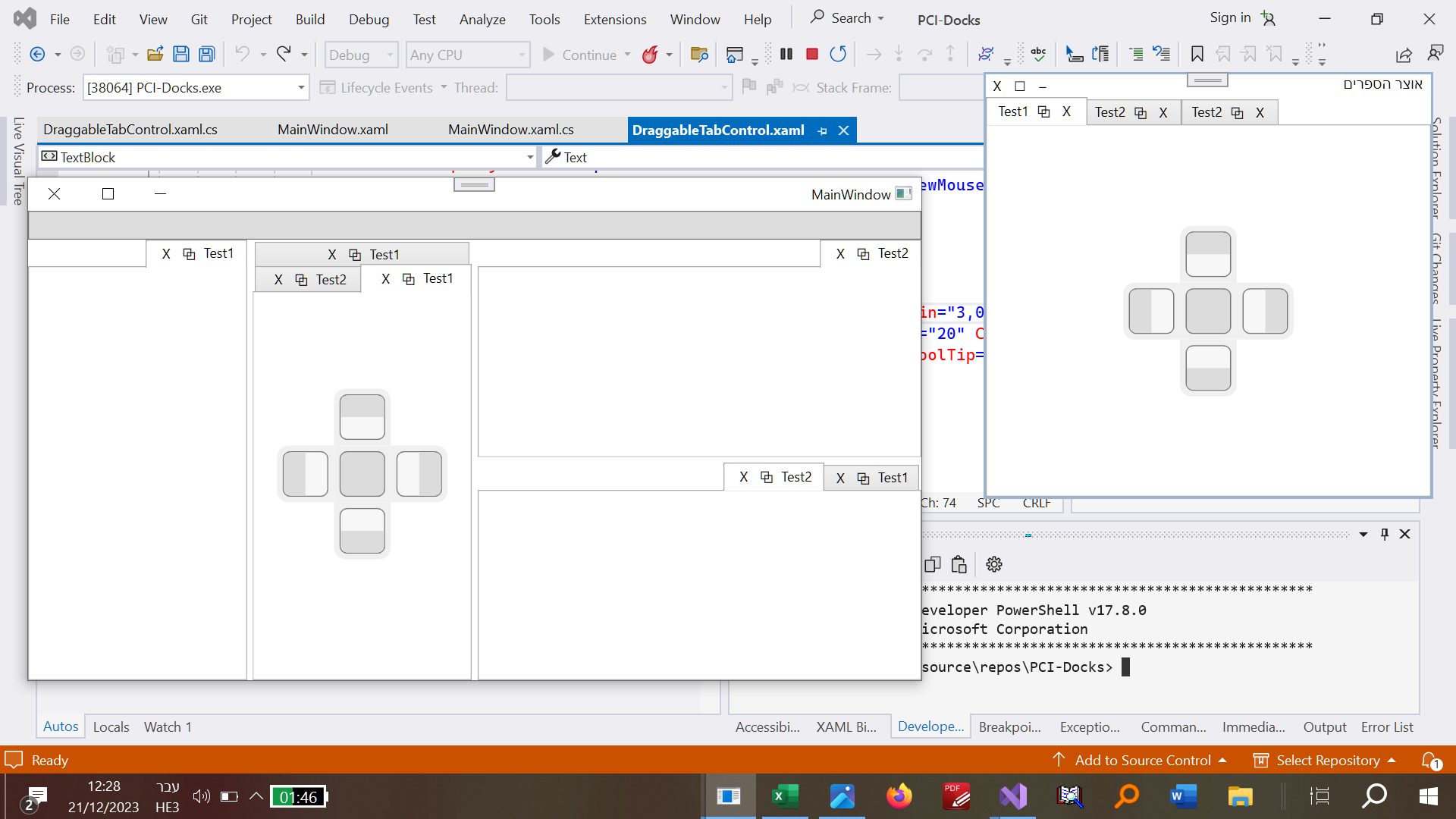
wpf tabcontrol כמו של winformsהצלחתי ב"ה
עריכה: הוספתי לו גם אפשרות להחליף מקומות של הטאבים:
<Window x:Class="wpflistview.MainWindow" xmlns="http://schemas.microsoft.com/winfx/2006/xaml/presentation" xmlns:x="http://schemas.microsoft.com/winfx/2006/xaml" xmlns:d="http://schemas.microsoft.com/expression/blend/2008" xmlns:mc="http://schemas.openxmlformats.org/markup-compatibility/2006" mc:Ignorable="d" Title="MainWindow" Height="500" Width="800" > <Window.Resources> <!-- Style for the TabControl --> <Style x:Key="TabControlStyle" TargetType="TabControl"> <Setter Property="AllowDrop" Value="True"/> <Setter Property="Template"> <Setter.Value> <ControlTemplate TargetType="TabControl"> <Grid x:Name="TabcontrolMainGrid"> <Border x:Name="TabcontrolMainBorder2" BorderBrush="{TemplateBinding BorderBrush}" BorderThickness="{TemplateBinding BorderThickness}" Background="{TemplateBinding Background}" SnapsToDevicePixels="True"> <Grid x:Name="TabcontrolMainGrid2"> <Grid.RowDefinitions> <RowDefinition Height="Auto"/> <RowDefinition Height="Auto"/> <RowDefinition Height="*"/> </Grid.RowDefinitions> <!-- ListBox for headers --> <Grid x:Name="listBoxcontainerGrid" Grid.Row="0" Margin="0,0,0,-20"> <Grid.ColumnDefinitions> <ColumnDefinition Width="*"/> <ColumnDefinition Width="Auto"/> </Grid.ColumnDefinitions> <ListBox x:Name="TabHeaderListBox" Margin="0" Grid.Column="0" Padding="-2,-2,0,1" ScrollViewer.HorizontalScrollBarVisibility="Visible" SelectionChanged="TabHeaderListBox_SelectionChanged" ItemsSource="{Binding RelativeSource={RelativeSource TemplatedParent}, Path=Items}" SelectedItem="{Binding RelativeSource={RelativeSource TemplatedParent}, Path=SelectedItem}" BorderBrush="{x:Null}" IsEnabled="True" Background="#FFFAFAFA"> <ListBox.ItemsPanel> <ItemsPanelTemplate> <StackPanel Orientation="Horizontal" /> </ItemsPanelTemplate> </ListBox.ItemsPanel> <ListBox.ItemTemplate> <DataTemplate> <Border x:Name="TabItemBorder" BorderThickness="1" BorderBrush="{x:Null}" Padding="5,2,5,2" Margin="-3,0,-3,0" PreviewMouseMove="TabItemBorder_PreviewMouseMove" DragOver="TabItemBorder_DragOver"> <Border.Effect> <DropShadowEffect ShadowDepth="1" BlurRadius="1" Color="Black" Opacity="0.5"/> </Border.Effect> <Border.Style> <Style TargetType="Border"> <Setter Property="Background" Value="#F0F0F0"/> <Style.Triggers> <DataTrigger Binding="{Binding IsSelected, RelativeSource={RelativeSource AncestorType={x:Type ListBoxItem}}}" Value="True"> <Setter Property="Background" Value="White"/> </DataTrigger> <!--<DataTrigger Binding="{Binding IsMouseOver, RelativeSource={RelativeSource AncestorType={x:Type ListBoxItem}}}" Value="True"> <Setter Property="Background" Value="#40BFD4FF"/> </DataTrigger> <DataTrigger Binding="{Binding IsMouseOff, RelativeSource={RelativeSource AncestorType={x:Type ListBoxItem}}}" Value="True"> <Setter Property="Background" Value="#F0F0F0"/> </DataTrigger>--> </Style.Triggers> </Style> </Border.Style> <StackPanel Orientation="Horizontal"> <TextBlock x:Name="tabItemTextBlock" Text="{Binding Header}" Margin="0,2,5,0"/> <Button Content="X" x:Name="TabCloseButton" Width="20" Height="20" Click="TabCloseButton_Click" Command="{Binding RelativeSource={RelativeSource FindAncestor, AncestorType={x:Type TabControl}}, Path=DataContext.CloseTabCommand}" CommandParameter="{Binding}" Background="{x:Null}" BorderBrush="{x:Null}" /> </StackPanel> </Border> </DataTemplate> </ListBox.ItemTemplate> </ListBox> <DockPanel HorizontalAlignment="Right" Background="#FFFAFAFA" Margin="0,3,2,23" Height="23"> <Button x:Name="TabscrollLeft" Content="◁" Click="TabscrollLeft_Click" Background="#F0F0F0" BorderThickness="0" BorderBrush="{x:Null}" Margin="0,0,2,0"> <Button.Effect> <DropShadowEffect ShadowDepth="1" BlurRadius="1" Color="Black" Opacity="0.5"/> </Button.Effect> </Button> <Button x:Name="TabsDropDown" Content="▽" Click="TabsDropDown_Click" Background="#F0F0F0" BorderThickness="0" BorderBrush="{x:Null}" Margin="0,0,2,0"> <Button.Effect> <DropShadowEffect ShadowDepth="1" BlurRadius="1" Color="Black" Opacity="0.5"/> </Button.Effect> <Button.ContextMenu> <ContextMenu/> </Button.ContextMenu> </Button> <Button x:Name="TabscrollRight" Content="▷" Click="TabscrollRight_Click" Background="#F0F0F0" BorderThickness="0" BorderBrush="{x:Null}"> <Button.Effect> <DropShadowEffect ShadowDepth="1" BlurRadius="1" Color="Black" Opacity="0.5"/> </Button.Effect> </Button> </DockPanel> </Grid> <!-- Content row --> <Border Grid.Row="1" Height="0.5" Background="{TemplateBinding BorderBrush}"/> <Border Grid.Row="2" x:Name="ContentPanel" BorderBrush="{TemplateBinding BorderBrush}" BorderThickness="0.5" Background="{TemplateBinding Background}" SnapsToDevicePixels="True"> <ContentPresenter x:Name="PART_SelectedContentHost" ContentSource="SelectedContent" Margin="{TemplateBinding Padding}" SnapsToDevicePixels="{TemplateBinding SnapsToDevicePixels}"/> </Border> </Grid> </Border> </Grid> <ControlTemplate.Triggers> <Trigger Property="IsEnabled" Value="False"> <Setter Property="Foreground" Value="{DynamicResource {x:Static SystemColors.GrayTextBrushKey}}"/> </Trigger> </ControlTemplate.Triggers> </ControlTemplate> </Setter.Value> </Setter> </Style> </Window.Resources> <Grid> <!-- Apply the custom style to the TabControl --> <TabControl Style="{StaticResource TabControlStyle}"> <!-- Add your tabs here --> <TabItem Header="Tab 1"> <!-- Tab 1 content --> </TabItem> <TabItem Header="Tab 2"> <!-- Tab 2 content --> </TabItem> <!-- Add more tabs as needed --> <TabItem Header="Tab 3"> asdfasdfasf </TabItem> <TabItem Header="Tab 4"> דכגשדגכשדכשדגכשדכג </TabItem> <!-- Add more tabs as needed --> <TabItem Header="Tab 5"> <!-- Tab 1 content --> </TabItem> <TabItem Header="Tab 6"> <!-- Tab 2 content --> </TabItem> <!-- Add more tabs as needed --> <TabItem Header="Tab 7"> <!-- Tab 1 content --> </TabItem> <TabItem Header="Tab 8"> <!-- Tab 2 content --> </TabItem> <!-- Add more tabs as needed --> </TabControl> </Grid> </Window>using BetterTabs; using FirstFloor.ModernUI.Windows.Media; using System; using System.Collections.Generic; using System.Collections.ObjectModel; using System.Linq; using System.Text; using System.Threading.Tasks; using System.Windows; using System.Windows.Controls; using System.Windows.Data; using System.Windows.Documents; using System.Windows.Input; using System.Windows.Media; using System.Windows.Media.Imaging; using System.Windows.Navigation; using System.Windows.Shapes; namespace wpflistview { /// <summary> /// Interaction logic for MainWindow.xaml /// </summary> /// public partial class MainWindow : Window { public MainWindow() { InitializeComponent(); } private void TabCloseButton_Click(object sender, RoutedEventArgs e) { // Handle the close button click event here if (sender is Button closeButton && closeButton.DataContext is TabItem tabItem) { // Your custom logic to close the tab // For example, remove the tab from the TabControl's Items collection var tabControl = FindParent<TabControl>(closeButton); (tabControl?.Items)?.Remove(tabItem); } } private void TabscrollLeft_Click(object sender, RoutedEventArgs e) { var tabControl = FindParent<TabControl>(sender as DependencyObject); if (tabControl != null) { int currentIndex = tabControl.SelectedIndex; if (currentIndex > 0) { tabControl.SelectedIndex = currentIndex - 1; } } } private void TabsDropDown_Click(object sender, RoutedEventArgs e) { Button button = (Button)sender; ContextMenu contextMenu = new ContextMenu(); foreach (TabItem tabItem in ((TabControl)button.TemplatedParent).Items) { MenuItem menuItem = new MenuItem { Header = tabItem.Header, Tag = tabItem }; menuItem.Click += TabMenuItem_Click; contextMenu.Items.Add(menuItem); } button.ContextMenu = contextMenu; button.ContextMenu.IsOpen = true; } private void TabMenuItem_Click(object sender, RoutedEventArgs e) // Event handler for context menu item click { ((ContextMenu)((MenuItem)sender).Parent).IsOpen = false; // Close the context menu TabItem selectedTab = (TabItem)((MenuItem)sender).Tag; // Get the associated TabItem from the Tag property ((TabControl)selectedTab.Parent).SelectedItem = selectedTab; // Set the selected tab in the TabControl } private void TabscrollRight_Click(object sender, RoutedEventArgs e) { var tabControl = FindParent<TabControl>(sender as DependencyObject); if (tabControl != null) { int currentIndex = tabControl.SelectedIndex; if (currentIndex < tabControl.Items.Count - 1) { tabControl.SelectedIndex = currentIndex + 1; } } } private static T FindParent<T>(DependencyObject child) where T : DependencyObject { // Find the parent of a specified type in the visual tree while (true) { DependencyObject parentObject = VisualTreeHelper.GetParent(child); if (parentObject == null) { return null; } if (parentObject is T parent) { return parent; } child = parentObject; } } private void TabHeaderListBox_SelectionChanged(object sender, SelectionChangedEventArgs e) { ListBox listBox = (ListBox)sender; if (listBox.SelectedItem != null) { listBox.ScrollIntoView(listBox.SelectedItem); } } private static T FindAncestor<T>(DependencyObject current) where T : DependencyObject { do { if (current is T ancestor) { return ancestor; } current = VisualTreeHelper.GetParent(current); } while (current != null); return null; } private void TabItemBorder_PreviewMouseMove(object sender, MouseEventArgs e) { if (sender is Border border && border.DataContext is TabItem tabItem && Mouse.PrimaryDevice.LeftButton == MouseButtonState.Pressed) { DragDrop.DoDragDrop(tabItem, tabItem, DragDropEffects.All); } } private void TabItemBorder_DragOver(object sender, DragEventArgs e) { if (e.Data.GetData(typeof(TabItem)) is TabItem tabItemSource && sender is Border border && border.DataContext is TabItem tabItemTarget && tabItemTarget.Parent is TabControl TergetTabControl) { int targetIndex = TergetTabControl.Items.IndexOf(tabItemTarget); TabControl SourceControl = tabItemSource.Parent as TabControl; SourceControl.Items.Remove(tabItemSource); TergetTabControl.Items.Insert(targetIndex, tabItemSource); tabItemSource.IsSelected = true; } } } } -
wpf tabcontrol כמו של winformsתמונה של התוכנה עם הקוד הנ"ל.
-
AvalonDock בחלון קטן@dovid
אתה צודק הבעיה היתה בפקד - תודה! -
AvalonDock בחלון קטןאני משתמש עם avalonDock ב wpf
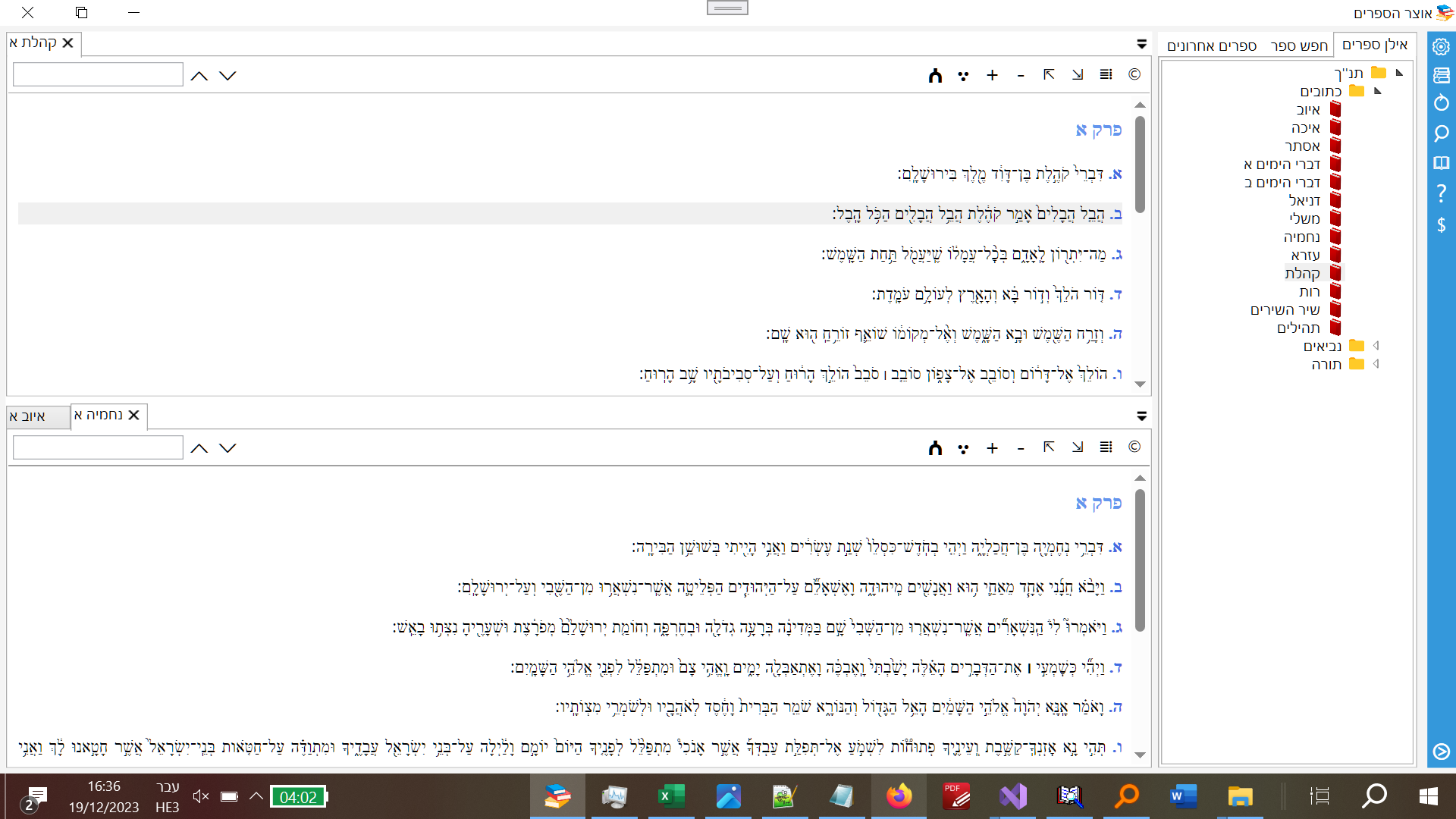
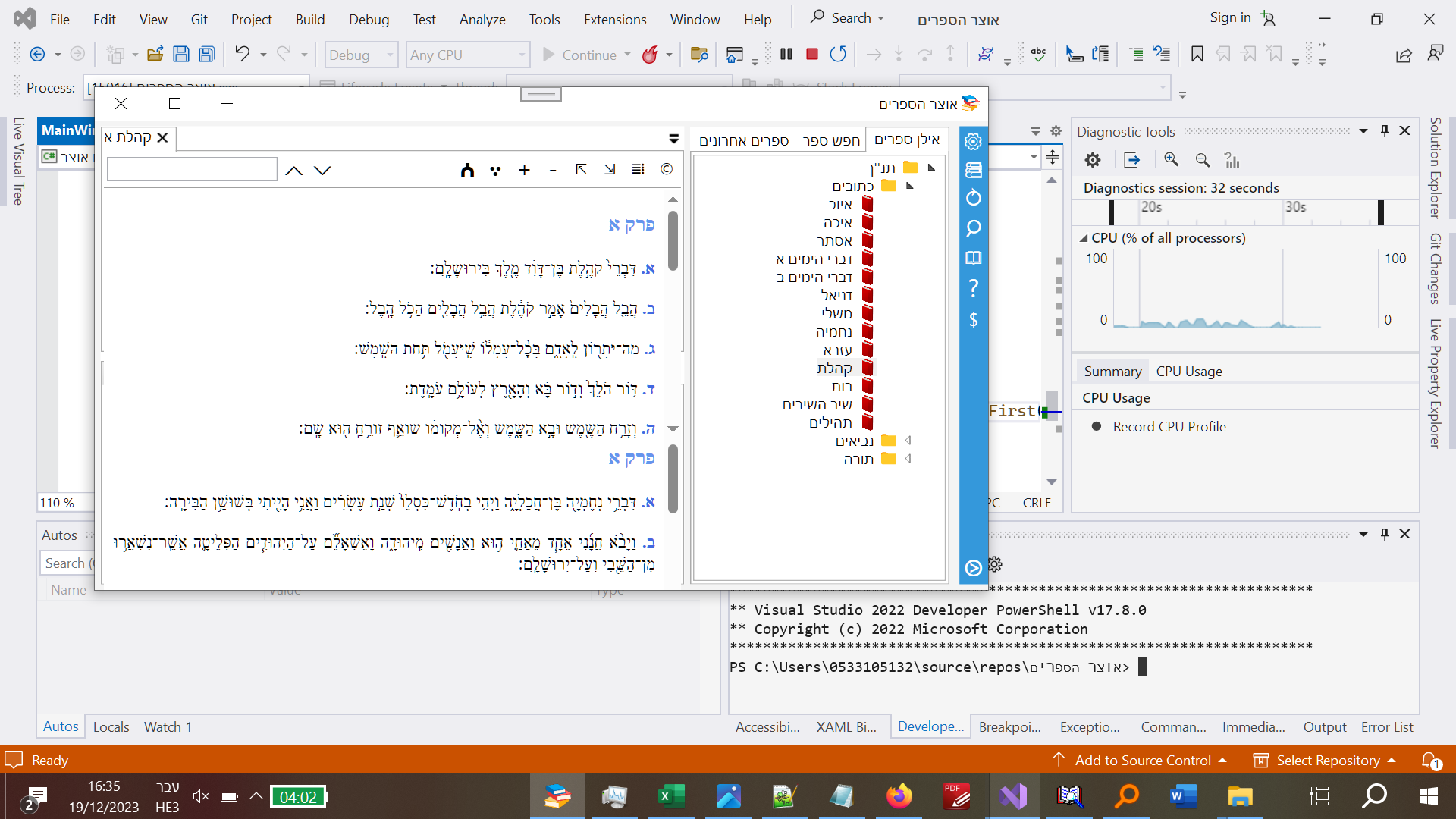
נתקלתי בבעיה כאשר החלון מצטמצם שאם החלון מפוצל לשניים אזי החלון העליון עולה מעל החלון התחתון ומסתיר את סרגל הכלים שלוכאשר התצוגה מצומצמצת המסמכים מתקרבים מדאי וחופפים אחד על השני
ככה אמור להיות:
זה מה שקורה כאשר החלון מוקטן - החלון העליון דורס את סרגל הכלים ואת הטאבים של התחתון:
-
AvalonDock WPF איך מוסיפים באופן תקין LayoutDocumentאני מנסה להשתמש בAvalonDock (פלטפורמה המדמה את הפלטפרומה של Visualstudio) עם טאבים נסגרים וחלונות נגררים ועוד ועוד מצו"ב תמונה.
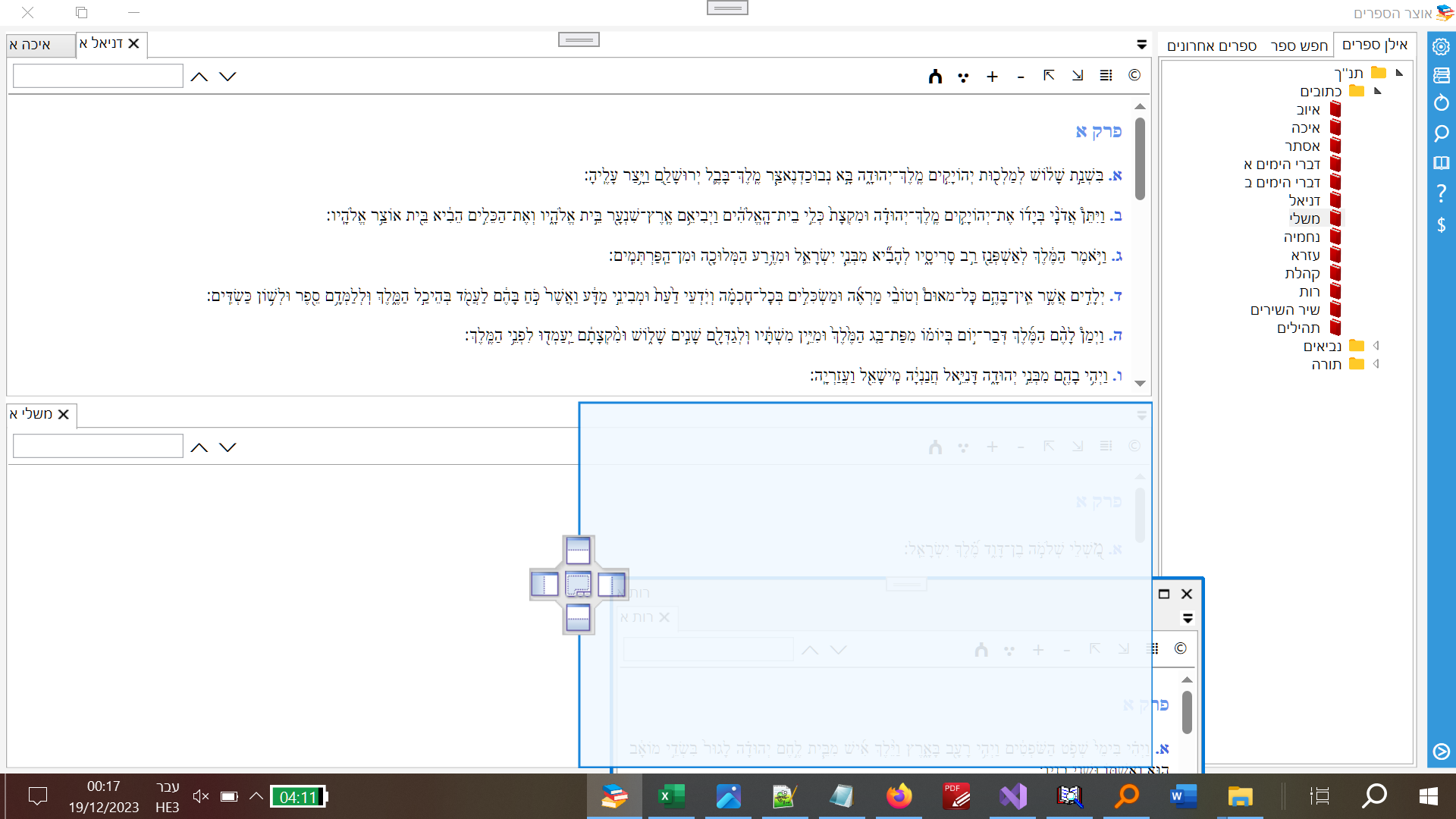
נתקלתי בבאג שאם אני מצמיד אפילו אחד המסמכים למטה ואז סוגר את המסמכים למעלה שוב כל טעינה של מסמך חדש אינו מוצג כלל. אשמח לפיתרון
הנה הקוד שלי. (את הפלטפורמה אני יוצר בwpf) ואת המסמכים אני מוסיף דינאמית בC#.WPF
<DockingManager x:Name="dockManager">
     <!--Define your layout here-->
    <LayoutRoot>
        <LayoutPanel Orientation="Horizontal">

             <!--Main Content Area-->
            <LayoutDocumentPane x:Name="documentPane">
                 <!--Add more documents as needed-->
            </LayoutDocumentPane>
        </LayoutPanel>
    </LayoutRoot>
</DockingManager>
והקוד בc# להוספה דינאמית של מסמכים
private void AddNewTab(string title)
{
\\לא יודע למה צריך להוסיף grid אבל בלי זה הוא נותן לי שגיאות מוזרות.
    Grid newGrid = new Grid();
    newGrid.Children.Add(cntrlBookView);
    LayoutDocument newLayoutDocument = new LayoutDocument
    {
        Title = title,
        Content = newGrid
    };

    cntrlBookView.layoutDocument = newLayoutDocument;
    newLayoutDocument.IsActive = true;
    documentPane.Children.Add(newLayoutDocument);
    newLayoutDocument.IsActive = false;

}