
הפורום כעת לקריאה בלבד, לקריאה נוספת.
הכנסת אובייקטים חדשים לתוך מערך c#
-
נקודה ששכחתי, וצריכה אצלי עדיין טיפול.
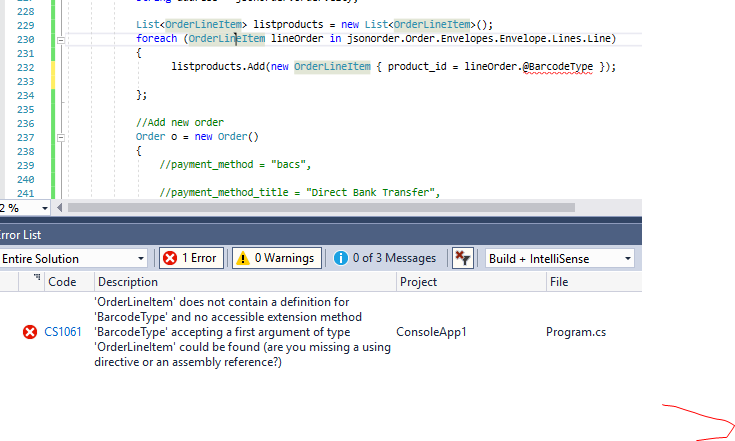
בקוד הנ"ל, נתוני האובייקטים שצריכים להיכנס לליסט צריכים שיבואו מתוך המערך (בקוד דלהלן 'lineOrder'). וניסיתי לגשת אליו, ללא הצלחה.
מצ"ב הקוד והשגיאות.
List<OrderLineItem> listproducts = new List<OrderLineItem>();
foreach (OrderLineItem lineOrder in jsonorder.Order.Envelopes.Envelope.Lines.Line)
    {
      listproducts.Add(new OrderLineItem { product_id = lineOrder.@BarcodeType });
    };
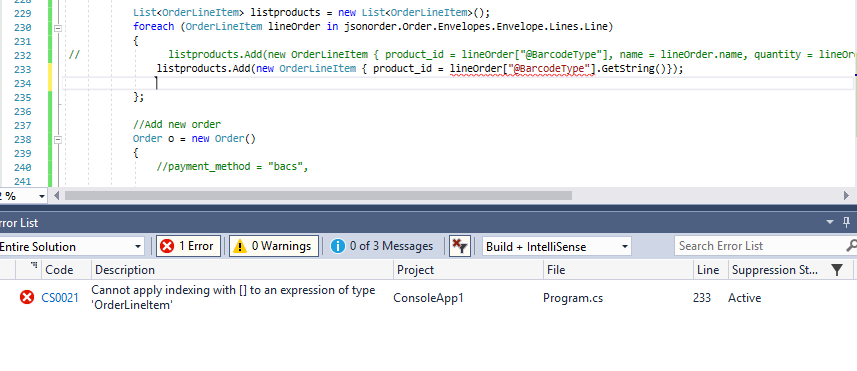
וגם לא ככה
List<OrderLineItem> listproducts = new List<OrderLineItem>();

foreach (OrderLineItem lineOrder in jsonorder.Order.Envelopes.Envelope.Lines.Line)

   {
listproducts.Add(new OrderLineItem { product_id = lineOrder["@BarcodeType"].GetString()});

   };
תודה
-
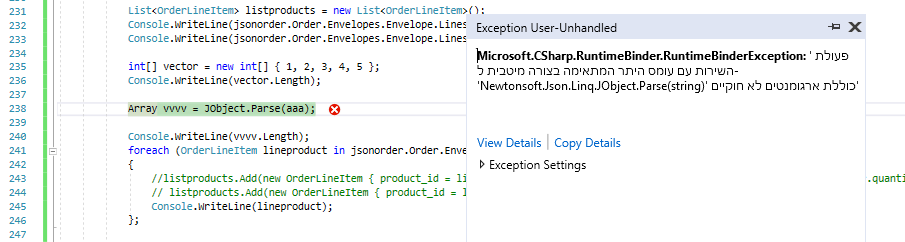
ניסיתי להמיר את הJSON לARRAY לפי המדריך הזה, אבל יש שגיאה.
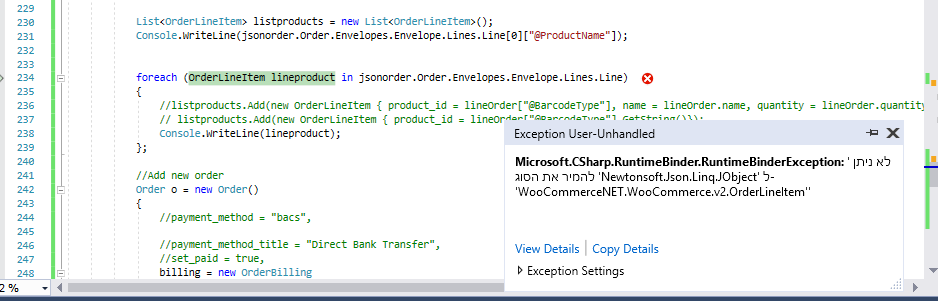
ואגב, אם אני מדפיס את המערךך json המקורי הוא ככה:
  [

    {

      "@Category": "Print",

      "@Product": "Print 10x15",

      "@Theme": "",

      "@ProductName": "Print 10x15",

      "@ProductCode": "",

      "@PaperType": "Undefined",

      "@BarcodeType": "EAN13",

      "@GS1DataMatrix240": "",

      "@EanCode": "",

      "@Quantity": "3",

      "@FixFee": "0",

      "@ShippingCost": "0",

      "@ServiceFee": "0",

      "@UnitPrice": "0",

      "@Discount": "0",

      "@PriceWithoutVat": "0",

      "@VatAmount": "0",

      "@Price": "0"

    },

    {

      "@Category": "Print",

      "@Product": "Print 15x20",

      "@Theme": "",

      "@ProductName": "Print 15x20",

      "@ProductCode": "",

      "@PaperType": "Undefined",

      "@BarcodeType": "EAN13",

      "@GS1DataMatrix240": "",

      "@EanCode": "",

      "@Quantity": "3",

      "@FixFee": "0",

      "@ShippingCost": "0",

      "@ServiceFee": "0",

      "@UnitPrice": "0",

      "@Discount": "0",

      "@PriceWithoutVat": "0",

      "@VatAmount": "0",

      "@Price": "0"

    },

    {

      "@Category": "",

      "@Product": "Passport Photos (45x35 x 8) 10x15 (35 mm x 45 mm)",

      "@Theme": "",

      "@ProductName": "Passport Photos (45x35 x 8) 10x15 (35 mm x 45 mm)",

      "@ProductCode": "",

      "@PaperType": "Undefined",

      "@BarcodeType": "EAN13",

      "@GS1DataMatrix240": "",

      "@EanCode": "",

      "@Quantity": "1",

      "@FixFee": "0",

      "@ShippingCost": "0",

      "@ServiceFee": "0",

      "@UnitPrice": "0",

      "@Discount": "0",

      "@PriceWithoutVat": "0",

      "@VatAmount": "0",

      "@Price": "0"

    },

    {

      "@Category": "Gift",

      "@Product": "Mug BLack",

      "@Theme": "",

      "@ProductName": "Mug BLack",

      "@ProductCode": "",

      "@PaperType": "Undefined",

      "@BarcodeType": "EAN13",

      "@GS1DataMatrix240": "",

      "@EanCode": "",

      "@Quantity": "1",

      "@FixFee": "0",

      "@ShippingCost": "0",

      "@ServiceFee": "0",

      "@UnitPrice": "0",

      "@Discount": "0",

      "@PriceWithoutVat": "0",

      "@VatAmount": "0",

      "@Price": "0"

    },

    {

      "@Category": "Poster",

      "@Product": "Poster 20x25",

      "@Theme": "",

      "@ProductName": "Poster 20x25",

      "@ProductCode": "",

      "@PaperType": "Undefined",

      "@BarcodeType": "EAN13",

      "@GS1DataMatrix240": "",

      "@EanCode": "",

      "@Quantity": "1",

      "@FixFee": "0",

      "@ShippingCost": "0",

      "@ServiceFee": "0",

      "@UnitPrice": "0",

      "@Discount": "0",

      "@PriceWithoutVat": "0",

      "@VatAmount": "0",

      "@Price": "0"

    }

  ]
יש בו משהו לא תקין?
-
dynamic jsonorder = JsonConvert.DeserializeObject(convert_xml_to_json($"{ e.FullPath}"));והפונקציה:
private static string convert_xml_to_json(string xmlFile) {//string xml string xml = File.ReadAllText(xmlFile); XmlDocument doc = new XmlDocument(); doc.LoadXml(xml); string jsonText = JsonConvert.SerializeXmlNode(doc); return jsonText; } -
@chagold אמר בהכנסת אובייקטים חדשים לתוך מערך c#:
convert_xml_to_json
תשנה בforeach מOrderLineItem לvar.
ותפנה למאפיינים כאינדקס:lineproduct["@ProductName"]מה מקור הXML? כלומר מי ייצר אותו?
- מנטור אישי בתכנות והמסתעף – להתקדם לשלב הבא!
- בכל נושא אפשר ליצור קשר dovid@tchumim.com
-
@chagold אמר בהכנסת אובייקטים חדשים לתוך מערך c#:
convert_xml_to_json
תשנה בforeach מOrderLineItem לvar.
ותפנה למאפיינים כאינדקס:lineproduct["@ProductName"]מה מקור הXML? כלומר מי ייצר אותו?
-
אוקי.
אז דבר ראשון הפונקציה convert_xml_to_json מיותר, תעבוד ישירות מול הXML.
הנה קוד ראשוני לעבוד עם הXML:var xdoc = XDocument.Load(e.FullPath); var lines = xdoc.Document .Element("Order") .Element("Envelopes") .Element("Envelope") .Element("Lines") .Elements("Line"); foreach (var element in lines) { Console.WriteLine(element.Element("@ProductName").Value); }אם זה לא עובד כנראה אני טועה בניחוש המבנה, וא"כ יעזור לי אם תכלול דוגמא קצרה של הXML.


שלום! נראה שהשיחה הזו מעניינת אותך, אבל עדיין אין לך חשבון.
נמאס לכם לגלול בין אותם הפוסטים בכל ביקור? כשנרשמים לחשבון, תמיד תחזרו בדיוק למקום שבו הייתם קודם, ותוכלו לבחור לקבל התראות על תגובות חדשות (בין אם במייל, ובין אם בהתראת פוש). תוכלו גם לשמור סימניות ולפרגן ב-upvote לפוסטים כדי להביע הערכה לחברי קהילה אחרים.
בעזרת התרומה שלך, הפוסט הזה יכול להיות אפילו טוב יותר 💗
הרשמה התחברות