
הפורום כעת לקריאה בלבד, לקריאה נוספת.
-
נכנסתי לטבלת ה USERS כדי לשנות את ההרשאות משתמש admin ואחרי ששיניתי את ההרשאות הסשן נסגר וזהו יותר אין לי איך להיכנס
נמצא על שרת אבנטו אולי יש איזשהו דרך מהטרמינל ? -
@clickone תודה רבה
רק מה שמעניין זה מחליף את הסיסמה ליוזר root ודרך myadmin א"א להיכנס ללא סיסמה -
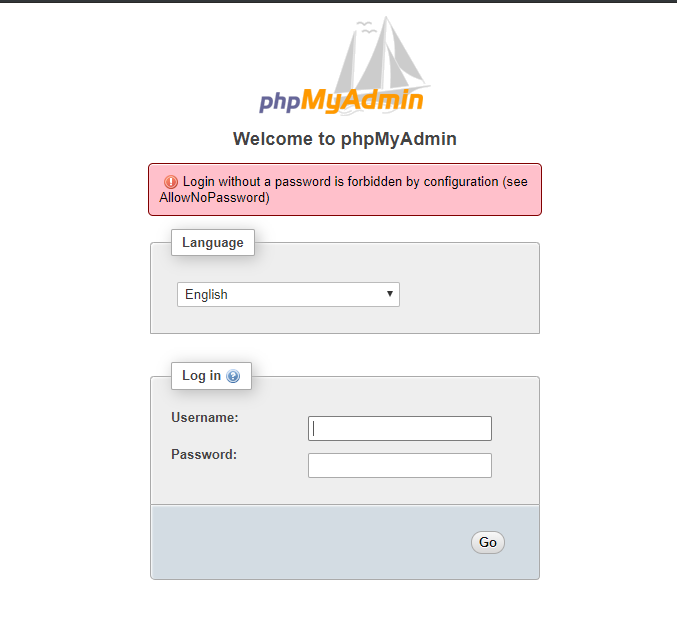
[1]+ Exit 1 sudo mysqld_safe --skip-grant-tables root@225:~# sudo /etc/init.d/mysql stop [ ok ] Stopping mysql (via systemctl): mysql.service. root@225:~# sudo /etc/init.d/mysql start [ ok ] Starting mysql (via systemctl): mysql.service. root@225:~# mysql -u root -p Enter password: Welcome to the MySQL monitor. Commands end with ; or \g. Your MySQL connection id is 11 Server version: 5.7.26-0ubuntu0.18.04.1 (Ubuntu) Copyright (c) 2000, 2019, Oracle and/or its affiliates. All rights reserved. Oracle is a registered trademark of Oracle Corporation and/or its affiliates. Other names may be trademarks of their respective owners. Type 'help;' or '\h' for help. Type '\c' to clear the current input statement. -
@clickone במקום שנדבר בשפה אילמת מצו"ב לוג
אבל דרך phpmyadmin אני לא מצליח להיכנסroot@225:~# sudo /etc/init.d/mysql stop [ ok ] Stopping mysql (via systemctl): mysql.service. root@225:~# sudo mysqld_safe --skip-grant-tables & [1] 2294 root@225:~# 2019-06-30T21:46:07.341282Z mysqld_safe Logging to syslog. 2019-06-30T21:46:07.357064Z mysqld_safe Logging to '/var/log/mysql/error.log'. 2019-06-30T21:46:07.362557Z mysqld_safe Directory '/var/run/mysqld' for UNIX socket file don't exists. mysql -uroot ERROR 2002 (HY000): Can't connect to local MySQL server through socket '/var/run/mysqld/mysqld.sock' (2) [1]+ Exit 1 sudo mysqld_safe --skip-grant-tables root@225:~# use mysql; Command 'use' not found, did you mean: command 'nse' from deb ns2 command 'fuse' from deb fuse-emulator-gtk command 'fuse' from deb fuse-emulator-sdl command 'muse' from deb muse command 'ase' from deb ase Try: apt install <deb name> root@225:~# root@225:~# update user set authentication_string=PASSWORD("mynewpassword") where User='root'; -bash: syntax error near unexpected token `(' root@225:~# root@225:~# flush privileges; Command 'flush' not found, did you mean: command 'clush' from deb clustershell Try: apt install <deb name> root@225:~# root@225:~# quit Command 'quit' not found, did you mean: command 'quiz' from deb bsdgames command 'quilt' from deb quilt command 'luit' from deb x11-utils command 'quot' from deb quota command 'qgit' from deb qgit Try: apt install <deb name> root@225:~# sudo /etc/init.d/mysql stop [ ok ] Stopping mysql (via systemctl): mysql.service. root@225:~# sudo /etc/init.d/mysql start [ ok ] Starting mysql (via systemctl): mysql.service. root@225:~# mysql -u root -p Enter password: Welcome to the MySQL monitor. Commands end with ; or \g. Your MySQL connection id is 3 Server version: 5.7.26-0ubuntu0.18.04.1 (Ubuntu) Copyright (c) 2000, 2019, Oracle and/or its affiliates. All rights reserved. Oracle is a registered trademark of Oracle Corporation and/or its affiliates. Other names may be trademarks of their respective owners. Type 'help;' or '\h' for help. Type '\c' to clear the current input statement. mysql> -
@clickone במקום שנדבר בשפה אילמת מצו"ב לוג
אבל דרך phpmyadmin אני לא מצליח להיכנסroot@225:~# sudo /etc/init.d/mysql stop [ ok ] Stopping mysql (via systemctl): mysql.service. root@225:~# sudo mysqld_safe --skip-grant-tables & [1] 2294 root@225:~# 2019-06-30T21:46:07.341282Z mysqld_safe Logging to syslog. 2019-06-30T21:46:07.357064Z mysqld_safe Logging to '/var/log/mysql/error.log'. 2019-06-30T21:46:07.362557Z mysqld_safe Directory '/var/run/mysqld' for UNIX socket file don't exists. mysql -uroot ERROR 2002 (HY000): Can't connect to local MySQL server through socket '/var/run/mysqld/mysqld.sock' (2) [1]+ Exit 1 sudo mysqld_safe --skip-grant-tables root@225:~# use mysql; Command 'use' not found, did you mean: command 'nse' from deb ns2 command 'fuse' from deb fuse-emulator-gtk command 'fuse' from deb fuse-emulator-sdl command 'muse' from deb muse command 'ase' from deb ase Try: apt install <deb name> root@225:~# root@225:~# update user set authentication_string=PASSWORD("mynewpassword") where User='root'; -bash: syntax error near unexpected token `(' root@225:~# root@225:~# flush privileges; Command 'flush' not found, did you mean: command 'clush' from deb clustershell Try: apt install <deb name> root@225:~# root@225:~# quit Command 'quit' not found, did you mean: command 'quiz' from deb bsdgames command 'quilt' from deb quilt command 'luit' from deb x11-utils command 'quot' from deb quota command 'qgit' from deb qgit Try: apt install <deb name> root@225:~# sudo /etc/init.d/mysql stop [ ok ] Stopping mysql (via systemctl): mysql.service. root@225:~# sudo /etc/init.d/mysql start [ ok ] Starting mysql (via systemctl): mysql.service. root@225:~# mysql -u root -p Enter password: Welcome to the MySQL monitor. Commands end with ; or \g. Your MySQL connection id is 3 Server version: 5.7.26-0ubuntu0.18.04.1 (Ubuntu) Copyright (c) 2000, 2019, Oracle and/or its affiliates. All rights reserved. Oracle is a registered trademark of Oracle Corporation and/or its affiliates. Other names may be trademarks of their respective owners. Type 'help;' or '\h' for help. Type '\c' to clear the current input statement. mysql> -
@yossiz אמר בהסיסמה התאפסה - mysql יש מה לעשות ?:
sudo chown mysql:mysql /var/run/mysqld
root@225:~# mkdir -p /var/run/mysqld root@225:~# chown mysql:mysql /var/run/mysqld root@225:~# sudo /etc/init.d/mysql stop [ ok ] Stopping mysql (via systemctl): mysql.service. root@225:~# sudo mysqld_safe --skip-grant-tables & [1] 12629 root@225:~# 2019-06-30T22:01:33.984342Z mysqld_safe Logging to syslog. 2019-06-30T22:01:33.993911Z mysqld_safe Logging to '/var/log/mysql/error.log'. 2019-06-30T22:01:34.035683Z mysqld_safe Starting mysqld daemon with databases from /var/lib/mysql mysql -uroot Welcome to the MySQL monitor. Commands end with ; or \g. Your MySQL connection id is 2 Server version: 5.7.26-0ubuntu0.18.04.1 (Ubuntu) Copyright (c) 2000, 2019, Oracle and/or its affiliates. All rights reserved. Oracle is a registered trademark of Oracle Corporation and/or its affiliates. Other names may be trademarks of their respective owners. Type 'help;' or '\h' for help. Type '\c' to clear the current input statement. mysql> use mysql; Reading table information for completion of table and column names You can turn off this feature to get a quicker startup with -A Database changed mysql> mysql> update user set authentication_string=PASSWORD("mynewpassword") where User='root'; Query OK, 1 row affected, 1 warning (0.00 sec) Rows matched: 1 Changed: 1 Warnings: 1 mysql> mysql> flush privileges; Query OK, 0 rows affected (0.00 sec) mysql> mysql> quit Bye root@225:~# sudo /etc/init.d/mysql stop [ ok ] Stopping mysql (via systemctl): mysql.service. root@225:~# sudo /etc/init.d/mysql start [....] Starting mysql (via systemctl): mysql.service mysql -u root -p OK, 1 row affected, 1 warning (0.00 sec) Rows matched: 1 Changed: 1 Warnings: 1 mysql> mysql> flush privileges; Query OK, 0 rows affected (0.00 sec) mysql> mysql> quit Bye root@225:~# sudo /etc/init.d/mysql stop [ ok ] Stopping mysql (via systemctl): mysql.service. root@225:~# sudo /etc/init.d/mysql start [....] Starting mysql (via systemctl): mysql.service mysql -u root -p OK, 1 row affected, 1 warning (0.00 sec) Rows matched: 1 Changed: 1 Warnings: 1 mysql> mysql> flush privileges; Query OK, 0 rows affected (0.00 sec) mysql> mysql> quit Bye root@225:~# sudo /etc/init.d/mysql stop [ ok ] Stopping mysql (via systemctl): mysql.service. root@225:~# sudo /etc/init.d/mysql start [....] Starting mysql (via systemctl): mysql.service mysql -u root -p -
@yossiz אמר בהסיסמה התאפסה - mysql יש מה לעשות ?:
sudo chown mysql:mysql /var/run/mysqld
root@225:~# mkdir -p /var/run/mysqld root@225:~# chown mysql:mysql /var/run/mysqld root@225:~# sudo /etc/init.d/mysql stop [ ok ] Stopping mysql (via systemctl): mysql.service. root@225:~# sudo mysqld_safe --skip-grant-tables & [1] 12629 root@225:~# 2019-06-30T22:01:33.984342Z mysqld_safe Logging to syslog. 2019-06-30T22:01:33.993911Z mysqld_safe Logging to '/var/log/mysql/error.log'. 2019-06-30T22:01:34.035683Z mysqld_safe Starting mysqld daemon with databases from /var/lib/mysql mysql -uroot Welcome to the MySQL monitor. Commands end with ; or \g. Your MySQL connection id is 2 Server version: 5.7.26-0ubuntu0.18.04.1 (Ubuntu) Copyright (c) 2000, 2019, Oracle and/or its affiliates. All rights reserved. Oracle is a registered trademark of Oracle Corporation and/or its affiliates. Other names may be trademarks of their respective owners. Type 'help;' or '\h' for help. Type '\c' to clear the current input statement. mysql> use mysql; Reading table information for completion of table and column names You can turn off this feature to get a quicker startup with -A Database changed mysql> mysql> update user set authentication_string=PASSWORD("mynewpassword") where User='root'; Query OK, 1 row affected, 1 warning (0.00 sec) Rows matched: 1 Changed: 1 Warnings: 1 mysql> mysql> flush privileges; Query OK, 0 rows affected (0.00 sec) mysql> mysql> quit Bye root@225:~# sudo /etc/init.d/mysql stop [ ok ] Stopping mysql (via systemctl): mysql.service. root@225:~# sudo /etc/init.d/mysql start [....] Starting mysql (via systemctl): mysql.service mysql -u root -p OK, 1 row affected, 1 warning (0.00 sec) Rows matched: 1 Changed: 1 Warnings: 1 mysql> mysql> flush privileges; Query OK, 0 rows affected (0.00 sec) mysql> mysql> quit Bye root@225:~# sudo /etc/init.d/mysql stop [ ok ] Stopping mysql (via systemctl): mysql.service. root@225:~# sudo /etc/init.d/mysql start [....] Starting mysql (via systemctl): mysql.service mysql -u root -p OK, 1 row affected, 1 warning (0.00 sec) Rows matched: 1 Changed: 1 Warnings: 1 mysql> mysql> flush privileges; Query OK, 0 rows affected (0.00 sec) mysql> mysql> quit Bye root@225:~# sudo /etc/init.d/mysql stop [ ok ] Stopping mysql (via systemctl): mysql.service. root@225:~# sudo /etc/init.d/mysql start [....] Starting mysql (via systemctl): mysql.service mysql -u root -p -
-





שלום! נראה שהשיחה הזו מעניינת אותך, אבל עדיין אין לך חשבון.
נמאס לכם לגלול בין אותם הפוסטים בכל ביקור? כשנרשמים לחשבון, תמיד תחזרו בדיוק למקום שבו הייתם קודם, ותוכלו לבחור לקבל התראות על תגובות חדשות (בין אם במייל, ובין אם בהתראת פוש). תוכלו גם לשמור סימניות ולפרגן ב-upvote לפוסטים כדי להביע הערכה לחברי קהילה אחרים.
בעזרת התרומה שלך, הפוסט הזה יכול להיות אפילו טוב יותר 💗
הרשמה התחברות