
הפורום כעת לקריאה בלבד, לקריאה נוספת.
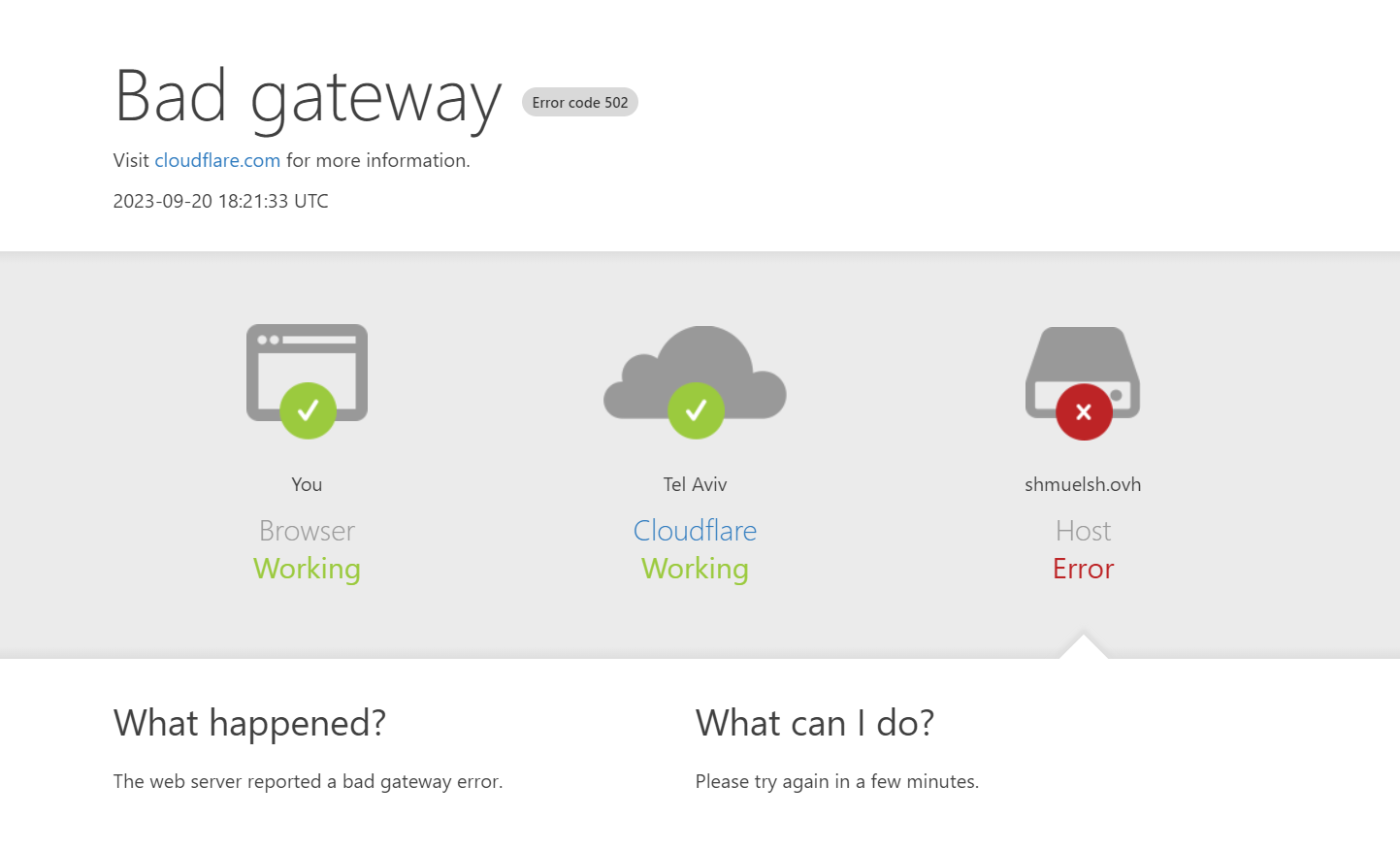
שיחקתי עם PHP בשרת שלי ועכשיו נהיה לי Error code 502, מה עושים???
-
עשיתי קצת שטויות... מחקתי אצלי את 8.1 PHP ואח"כ פשוט מחקתי ידנית את כל התיקיות של 8.1 PHP, ומאז יש לי את השגיאה הנ"ל!
מה עושים?
ניסיתי לעשותapt remove php8.2* apt remove php8.1* apt remove php8*ואז להפעיל מחדש ואז להתקין מחדש את 8.2 PHP ואז להפעיל מחדש את nginx ושום דבר לא עזר!
בטרמינל וב VScode זה כן עובד
מה הבעיה?
@ivrtikshoret -
אתה הגדרת פעם ראשונה את NGINX?
שינית שמה קובץ כל שהוא?
טוב, אם אתה לא יודע על מה אני מדבר, תביא לפה את הפלט של הפקודהsudo nginx -T -
אתה הגדרת פעם ראשונה את NGINX?
שינית שמה קובץ כל שהוא?
טוב, אם אתה לא יודע על מה אני מדבר, תביא לפה את הפלט של הפקודהsudo nginx -T@dovid כתב בשיחקתי עם PHP בשרת שלי ועכשיו נהיה לי Error code 502, מה עושים???:
תביא לפה את הפלט של הפקודה
nginx: the configuration file /etc/nginx/nginx.conf syntax is ok nginx: configuration file /etc/nginx/nginx.conf test is successful # configuration file /etc/nginx/nginx.conf: user www-data; worker_processes auto; pid /run/nginx.pid; include /etc/nginx/modules-enabled/*.conf; events { worker_connections 768; # multi_accept on; } http { ## # Basic Settings ## sendfile on; tcp_nopush on; types_hash_max_size 2048; # server_tokens off; # server_names_hash_bucket_size 64; # server_name_in_redirect off; include /etc/nginx/mime.types; default_type application/octet-stream; ## # SSL Settings ## ssl_protocols TLSv1 TLSv1.1 TLSv1.2 TLSv1.3; # Dropping SSLv3, ref: POODLE ssl_prefer_server_ciphers on; ## # Logging Settings ## access_log /var/log/nginx/access.log; error_log /var/log/nginx/error.log; ## # Gzip Settings ## gzip on; # gzip_vary on; # gzip_proxied any; # gzip_comp_level 6; # gzip_buffers 16 8k; # gzip_http_version 1.1; # gzip_types text/plain text/css application/json application/javascript text/xml application/xml application/xml+rss text/javascript; ## # Virtual Host Configs ## include /etc/nginx/conf.d/*.conf; include /etc/nginx/sites-enabled/*; } #mail { # # See sample authentication script at: # # http://wiki.nginx.org/ImapAuthenticateWithApachePhpScript # # # auth_http localhost/auth.php; # # pop3_capabilities "TOP" "USER"; # # imap_capabilities "IMAP4rev1" "UIDPLUS"; # # server { # listen localhost:110; # protocol pop3; # proxy on; # } # # server { # listen localhost:143; # protocol imap; # proxy on; # } #} # configuration file /etc/nginx/modules-enabled/50-mod-http-geoip2.conf: load_module modules/ngx_http_geoip2_module.so; # configuration file /etc/nginx/modules-enabled/50-mod-http-image-filter.conf: load_module modules/ngx_http_image_filter_module.so; # configuration file /etc/nginx/modules-enabled/50-mod-http-xslt-filter.conf: load_module modules/ngx_http_xslt_filter_module.so; # configuration file /etc/nginx/modules-enabled/50-mod-mail.conf: load_module modules/ngx_mail_module.so; # configuration file /etc/nginx/modules-enabled/50-mod-stream.conf: load_module modules/ngx_stream_module.so; # configuration file /etc/nginx/modules-enabled/70-mod-stream-geoip2.conf: load_module modules/ngx_stream_geoip2_module.so; # configuration file /etc/nginx/mime.types: types { text/html html htm shtml; text/css css; text/xml xml; image/gif gif; image/jpeg jpeg jpg; application/javascript js; application/atom+xml atom; application/rss+xml rss; text/mathml mml; text/plain txt; text/vnd.sun.j2me.app-descriptor jad; text/vnd.wap.wml wml; text/x-component htc; image/png png; image/tiff tif tiff; image/vnd.wap.wbmp wbmp; image/x-icon ico; image/x-jng jng; image/x-ms-bmp bmp; image/svg+xml svg svgz; image/webp webp; application/font-woff woff; application/java-archive jar war ear; application/json json; application/mac-binhex40 hqx; application/msword doc; application/pdf pdf; application/postscript ps eps ai; application/rtf rtf; application/vnd.apple.mpegurl m3u8; application/vnd.ms-excel xls; application/vnd.ms-fontobject eot; application/vnd.ms-powerpoint ppt; application/vnd.wap.wmlc wmlc; application/vnd.google-earth.kml+xml kml; application/vnd.google-earth.kmz kmz; application/x-7z-compressed 7z; application/x-cocoa cco; application/x-java-archive-diff jardiff; application/x-java-jnlp-file jnlp; application/x-makeself run; application/x-perl pl pm; application/x-pilot prc pdb; application/x-rar-compressed rar; application/x-redhat-package-manager rpm; application/x-sea sea; application/x-shockwave-flash swf; application/x-stuffit sit; application/x-tcl tcl tk; application/x-x509-ca-cert der pem crt; application/x-xpinstall xpi; application/xhtml+xml xhtml; application/xspf+xml xspf; application/zip zip; application/octet-stream bin exe dll; application/octet-stream deb; application/octet-stream dmg; application/octet-stream iso img; application/octet-stream msi msp msm; application/vnd.openxmlformats-officedocument.wordprocessingml.document docx; application/vnd.openxmlformats-officedocument.spreadsheetml.sheet xlsx; application/vnd.openxmlformats-officedocument.presentationml.presentation pptx; audio/midi mid midi kar; audio/mpeg mp3; audio/ogg ogg; audio/x-m4a m4a; audio/x-realaudio ra; video/3gpp 3gpp 3gp; video/mp2t ts; video/mp4 mp4; video/mpeg mpeg mpg; video/quicktime mov; video/webm webm; video/x-flv flv; video/x-m4v m4v; video/x-mng mng; video/x-ms-asf asx asf; video/x-ms-wmv wmv; video/x-msvideo avi; } # configuration file /etc/nginx/conf.d/default.conf: server { listen 80; listen [::]:80; server_name _; root /usr/share/nginx/html/; index index.php index.html index.htm index.nginx-debian.html; location / { try_files $uri $uri/ /index.php; } location ~ \.php$ { fastcgi_pass unix:/run/php/php8.1-fpm.sock; fastcgi_param SCRIPT_FILENAME $document_root$fastcgi_script_name; include fastcgi_params; include snippets/fastcgi-php.conf; } # A long browser cache lifetime can speed up repeat visits to your page location ~* \.(jpg|jpeg|gif|png|webp|svg|woff|woff2|ttf|css|js|ico|xml)$ { access_log off; log_not_found off; expires 360d; } # disable access to hidden files location ~ /\.ht { access_log off; log_not_found off; deny all; } } # configuration file /etc/nginx/fastcgi_params: fastcgi_param QUERY_STRING $query_string; fastcgi_param REQUEST_METHOD $request_method; fastcgi_param CONTENT_TYPE $content_type; fastcgi_param CONTENT_LENGTH $content_length; fastcgi_param SCRIPT_NAME $fastcgi_script_name; fastcgi_param REQUEST_URI $request_uri; fastcgi_param DOCUMENT_URI $document_uri; fastcgi_param DOCUMENT_ROOT $document_root; fastcgi_param SERVER_PROTOCOL $server_protocol; fastcgi_param REQUEST_SCHEME $scheme; fastcgi_param HTTPS $https if_not_empty; fastcgi_param GATEWAY_INTERFACE CGI/1.1; fastcgi_param SERVER_SOFTWARE nginx/$nginx_version; fastcgi_param REMOTE_ADDR $remote_addr; fastcgi_param REMOTE_PORT $remote_port; fastcgi_param REMOTE_USER $remote_user; fastcgi_param SERVER_ADDR $server_addr; fastcgi_param SERVER_PORT $server_port; fastcgi_param SERVER_NAME $server_name; # PHP only, required if PHP was built with --enable-force-cgi-redirect fastcgi_param REDIRECT_STATUS 200; # configuration file /etc/nginx/snippets/fastcgi-php.conf: # regex to split $uri to $fastcgi_script_name and $fastcgi_path fastcgi_split_path_info ^(.+?\.php)(/.*)$; # Check that the PHP script exists before passing it try_files $fastcgi_script_name =404; # Bypass the fact that try_files resets $fastcgi_path_info # see: http://trac.nginx.org/nginx/ticket/321 set $path_info $fastcgi_path_info; fastcgi_param PATH_INFO $path_info; fastcgi_index index.php; include fastcgi.conf; # configuration file /etc/nginx/fastcgi.conf: fastcgi_param SCRIPT_FILENAME $document_root$fastcgi_script_name; fastcgi_param QUERY_STRING $query_string; fastcgi_param REQUEST_METHOD $request_method; fastcgi_param CONTENT_TYPE $content_type; fastcgi_param CONTENT_LENGTH $content_length; fastcgi_param SCRIPT_NAME $fastcgi_script_name; fastcgi_param REQUEST_URI $request_uri; fastcgi_param DOCUMENT_URI $document_uri; fastcgi_param DOCUMENT_ROOT $document_root; fastcgi_param SERVER_PROTOCOL $server_protocol; fastcgi_param REQUEST_SCHEME $scheme; fastcgi_param HTTPS $https if_not_empty; fastcgi_param GATEWAY_INTERFACE CGI/1.1; fastcgi_param SERVER_SOFTWARE nginx/$nginx_version; fastcgi_param REMOTE_ADDR $remote_addr; fastcgi_param REMOTE_PORT $remote_port; fastcgi_param REMOTE_USER $remote_user; fastcgi_param SERVER_ADDR $server_addr; fastcgi_param SERVER_PORT $server_port; fastcgi_param SERVER_NAME $server_name; # PHP only, required if PHP was built with --enable-force-cgi-redirect fastcgi_param REDIRECT_STATUS 200; # configuration file /etc/nginx/conf.d/webmin.conf: server { server_name webmin.shmuelsh.ovh; access_log /var/log/nginx/webmin.access; error_log /var/log/nginx/webmin.error; location / { proxy_pass http://127.0.0.1:10000; #proxy_set_header Host $http_host; proxy_set_header X-Real-IP $remote_addr; proxy_set_header X-Forwarded-For $proxy_add_x_forwarded_for; proxy_set_header X-Forwarded-Proto $scheme; } listen [::]:443 ssl ipv6only=on; # managed by Certbot listen 443 ssl; # managed by Certbot ssl_certificate /etc/letsencrypt/live/webmin.shmuelsh.ovh/fullchain.pem; # managed by Certbot ssl_certificate_key /etc/letsencrypt/live/webmin.shmuelsh.ovh/privkey.pem; # managed by Certbot include /etc/letsencrypt/options-ssl-nginx.conf; # managed by Certbot ssl_dhparam /etc/letsencrypt/ssl-dhparams.pem; # managed by Certbot add_header Strict-Transport-Security "max-age=31536000" always; # managed by Certbot ssl_trusted_certificate /etc/letsencrypt/live/webmin.shmuelsh.ovh/chain.pem; # managed by Certbot ssl_stapling on; # managed by Certbot ssl_stapling_verify on; # managed by Certbot } server { if ($host = webmin.shmuelsh.ovh) { return 301 https://$host$request_uri; } # managed by Certbot listen 80; listen [::]:80; server_name webmin.shmuelsh.ovh; access_log /var/log/nginx/webmin.access; error_log /var/log/nginx/webmin.error; location / { proxy_pass http://127.0.0.1:10000; #proxy_set_header Host $http_host; proxy_set_header X-Real-IP $remote_addr; proxy_set_header X-Forwarded-For $proxy_add_x_forwarded_for; proxy_set_header X-Forwarded-Proto $scheme; } } # configuration file /etc/letsencrypt/options-ssl-nginx.conf: # This file contains important security parameters. If you modify this file # manually, Certbot will be unable to automatically provide future security # updates. Instead, Certbot will print and log an error message with a path to # the up-to-date file that you will need to refer to when manually updating # this file. ssl_session_cache shared:le_nginx_SSL:10m; ssl_session_timeout 1440m; ssl_session_tickets off; ssl_protocols TLSv1.2 TLSv1.3; ssl_prefer_server_ciphers off; ssl_ciphers "ECDHE-ECDSA-AES128-GCM-SHA256:ECDHE-RSA-AES128-GCM-SHA256:ECDHE-ECDSA-AES256-GCM-SHA384:ECDHE-RSA-AES256-GCM-SHA384:ECDHE-ECDSA-CHACHA20-POLY1305:ECDHE-RSA-CHACHA20-POLY1305:DHE-RSA-AES128-GCM-SHA256:DHE-RSA-AES256-GCM-SHA384"; -
הרץ:
sudo nano /etc/nginx/conf.d/default.confרד לשורה בה מופיעה הטקסט הזה:
fastcgi_pass unix:/run/php/php8.1-fpm.sock;שנה את ה8.1 לגירסה המותקנת.
הקש Ctrl+X, ואז Y.
אח"כ הרץ:sudo nginx -s reloadותגיד אם עובד.
-
א. בדוק שוב בקובץ (הנ"ל /etc/nginx/conf.d/default.conf) אם השינוי נשמר.
ב. בדוק בפקודה הבאה האם הערך שכתבת בגירסת php מופיעה פהls /run/phpג. כתוב בקונסול curl 127.0.0.1
צרף פה את הפלט.

שלום! נראה שהשיחה הזו מעניינת אותך, אבל עדיין אין לך חשבון.
נמאס לכם לגלול בין אותם הפוסטים בכל ביקור? כשנרשמים לחשבון, תמיד תחזרו בדיוק למקום שבו הייתם קודם, ותוכלו לבחור לקבל התראות על תגובות חדשות (בין אם במייל, ובין אם בהתראת פוש). תוכלו גם לשמור סימניות ולפרגן ב-upvote לפוסטים כדי להביע הערכה לחברי קהילה אחרים.
בעזרת התרומה שלך, הפוסט הזה יכול להיות אפילו טוב יותר 💗
הרשמה התחברות