
הפורום כעת לקריאה בלבד, לקריאה נוספת.
בהתקנת פורום phpbb אני מגיע לדף 404
-
אני מנסה להתקין את פורום phpbb, אני מגיע לעמוד ההתקנה
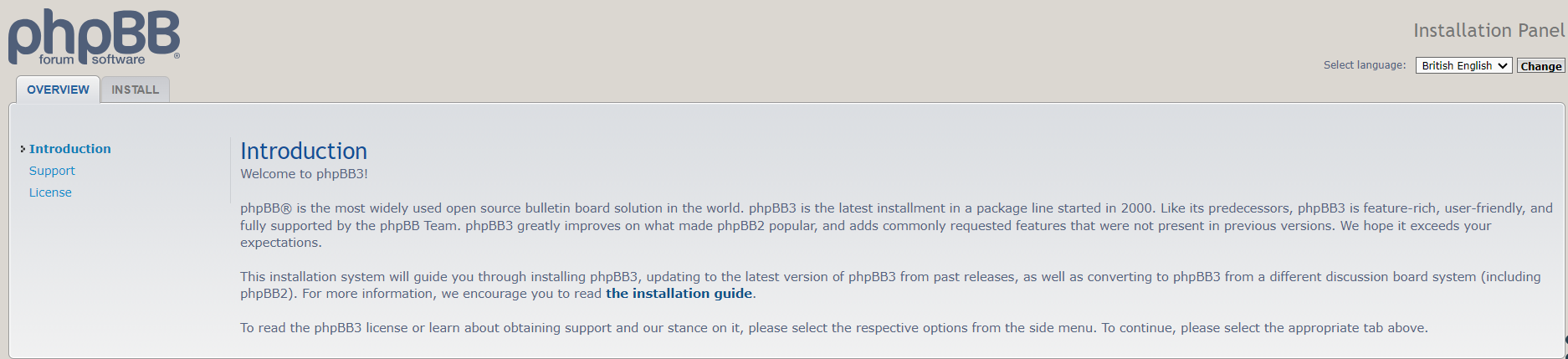
בקישור הזה
https:///phpbb/install/app.php
וכשאני לוחץ על התקנה הוא מפנה אותי לקישור
https:///phpbb/install/app.php/install
שלא קיים (קובץ app.php זה קובץ ולא תיקייה)
זה מה שיש בתיקיית הפרום בשרת

מה זה אמור להיות?
איך מתקנים את זה?תודה רבה לכל העוזרים!
-
כנראה זה בגלל שאתה משתמש בnginx שלא מכבד את הקובץ .htaccess,
(בקובץ htaccess שמגיע עם תיקיית phpbb יש הגדרה שאם הנתיב לא מתאים לקובץ/תיקיה פיזיים, הוא מנותב בשלמותו לapp.php שבתיקיית השורש).
ולכן אתה צריך לעדכן את הגדרות הnginx בהתאם, יש דוגמה בתיעוד:
https://www.phpbb.com/community/docs/nginx.sample.conf -
כנראה זה בגלל שאתה משתמש בnginx שלא מכבד את הקובץ .htaccess,
(בקובץ htaccess שמגיע עם תיקיית phpbb יש הגדרה שאם הנתיב לא מתאים לקובץ/תיקיה פיזיים, הוא מנותב בשלמותו לapp.php שבתיקיית השורש).
ולכן אתה צריך לעדכן את הגדרות הnginx בהתאם, יש דוגמה בתיעוד:
https://www.phpbb.com/community/docs/nginx.sample.conf@dovid קודם כל תודה רבה!!
הכנסתי את הקובץ בהתאם להוראות שם# Sample nginx configuration file for phpBB. # Tested with: # - nginx 0.8.35 # - nginx 1.17.7 (mainline) # # Filename: /etc/nginx/sites-available/example.com.conf # # Replace example.com with your own domain name. # If you want to use the X-Accel-Redirect feature, # add the following to your config.php. # # define('PHPBB_ENABLE_X_ACCEL_REDIRECT', true); # # See http://wiki.nginx.org/XSendfile for the details # on X-Accel-Redirect. # Sample FastCGI server configuration. # Filename: /etc/nginx/conf.d/php.conf # # upstream php { # server unix:/run/php-fpm/php-fpm.sock; # } # Remove www domain prefix. server { listen 80; # IPv6 listen [::]:80; # Remove www server_name www.forum.****.ovh; return 301 $scheme://forum.****.ovh$request_uri; } # Board configuration. server { listen 80; # IPv6 listen [::]:80; server_name forum.****.ovh; root /var/www/forum; # phpBB uses index.htm index index.php index.html index.htm; # Loggers error_log /var/log/nginx/example.com.error.log warn; access_log /var/log/nginx/example.com.access.log; location / { try_files $uri $uri/ @rewriteapp; # Pass the php scripts to FastCGI server specified in upstream declaration. location ~ \.php(/|$) { include fastcgi.conf; fastcgi_split_path_info ^(.+\.php)(/.*)$; fastcgi_param PATH_INFO $fastcgi_path_info; fastcgi_param SCRIPT_FILENAME $realpath_root$fastcgi_script_name; fastcgi_param DOCUMENT_ROOT $realpath_root; try_files $uri $uri/ /app.php$is_args$args; fastcgi_pass php; } # Deny access to internal phpbb files. location ~ /(config|common\.php|cache|files|images/avatars/upload|includes|(?<!ext/)phpbb(?!\w+)|store|vendor) { deny all; # deny was ignored before 0.8.40 for connections over IPv6. # Use internal directive to prohibit access on older versions. internal; } } location @rewriteapp { rewrite ^(.*)$ /app.php/$1 last; } # Correctly pass scripts for installer location /install/ { try_files $uri $uri/ @rewrite_installapp =404; # Pass the php scripts to fastcgi server specified in upstream declaration. location ~ \.php(/|$) { include fastcgi.conf; fastcgi_split_path_info ^(.+\.php)(/.*)$; fastcgi_param PATH_INFO $fastcgi_path_info; fastcgi_param SCRIPT_FILENAME $realpath_root$fastcgi_script_name; fastcgi_param DOCUMENT_ROOT $realpath_root; try_files $uri $uri/ /install/app.php$is_args$args =404; fastcgi_pass php; } } location @rewrite_installapp { rewrite ^(.*)$ /install/app.php/$1 last; } # Deny access to version control system directories. location ~ /\.svn|/\.git { deny all; internal; } }והוא נותן לי שגיאה בבדיקת ה nginx
nginx: [emerg] no port in upstream "php" in /etc/nginx/sites-enabled/phpbb:62 nginx: configuration file /etc/nginx/nginx.conf test failedעל השורה הזאת
fastcgi_pass php;מה הבעיה?
עריכה: תיקנתי את השורות האלו
#  upstream php {
#      server unix:/run/php-fpm/php-fpm.sock;
#  }
ל
upstream php {
      server unix:/run/php/php8.2-fpm.sock;
  }
ואין שגיאה

שלום! נראה שהשיחה הזו מעניינת אותך, אבל עדיין אין לך חשבון.
נמאס לכם לגלול בין אותם הפוסטים בכל ביקור? כשנרשמים לחשבון, תמיד תחזרו בדיוק למקום שבו הייתם קודם, ותוכלו לבחור לקבל התראות על תגובות חדשות (בין אם במייל, ובין אם בהתראת פוש). תוכלו גם לשמור סימניות ולפרגן ב-upvote לפוסטים כדי להביע הערכה לחברי קהילה אחרים.
בעזרת התרומה שלך, הפוסט הזה יכול להיות אפילו טוב יותר 💗
הרשמה התחברות